
2 in 1 Laptop Buying Guide: How to Choose the Right One in 2026
Disclosure: We may earn a commission when you buy through links on this page, at no extra cost to you. As an Amazon Associate I earn from qualifying purchases. Learn more

This 2 in 1 laptop buying guide covers hinge style, screen quality, pen support, weight and battery, so you pick a convertible that fits.
A good 2 in 1 laptop buying guide starts with a simple idea: these machines trade some of a normal laptop's value for the flexibility to work as a tablet, a tent or a presentation stand. They suit note takers, artists, travelers and anyone who likes a touchscreen, but they come with weight, price and durability questions. The product table right after this introduction lists convertibles at a range of prices.
Use the sections below to decide which kind of 2 in 1 you need, what to check on the feature list and what to skip.



What a 2 in 1 Really Is
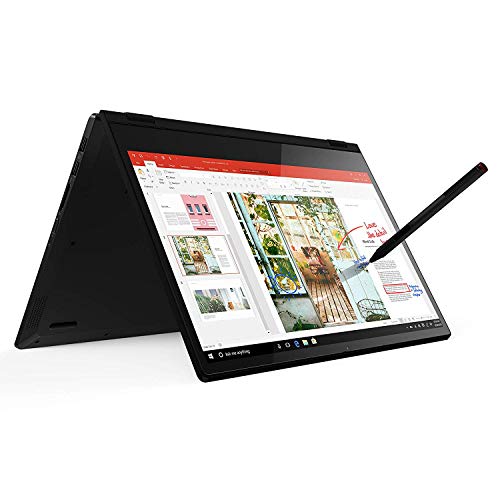
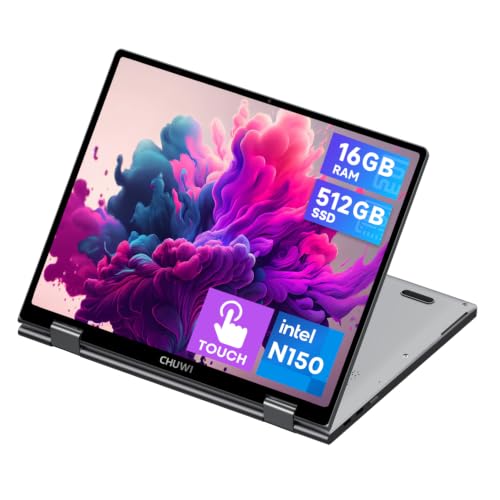
There are two main designs. A convertible has a hinge that folds the screen back through 360 degrees, so the keyboard ends up behind the display. A detachable has a tablet with a removable keyboard cover that clips on and off. Both give you laptop and tablet modes, but they feel quite different in daily use.
Convertibles keep a proper keyboard and a firm base, so they work well on a lap or desk. Detachables are lighter as tablets but the keyboard cover can feel flimsy, and the machine can be top-heavy on your knees. Pick based on which mode you will use most.
Screen: Touch, Pen and Brightness
The screen is the heart of a 2 in 1. Look for a touch panel that feels responsive and sits close to the glass. A glossy screen looks vivid but picks up reflections, and a matte one cuts glare at the cost of a little sharpness.
If you plan to draw or take handwritten notes, check pen support, and whether a pen is included or sold separately. Not all pens work with all models. Pressure sensitivity and low lag differ, so read what the maker says about the pen.
- Resolution: full HD is the minimum worth considering on a 13 to 15 inch screen.
- Brightness: higher is better if you work near windows or outdoors.
- Aspect ratio: taller screens suit documents and reading in tablet mode.
Performance and Memory
A convertible's slim body limits cooling, so the processor often runs a bit slower than the same chip in a thicker laptop. For everyday work, browsing and video calls, mainstream processors are plenty. For video editing or heavy multitasking, look for a more powerful chip and a design with room for fans.
Memory and storage matter as much as the processor. Eight gigabytes of RAM is workable for light use, but 16GB makes a machine feel smooth for longer. Choose at least 256GB of storage, and more if you keep lots of files locally, because many thin models have soldered memory and cannot be upgraded.
Chromebook-style convertibles run a simpler system with lower hardware needs. They cost less and boot quickly, and they suit web-based work, students and note taking, but they will not run all desktop software.
Battery, Weight and Build
Portability is a key reason to buy a 2 in 1, so weight and battery matter. A lighter model is easier to hold as a tablet. For battery, look at independent usage estimates rather than the claim on the box, and remember that a bright touchscreen drains power faster.
The hinge is the moving part to inspect. A strong, smooth hinge holds the screen at any angle and survives years of flipping. Read user feedback for hinge complaints, and consider the warranty length. Aluminum or magnesium bodies feel sturdier than thin plastic, though they add weight and cost.
Ports, Keyboard and Extras
Do not overlook everyday basics. Count the ports and check what you need: USB-C for charging and displays, USB-A for older devices, HDMI for projectors, and a headphone jack. A backlit keyboard with decent key travel makes a long writing session far nicer than a shallow one.
Check the webcam quality and microphones if you take many calls, and see whether a fingerprint reader or face unlock is included. These features are standard on mid-range and higher models.
Is a 2 in 1 Worth It for You?
If you never use touch or tablet mode, a regular laptop gives you more performance for the money. If you draw, annotate documents, present from a stand or like reading in tablet mode, a convertible earns its place. Our short guide is a 2 in 1 laptop worth it goes deeper on that choice, and how to choose a 2 in 1 laptop adds a quick checklist.
See the best 2 in 1 laptop list for current favorites in each price tier.
Software, Updates and Support
Hardware is only half of a 2 in 1. The system needs to switch cleanly between laptop and tablet layouts, handle rotation, and offer a decent on-screen keyboard. Windows does this well on current devices, and ChromeOS has a tablet mode that suits touch and Android apps. Check whether the manufacturer promises security updates for several years, since that decides how long the device stays safe to use.
Look also at the pen software. Some makers bundle drawing and note-taking apps, while others rely on whatever the operating system offers. Free apps cover most needs, but artists and heavy note takers should confirm that their preferred program supports the pen on their model.
Where to Spend and Where to Save
Put your money into the screen, the memory and the build, since those shape daily comfort and cannot be fixed later. Spend less on gimmicks like extra lighting, bundled accessories that you will not use, and top-end processors if you only browse and write. A mid-range chip with 16GB of memory feels faster in daily use than a premium chip starved of memory.
Buying a slightly older model can also save a lot. Last generation's convertibles often sell at a discount and offer nearly the same experience for ordinary tasks. Just confirm that the battery and the support period still suit your plans.
2 in 1 Laptop Buying Guide: Quick Checklist
- Pick the design first: flip hinge or detachable.
- Check screen brightness, touch response and pen support.
- Choose 16GB of memory if you plan to keep it for years.
- Read real battery feedback and hinge reviews.
- Compare warranty length and repair options.
FAQ
Are 2 in 1 laptops good for students?
Yes, especially for note taking and reading. A model with a pen and a good battery covers lectures, writing and study.
Are they less durable than normal laptops?
The hinge and touchscreen add parts that can wear, but a well-built model lasts for years with ordinary care.
Do I need a pen?
Only if you draw or write by hand. Many people use touch alone.
Can a 2 in 1 replace a tablet?
For many people yes, though tablets are lighter and have simpler apps for casual use.
To finish this 2 in 1 laptop buying guide: choose the design that matches your habits, put money into the screen, memory and hinge, and skip the extras you will not use.


