
Alienware AW3425DW Review for 2026: 34-Inch QD-OLED Ultrawide
Disclosure: We may earn a commission when you buy through links on this page, at no extra cost to you. As an Amazon Associate I earn from qualifying purchases. Learn more

Alienware AW3425DW review covering the 34-inch 240Hz QD-OLED ultrawide, HDR, how it compares with nearby models and burn-in care.
The Alienware AW3425DW is a 34-inch curved ultrawide QD-OLED gaming monitor with a 3440 x 1440 resolution and a 240Hz refresh rate, and this alienware aw3425dw review explains what makes it appealing, what to watch for with OLED and how it compares with the models around it. It suits players and creators who want an immersive ultrawide screen with deep blacks and fast motion at a price near $700.
It is a successor to the AW3423DW and sits below the newer AW3426DW, so the model number matters when you compare listings.


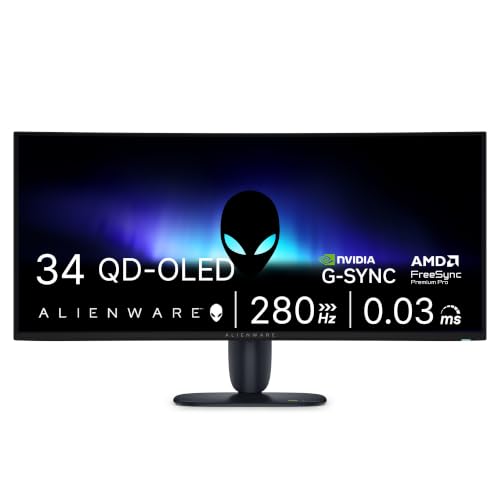
Alienware AW3425DW Review: The Panel
Alienware lists a 34.2-inch WQHD (3440 x 1440) QD-OLED panel with a 21:9 shape, an 1800R curve, a 240Hz refresh rate and a 0.03 millisecond response time. The ultrawide shape adds side view that makes racing, flight and open world games feel larger, and it gives you room for two or three windows at once at work.
The resolution is the same as the older AW3423DW, so text sharpness is similar to a typical 1440p monitor stretched to a wider shape. The upgrade is in speed, with 240Hz compared with 175Hz on the older model.
Color, Contrast and HDR
The listing mentions 99.3% DCI-P3 color coverage, Delta E under 2 accuracy and an infinite contrast ratio. VESA DisplayHDR TrueBlack 400 is supported, with a peak HDR brightness of 1,000 nits listed. Together those specs describe a screen with vivid color and deep blacks, which is the main reason people choose OLED for gaming and movies.
HDR looks best in a dim room, where the peak highlights stand out against the perfect blacks.
Sync and Speed
NVIDIA G-SYNC Compatible, AMD FreeSync Premium Pro and VESA AdaptiveSync are all supported, so the monitor keeps motion smooth with either graphics card brand. At 3440 x 1440, a mid-high graphics card such as an RTX 5070 reaches high frame rates in most games, which makes the 240Hz panel useful rather than an unreachable number.
How It Compares With Nearby Models
The AW3423DW costs around $1,000 and tops out at 175Hz, which makes the newer AW3425DW the better value. The AW3423DWF is a 165Hz model near $720. The AW3425DWM is a 34-inch curved 180Hz monitor at around $350, which uses a non-OLED panel and is the budget option. The newer AW3426DW lists a 280Hz UWQHD QD-OLED panel, an RGB stripe pixel layout for clearer text, 1,300 nits of peak brightness, Dolby Vision, USB-C and an anti-burn-in graphite sheet around $800.
If you want sharper text and the latest panel, the AW3426DW is worth the extra money. If you want the best price for a 240Hz OLED ultrawide, the AW3425DW is the sweet spot.
Burn-In and Care
OLED panels can retain static images after many hours. Keep the brightness moderate for desktop work, use a dark theme and a screen saver, auto-hide the taskbar if you can and let the monitor run its pixel refresh cycles. Avoid leaving the same bright window open all day. Check the warranty terms for burn-in coverage before you buy.
Normal use mixing games, video and varied desktop windows rarely causes visible problems.
Who Should Buy the Alienware AW3425DW
Choose it if you want an immersive ultrawide display with OLED contrast and a fast refresh rate at a price near $700, and your desk has room for a 34-inch curved screen. It suits single player games, racing and flight simulators, and productivity with many windows.
Skip it if you want a flat screen, a 4K sharpness upgrade or a lower price. The best gaming monitor guide, the AOC Q27G3XMN review and the Samsung Odyssey G5 review cover cheaper options.
Ultrawide Gaming Tips
Not every game supports a 21:9 shape, so check the game's settings or community notes before you buy. Most modern titles support it, and many show extra view at the sides, while a few add black bars or stretch the picture. Cutscenes in some games stay in 16:9, which leaves bars on each side, so keep that in mind if you play story games.
For work, use Windows snap layouts to split the screen into three columns. Put a document in the middle and reference windows on each side, and use a monitor arm if the stand takes too much desk depth.
Setup and Everyday Use
Place the monitor at arm's length, with the top edge at eye level. Set the refresh rate to 240Hz in Windows, use a DisplayPort cable and turn on adaptive sync. Use sRGB mode for office work and the wide gamut mode for games and movies. Lower the brightness for dark rooms, which also helps the screen last longer.
Buying Checklist
- Confirm the AW3425DW name in the title, since the AW3423DW and AW3425DWM look similar but differ.
- Check the seller and the warranty.
- Use a DisplayPort cable to reach 240Hz at the native resolution.
- Measure the desk for a 34-inch curved screen and check the stand height.
Pairing It With the Right PC
At 3440 x 1440, an ultrawide asks for about 30 percent more pixels than a 2560 x 1440 monitor, so choose a graphics card to match. An RTX 5070 or better handles most games at high frame rates, and a mid-range card may need lower settings or upscaling. A fast processor also helps to reach 240 frames per second in esports titles.
Use a DisplayPort 1.4 cable for the best compatibility. If the monitor shows a lower refresh rate than expected, open the display settings in Windows and select 240Hz manually, and check the cable and the port on the graphics card.
FAQ
Is the Alienware AW3425DW worth it?
Yes, if you want an OLED ultrawide at around $700. It offers 240Hz, strong color and deep blacks.
What is the difference between AW3425DW and AW3423DW?
The AW3425DW has a 240Hz refresh rate and a lower price, while the older AW3423DW runs at 175Hz.
Does it support HDR?
Yes. It supports VESA DisplayHDR TrueBlack 400 with a listed 1,000 nits peak HDR brightness.
Will it burn in?
OLEDs can burn in with long static content. Use moderate brightness and screen savers to reduce the risk.
Final Verdict
This alienware aw3425dw review shows a fast, vivid ultrawide with a fair price for OLED. Confirm the model name, look at the AW3426DW if you want the newest panel, and choose a cheaper VA model if you want to save.


