
Anker Nebula Capsule 3 Review for 2026: Standard or Laser Version
Disclosure: We may earn a commission when you buy through links on this page, at no extra cost to you. As an Amazon Associate I earn from qualifying purchases. Learn more

Anker Nebula Capsule 3 Review: standard versus Laser brightness, setup, battery life and accessories for a pocket Google TV projector.
The Nebula Capsule 3 packs a projector, a speaker, a battery and Google TV into a body about the size of a drink can. This anker nebula capsule 3 review explains what the standard and Laser versions deliver, where a pocket projector falls short and which accessories are worth adding.
The product table lists the standard Capsule 3, the Capsule 3 Laser and several bundles with stands and cases. The notes below help you pick the version that fits your room.
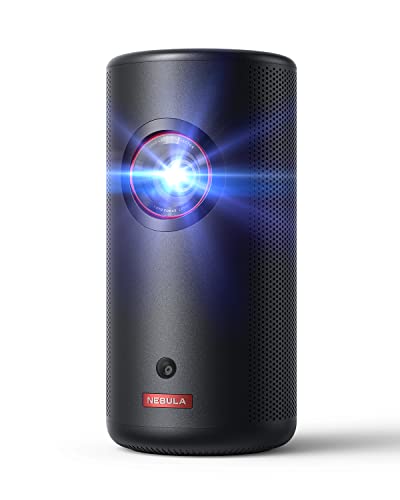


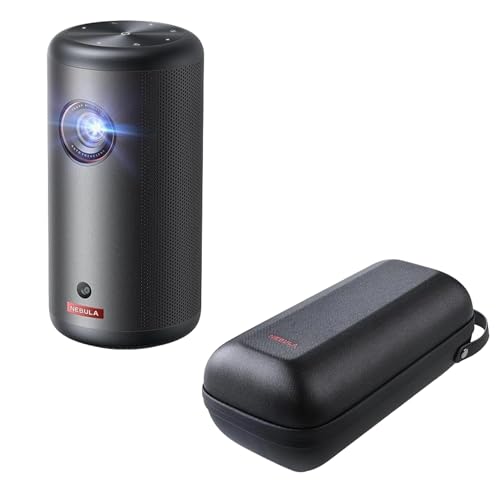


Capsule 3 and Capsule 3 Laser
The standard Capsule 3 lists a 1080p image at 200 lumens, a 120 inch maximum screen, a 2.5 hour battery and Google TV with Netflix licensing. The Capsule 3 Laser raises brightness to 300 ANSI lumens with a laser light source, weighs about 2 lb and uses 8W Dolby Digital speakers. Both fit a bag, and both support PD charging so you can use a power bank.
The Laser version costs around two hundred and fifty dollars more, and the extra brightness is the reason.
Anker Nebula Capsule 3 Review: Picture Quality
Pocket projectors work best in dim rooms. At 200 lumens the standard model suits a dark bedroom or an evening outdoors, and the 300 lumen Laser model copes better with some ambient light. The 1080p resolution is sharp enough for movies and shows on a screen up to a few feet wide, and larger sizes show softer detail.
Do not expect a daytime picture in a bright living room. Close the blinds and the image improves sharply.
Setup and Smart Features
The projector adjusts itself with autofocus, automatic keystone correction, screen fit and obstacle avoidance in about three seconds, according to the listing. That removes most of the tinkering that older projectors need. Google TV brings streaming apps, Google Assistant and Chromecast support, and the listing advises updating the system software before first use.
- Place it on a stable surface or a tripod.
- Point it at a flat, light wall or a screen.
- Let the autofocus finish before you change position.
- Update the software on first use.
Battery, Sound and Portability
The built-in battery runs a movie of about two and a half hours, or about eight hours of music in eco mode. That fits an evening outdoors or a trip, and a power bank extends it. The speaker fills a small room, though it is no match for a dedicated soundbar. For a larger gathering, connect an external speaker.
Accessories That Help
Several bundles pair the projector with a foldable stand, a gimbal stand, a travel case or a battery tripod. A stand makes aiming easy, a travel case protects the projector in a bag and a tripod suits outdoor use. Compare the bundle price with the cost of the parts separately, because some bundles include a premium.
Walls, Screens and Image Size
A smooth, light colored wall gives a good picture, and a portable screen improves contrast in rooms with colored walls. The listing quotes a maximum of 120 inches, but the picture is brightest and sharpest at smaller sizes, so start near 60 or 80 inches and move the projector back only if you need more. Shorter distances also keep the image brighter.
Avoid textured walls and dark paint, which dull the picture. A cheap pull-down screen or even a white bed sheet pulled flat can look better than a patterned wall.
Planning an Outdoor Movie Night
Set the projector on a stable table or a tripod, aim it at a screen hung from a fence or a wall, and wait until dusk. Charge the battery fully, or connect a power bank for longer films, and bring an external speaker if the group is large. Check the weather, because dew and rain are enemies of any projector.
- Choose a screen or a pale wall that blocks nearby lights.
- Charge the battery before guests arrive.
- Use an external speaker for groups.
- Bring a cover for sudden rain.
Sound and Connectivity Notes
The built-in speaker is fine for solo viewing, and Bluetooth lets you pair a better speaker or headphones. Wi-Fi handles streaming, and the projector can cast from a phone. Keep the router in range, because a weak connection causes buffering that looks like a projector fault.
Which Version to Choose
Choose the standard Capsule 3 for dark rooms and the best price. Choose the Laser version for more brightness, for rooms with some light or for a more premium feel. Choose a bundle only when you need the stand or case anyway.
Limits to Know
A projector this small does not match a big TV on brightness, contrast or sound. It is a flexible second screen for bedrooms, trips and backyards, not a main living room display. Fan noise is audible in quiet scenes, and the picture depends on the wall you project on.
Care, Updates and Longevity
Keep the lens clean with a soft cloth and store the projector in its case between trips. Do not block the vents while it runs, and let it cool before packing. Install software updates when they appear, since they improve streaming apps and the autofocus behavior over time. A battery that is charged now and then lasts longer than one left empty for months.
Keep the box and the receipt for the warranty period, and note the model name in the title when you order, since the standard and Laser versions look alike.
For more detail, read the best projector guide.
FAQs
How bright is the Capsule 3?
The standard model lists 200 lumens, and the Laser version lists 300 ANSI lumens.
Does it have a battery?
Yes. It runs about two and a half hours of video per charge.
Does it include streaming apps?
Yes. It runs Google TV and carries a Netflix license.
Can I use it outdoors?
Yes, after dark, with a flat surface or screen.
Final Thoughts
This anker nebula capsule 3 review favors the projector as a portable second screen. Pick the standard or Laser version by room brightness, add a stand if you need one and compare the options in the table.


