
ASUS Zenbook 14 OLED Review for 2026: Who It Suits and What to Check
Disclosure: We may earn a commission when you buy through links on this page, at no extra cost to you. As an Amazon Associate I earn from qualifying purchases. Learn more

ASUS Zenbook 14 OLED Review: a light OLED laptop sold in several processor versions, with advice on which configuration to pick.
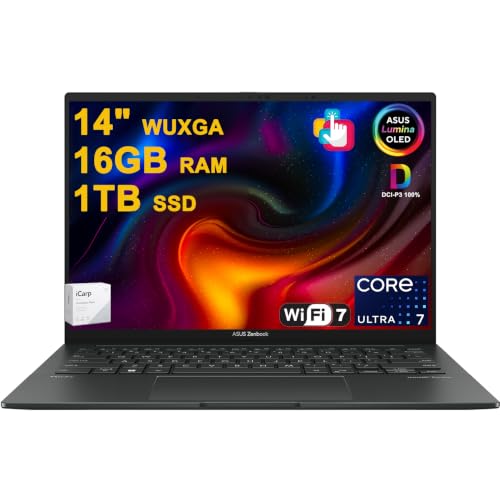
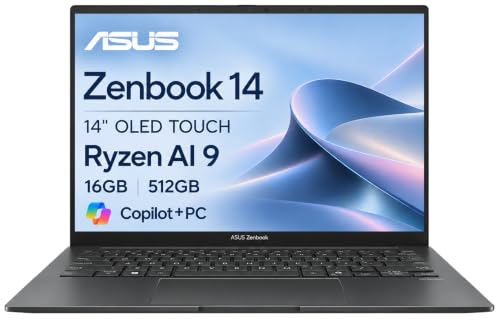
The asus zenbook 14 oled review question is harder than it looks, because ASUS has sold the Zenbook 14 OLED name across several generations and processor families. A listing that says Zenbook 14 OLED might hold an older AMD Ryzen chip, an Intel Core Ultra chip or a newer AMD Ryzen AI chip, and the price swings widely between them.
This guide explains what the laptop is good at, where it asks for compromises, and how to read a listing so you pay for the configuration you actually want. The product table shows the Zenbook 14 listings available now, so you can compare them against the checklist below.




ASUS Zenbook 14 OLED: What You Are Buying
It is a 14 inch thin and light laptop built around an OLED touchscreen, aimed at students, remote workers and travelers who want a premium display without moving up to a heavier creator laptop. Listings describe WUXGA or 2K class panels, backlit keyboards, 1080p cameras and Wi-Fi 6E or newer, with 16GB of memory and a 1TB drive on many configurations.
The core appeal is the screen. OLED panels light each pixel on their own, so black is truly black and colors look rich in a dim room. Several Zenbook 14 listings mention wide color coverage and HDR level brightness, which helps for photo editing, video and streaming.
Display and Everyday Comfort
Expect a glossy touchscreen. The upside is vivid contrast and sharp text. The downside is reflections in a bright office or near a window, so it suits indoor work better than a sunny cafe table.
Touch support makes the Zenbook 14 handy for scrolling and signing documents, and some bundles add a stylus. If you never touch your laptop screen, a non-touch panel would be fine, but most Zenbook 14 OLED listings include touch by default.
OLED also brings habits worth knowing. Use a dark theme where you can, let the screen sleep when you step away, and avoid leaving a bright static image up for hours. Those simple steps are the manufacturer style advice for any OLED screen and keep the panel looking good longer.
Performance by Processor Family
Intel Core Ultra versions
The Intel Core Ultra listings (Ultra 7 and Ultra 9 class) suit multitasking, spreadsheets, video calls and light editing. They add an AI engine for newer Windows features and tend to be the pricier end of the range.
AMD Ryzen versions
The AMD Ryzen listings, from the older Ryzen 7 5825U up to the newer Ryzen 7 8840HS and Ryzen AI 9 465, are often better value. The Ryzen 7 8840HS listing pairs the chip with Radeon graphics and 16GB of memory, which is a comfortable setup for office work, coding and casual gaming at low settings.
Which one to choose
Match the chip to your work rather than the biggest model number. For documents, browsing and video calls, a mid-range chip is enough. Pay more for a top chip only if you edit video, run virtual machines or want the longest useful life from the purchase.
Memory, Storage and Ports
Memory on thin laptops is usually soldered to the board, which means you cannot add more later. Treat 16GB as the sensible floor for a laptop you plan to keep for years, and avoid 8GB listings unless the price is very low and your work is light.
Storage is an SSD, and 512GB fills quickly with video and games. A 1TB listing costs more up front but saves you from carrying an external drive.
Check the port list on the exact listing. You should see USB-C ports, an HDMI output and a headphone jack. Older versions may include a full-size USB-A port, which is useful for mice and flash drives.
Battery and Portability
Zenbook 14 models are built to be carried. They are slim, they charge over USB-C, and OLED screens draw less power on dark content. Real battery life depends on brightness, the processor in your configuration and what you run, so treat any hour claim on a listing as a best case.
If you travel a lot, a single small USB-C charger that also tops up your phone is a nice bonus. Keep the original charger for at-home use so you can leave the lighter one in your bag.
Pros and Cons at a Glance
- Vivid OLED touchscreen with strong contrast.
- Slim, light build that suits commuting and travel.
- Several processor choices, from value AMD to premium Intel.
- Glossy screen reflects light in bright rooms.
- Soldered memory, so choose enough at purchase.
- Prices vary a lot between generations under the same name.
Who Should Buy It, and Who Should Skip It
Buy it if you want a premium screen in a portable body for work, study and media. Skip it if you mainly play demanding games, need many ports, or work outdoors in bright light, where a matte display or a gaming laptop with a dedicated graphics card makes more sense.
Reading a Listing Before You Buy
Because the name covers so many versions, the title line matters. Find the processor model, the memory size, the storage size and the screen description, and make sure all four match what you want. Be cautious with listings that bundle a stylus, a flash drive or software to push the price up, and compare them to a plain configuration of the same laptop.
If a listing looks unusually cheap, check that it is a new unit sold by a reputable seller and that the warranty is clear. Keep the packaging for the first few weeks so a return stays simple if the screen or keyboard is not to your liking.
Related Laptop Guides
If the Zenbook 14 is not quite right, compare the lighter asus zenbook a14 review, a business-style option in the hp omnibook 5 review, or browse the best laptop guide for the full field.
FAQ
Is the Zenbook 14 OLED good for students?
Yes, it is a strong fit. It is light enough for a backpack, the screen is pleasant for reading and video, and a 16GB configuration will stay responsive through years of coursework.
Which Zenbook 14 OLED version offers the best value?
The AMD Ryzen 7 listings usually give the best balance of price and performance. Intel Core Ultra and Ryzen AI versions cost more and make sense if you want the newest features.
Does the OLED screen burn in?
OLED panels can show image retention if a bright static image stays on for very long periods. Normal use with a changing screen, a screen timeout and a dark theme keeps the risk low.
Can I upgrade the memory later?
Usually not on thin laptops like this, because the memory is part of the board. Choose the amount you need when you buy, and check the listing to confirm.
Final Verdict
The Zenbook 14 OLED is a good choice if you value screen quality in a light body, as long as you pick the generation and memory carefully. Use this asus zenbook 14 oled review as a checklist, compare the listings in the product table, and choose the configuration that fits your work and budget.
Prices and availability can change, so check the product page before ordering.


