Apple
Apple Pencil Pro: Latest Model - Device Compatibility Check Required
Disclosure: We may earn a commission when you buy through links on this page, at no extra cost to you. As an Amazon Associate I earn from qualifying purchases. Learn more
Highlights
- WHY APPLE PENCIL PRO — Apple Pencil Pro is loaded with intuitive features for ultimate creative control. Gestures and haptics allow you to seamlessly create without missing a beat. And Apple Pencil Pro features pixel-perfect precision, tilt and pressure sensitivity, and low latency. Attaches magnetically for wireless pairing and charging.
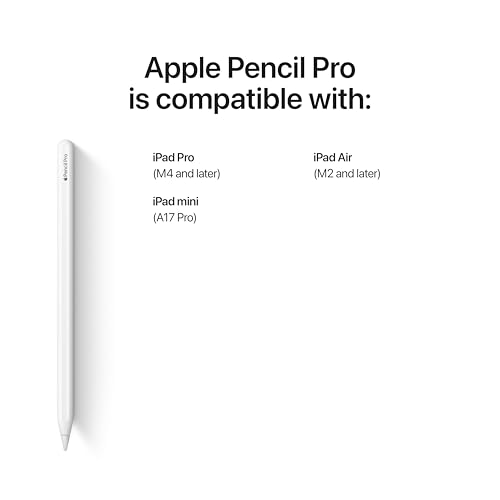
- COMPATIBILITY — Apple Pencil Pro works with iPad Pro 13-inch (M5 and M4), iPad Pro 11-inch (M5 and M4), iPad Air 11-inch (M2, M3, and M4), iPad Air 13-inch (M2, M3, and M4), and iPad mini (A17 Pro).
- ADVANCED TOOLS — Apple Pencil Pro gives you ultimate creative control. Use gestures like squeeze and barrel roll to access tools, change brushes, and create strokes without missing a beat. Haptics allow you to feel shapes snap into place, and more. Use Apple Pencil hover on iPad Pro (M5 and M4) and iPad Air (M3 and M2) to preview your mark before you make it. And now you can use Find My to locate your Apple Pencil Pro.
- EASY AND NATURAL — Apple Pencil Pro does it all with pixel-perfect precision, tilt and pressure sensitivity, and low latency. Featuring a flat edge, Apple Pencil Pro allows you to change tools with just the tap of a finger. Apple Pencil Pro attaches, charges, and pairs magnetically.
- TRANSFORMS IPAD INTO A CANVAS — Draw, sketch, color, take notes, and mark up documents. Use built-in apps like Notes and Freeform, or choose from over a million more apps available on the App Store. And for pros, use Apple Pencil hover on iPad Pro and iPad Air (M2) to preview your mark before you make it.
- Apple Pencil Pro is sold separately. Compatible with iPad Pro (M5 and M4) and iPad Air (M2, M3, and M4).
Why You'll Love It
- Squeeze and barrel roll gestures let you switch tools and change brushes without interrupting workflow
- Built-in haptics provide physical feedback when shapes snap into position
- Magnetically snaps to your iPad for automatic wireless pairing and charging
- Apple Pencil hover previews your mark on compatible iPad Pro and iPad Air screens
- Find My integration helps you track down your stylus if misplaced
- Low latency combined with tilt and pressure sensitivity allows accurate drawing and writing
Pros
- +Squeeze and barrel roll gesture controls
- +Built-in haptic feedback
- +Magnetic wireless pairing and charging
- +Find My tracking support
- +Hover preview on supported iPads
Cons
- -Limited to select newer iPad models
- -Hover preview unavailable on iPad mini
Detailed Review
The Apple Pencil Pro is a dedicated digital stylus designed for note-takers, illustrators, and document editors using recent iPad models. It pairs directly with your tablet to turn the screen into a digital workspace for sketching, coloring, and marking up files in apps like Notes, Freeform, or App Store software.
Interaction is driven by new physical controls and feedback mechanisms. Squeeze and barrel roll gestures let you swap tools, alter brush strokes, and adjust options without reaching for menus. Built-in haptic feedback lets you physically feel on-screen actions, such as shapes snapping into place. On compatible iPad Pro and iPad Air tablets, hover functionality displays a preview of your stroke before the tip touches the glass.
Day-to-day handling relies on a flat edge that allows tool switching with a finger tap. Storage and power are integrated directly into the hardware setup, as the stylus attaches magnetically to the side of your tablet to pair and charge wirelessly. If it ever goes missing, you can track its location using the Find My network.
The main limitation is hardware compatibility. The Apple Pencil Pro only works with specific tablets: iPad Pro 13-inch (M4, M5), iPad Pro 11-inch (M4, M5), iPad Air 11-inch and 13-inch (M2, M3, M4), and iPad mini (A17 Pro). Older iPad generations cannot use this model, and hover features are not listed for the iPad mini.
Verdict: The Apple Pencil Pro is an excellent addition for owners of compatible M-series or A17 Pro iPads who want gesture controls, haptic responses, and magnetic charging for drawing and note-taking.
Who Should Buy It
A great fit if you:
- Own a compatible iPad Pro (M4 or M5), iPad Air (M2, M3, or M4), or iPad mini (A17 Pro).
- Want gesture shortcuts like squeeze and barrel roll to speed up digital drawing or writing.
- Rely on Find My tracking to keep tabs on your tablet accessories.
- Prefer wireless magnetic charging directly on the edge of your tablet.
Consider something else if you:
- Use an older iPad model not included in the compatibility list.
- Do not need gesture tools or haptic feedback for basic tablet navigation.
FAQ
Which iPad models are compatible with Apple Pencil Pro?
It works with iPad Pro 13-inch (M5 and M4), iPad Pro 11-inch (M5 and M4), iPad Air 11-inch (M2, M3, and M4), iPad Air 13-inch (M2, M3, and M4), and iPad mini (A17 Pro).
How does the Apple Pencil Pro charge and pair?
It attaches magnetically to the side of compatible iPad models for wireless charging and pairing.
Can I track a misplaced Apple Pencil Pro?
Yes, you can locate the stylus using Apple's Find My app.
Which devices support the Apple Pencil hover feature?
Hover previews are supported on iPad Pro (M5 and M4) and iPad Air (M2 and M3) models.
Photos



Product Details
| Brand | Apple |
| ASIN | B0D3J71RM7 |