ASUS
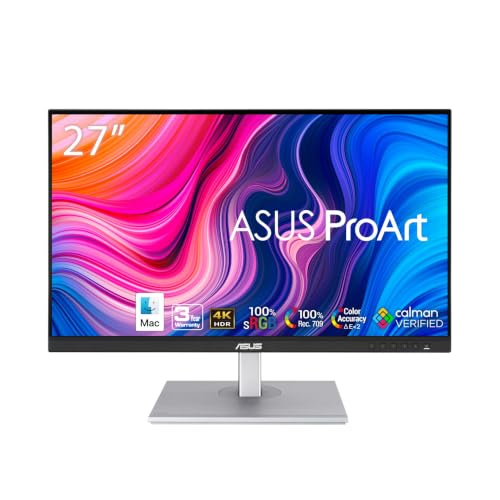
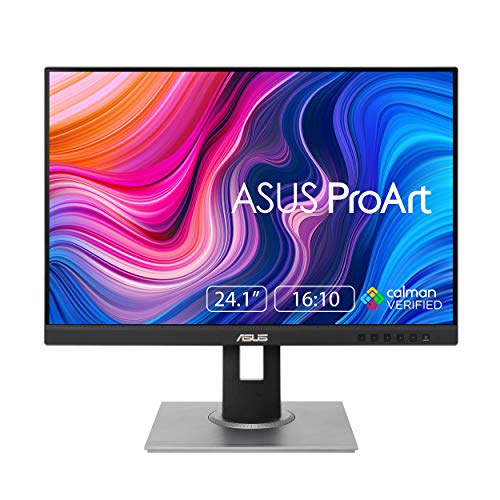
ASUS ProArt PA248QV 24 Inch WUXGA 16:10 Professional Monitor
Disclosure: We may earn a commission when you buy through links on this page, at no extra cost to you. As an Amazon Associate I earn from qualifying purchases. Learn more
Highlights
- Accurate and Vivid Color Reproduction: Experience true-to-life color accuracy with the ASUS ProArt Display featuring 100% sRGB/Rec.709 color space coverage that delivers stunning images with vivid color reproduction
- High Color Fidelity for Truly Expressive Hues: Experience precise and accurate color reproduction with 100% sRGB/Rec.709 coverage and DeltaE < 2 on the ASUS ProArt Display. This monitor is Calman verified, ensuring consistent and true-to-life hues
- WUXGA Resolution Display: Enjoy sharp images and vivid colors with this monitor display featuring a WUXGA resolution of 1920 x 1200 and 100% sRGB/Rec.709 color space coverage for a vivid viewing experience
- Professional Grade Technology: The ASUS ProArt display offers stunning image clarity with its 1920 x 1200 WUXGA resolution, 100% sRGB and Rec.709 color space coverage, IPS panel, and Calman Verified technology
- Free 3-month Adobe Creative Cloud Subscription: Receive complimentary access with the purchase of this product (offer valid to 8/31/2028)
- Extended Warranty Coverage: 5-year warranty included (3 years plus 2 years extension with online registration)
- Versatile Ergonomic Design: Customize your viewing experience with tilt, pivot, swivel, and height-adjustable stand features that ensure optimal comfort during prolonged use and reduce strain
- Multiple Connectivity Options: Connect easily to various devices with DisplayPort, HDMI, and D-Sub ports providing flexible connectivity solutions for your professional or entertainment needs
- Anti-Glare Screen Technology: Reduce unwanted reflections and eye strain with the anti-glare feature that provides a comfortable viewing experience even during extended work sessions
Why You'll Love It
- Full sRGB and Rec.709 coverage supports color focused creative work and consistent visual decisions
- Calman Verified color accuracy with DeltaE below 2 supports precise color reproduction
- WUXGA resolution provides 1920 x 1200 pixels in a 16:10 viewing format
- Height, tilt, swivel, and pivot adjustments help tailor the screen position to your workspace
- DisplayPort, HDMI, and D-Sub connections offer flexibility when connecting compatible devices
- A five year warranty with online registration and a complimentary Adobe Creative Cloud subscription add purchase value
Pros
- +100% sRGB and Rec.709 color coverage
- +Calman Verified color accuracy
- +1920 x 1200 WUXGA resolution
- +Four way stand adjustment
- +DisplayPort, HDMI, and D-Sub connectivity
Cons
- -WUXGA resolution rather than a higher resolution format
- -Color coverage is focused on sRGB and Rec.709
- -Adobe Creative Cloud offer has an eligibility end date
Detailed Review
The ASUS PA248QV is a 24 inch professional monitor designed for people who want dependable color representation and extra vertical workspace for creative or detail focused tasks. Its 1920 x 1200 WUXGA resolution uses a 16:10 format, giving buyers a clear specification to consider when choosing a screen for image work, document editing, and everyday computer use. The main attraction is its emphasis on color fidelity rather than an extensive list of entertainment features.
Color accuracy is the central reason to consider this display. ASUS lists 100% coverage of both the sRGB and Rec.709 color spaces, along with DeltaE below 2 and Calman Verified status. Together, these specifications make the monitor relevant to creative users who need to make color decisions with confidence. The stated color coverage is especially useful when your work is intended for color spaces such as sRGB or Rec.709. Buyers should still consider which color requirements their particular workflow demands.
The WUXGA resolution provides 1920 x 1200 pixels, while the IPS panel is another part of the display's professional positioning. The 16:10 format gives the screen a taller proportion than a 16:9 format, which may suit people who prefer additional vertical room for documents, editing interfaces, or other content. An anti-glare screen is designed to reduce unwanted reflections, making it a practical feature for workspaces where reflected light can distract from what is displayed. These elements make the monitor a considered option for sustained desk based work.
Adjustability and connectivity add useful flexibility. The stand supports height adjustment, tilt, swivel, and pivot, so you can change the screen position to suit your desk and preferred viewing arrangement. DisplayPort, HDMI, and D-Sub connections give you several connection types to consider when matching the monitor with existing equipment. The listed five year warranty consists of three years plus a two year extension with online registration. A complimentary three month Adobe Creative Cloud subscription is also offered, with the stated offer valid through August 31, 2028.
The main trade off is that this monitor's appeal is specific: its listed strengths center on WUXGA resolution and sRGB and Rec.709 color work. Buyers who need a different resolution, broader color coverage, or capabilities beyond those listed should compare alternatives against their actual requirements. Its subscription offer also has an end date, and the warranty extension requires registration. Verdict: Choose this professional monitor if color accuracy, a 16:10 workspace, ergonomic adjustment, and flexible connections are priorities. If your work depends on a different resolution or color space, compare those requirements carefully before deciding whether this display is the right match.
Specifications
- Brand and model: ASUS ProArt PA248QV
- Product type: Professional monitor
- Screen size: 24 inches
- Resolution: 1920 x 1200 WUXGA
- Aspect ratio: 16:10
- Panel type: IPS
- Color space coverage: 100% sRGB and 100% Rec.709
- Color accuracy: DeltaE below 2
- Verification: Calman Verified
- Screen surface: Anti-glare
- Stand adjustments: Height, tilt, swivel, and pivot
- Connections: DisplayPort, HDMI, and D-Sub
- Warranty: Five years, comprising three years plus a two year extension with online registration
- Software offer: Complimentary three month Adobe Creative Cloud subscription, offer valid through August 31, 2028
Who Should Buy It
A great fit if you:
- You edit images or other visual content and want a display with clearly stated sRGB and Rec.709 coverage.
- You prefer a 16:10 screen format with 1920 x 1200 resolution for your regular desktop tasks.
- You want to adjust screen height, tilt, swivel, and pivot rather than settle for one fixed viewing position.
- Your computer or other device can connect through DisplayPort, HDMI, or D-Sub.
- You value a stated warranty extension and could make use of the included Adobe Creative Cloud subscription offer.
Consider something else if you:
- Your workflow requires a different resolution or color coverage, making a monitor with specifications tailored to those needs a better choice.
- You need a particular connection, feature, or included accessory that a more specifically equipped monitor would provide.
Before You Buy
Confirm on the listing:
- Measure your intended desk space and check that a 24 inch screen and its adjustable stand will fit your setup comfortably.
- Check which video output your computer or other device uses, then confirm compatibility with DisplayPort, HDMI, or D-Sub.
- Confirm what comes in the box, including any cables or other accessories you expect to need for your setup.
- Review the warranty registration requirements and the terms of the Adobe Creative Cloud subscription offer before relying on either benefit.
How to compare your options: Start with resolution, aspect ratio, and color coverage, since these directly affect how well a monitor suits your work. The PA248QV combines WUXGA resolution, a 16:10 format, and full sRGB and Rec.709 coverage with Calman Verified color accuracy. Next, compare the available connections and stand adjustments against your existing equipment and workspace. Prioritize the specifications that matter to your tasks instead of choosing by screen size alone.
Getting the Most From It
Begin by arranging the monitor around your workspace and preferred viewing position. Use the height, tilt, swivel, and pivot adjustments to find an arrangement that works with your desk and the way you sit or stand while working.
Choose a connection that matches your device, using DisplayPort, HDMI, or D-Sub as appropriate. If you are replacing an existing monitor, check your available output and cable before connecting everything so you can plan the setup around compatible equipment.
For color focused tasks, keep the monitor's 100% sRGB and Rec.709 coverage in mind when choosing settings and preparing work for those color spaces. Calman Verified status and DeltaE below 2 are useful specifications to consider, but your workflow should determine which color requirements matter most.
Make use of the anti-glare screen feature when arranging your workspace, and adjust the display position if reflections interfere with your view. Follow the manufacturer's care guidance for cleaning and maintenance. If you intend to use the Adobe Creative Cloud offer, review its terms and arrange the subscription around your creative needs.
FAQ
Is the ASUS PA248QV suitable for photo editing?
Yes, it is worth considering for color focused image work because it lists 100% sRGB coverage, DeltaE below 2, and Calman Verified status. Check that sRGB coverage matches your particular workflow.
What resolution and aspect ratio does it have?
It has 1920 x 1200 WUXGA resolution and a 16:10 aspect ratio. This combination is a key part of its appeal for users who prefer this screen format.
Can I adjust the monitor's position?
Yes, its stand supports height adjustment, tilt, swivel, and pivot. These options let you adapt the viewing position to your workspace.
What devices can I connect to it?
It provides DisplayPort, HDMI, and D-Sub connections. Check your device's available output and confirm the required cable or adapter before purchasing.
Does it include a warranty and creative software?
Yes, the stated warranty is five years, including an extension that requires online registration, and the product offers a complimentary three month Adobe Creative Cloud subscription. The software offer is valid through August 31, 2028, so review its terms before purchase.
Product Details
| Brand | ASUS |
| ASIN | B088BC5HKF |