Bird Buddy
Birdbuddy Pro Solar Smart Bird Feeder with Camera, AI Bird ID, 2K Video
Disclosure: We may earn a commission when you buy through links on this page, at no extra cost to you. As an Amazon Associate I earn from qualifying purchases. Learn more
Highlights
- AI-POWERED BIRDWATCHING APP: Premium Subscription required. The Bird Buddy app uses AI to identify bird species and individual birds, detect signs of illness, recognize other animal visitors, and provide real-time alerts when birds visit your feeder. Access advanced birdwatching features, personalized collections, and insights about your local wildlife through an active subscription.
- ADVANCED HD+ BIRD FEEDER CAMERA: The 2x larger sensor supports HDR for stunning contrasts and vibrant colors in 5MP photos and 2K video resolution. Unlock extra features and capture slow-motion videos of birds in flight, or enjoy a wider field of view.
- EASY SETUP & VARIOUS MOUNTING OPTIONS: 1) Download the Birdbuddy app and create an account. 2) Charge the camera. 3) Pair via Bluetooth and connect to 2.4 GHz Wi-Fi. 4) Choose the ideal spot with app guidance. 5) Mount on a pole (not included) or hang from a branch (hanger included). 6) Add birdseed. 7) Test the livestream or wait for birds!
Why You'll Love It
- Capture visiting birds in 2K video and 5MP photos with an HDR supported camera sensor
- Use AI bird identification to explore species and individual visitors through the Bird Buddy app
- Receive alerts when birds visit, with a subscription that unlocks advanced birdwatching features
- Build personalized bird collections and explore insights about wildlife visiting your feeder
- Choose a hanging or pole mounted position to suit your preferred feeder location
- Follow guided app setup to pair the camera, connect Wi-Fi, add seed, and view the livestream
Pros
- +2K video and 5MP photo capture
- +AI powered bird identification
- +Alerts for feeder visits
- +Solar smart feeder design
- +Hanging or pole mounting options
Cons
- -Premium app subscription required for AI features
- -Mounting pole must be purchased separately
- -Requires a 2.4 GHz Wi-Fi connection
Detailed Review
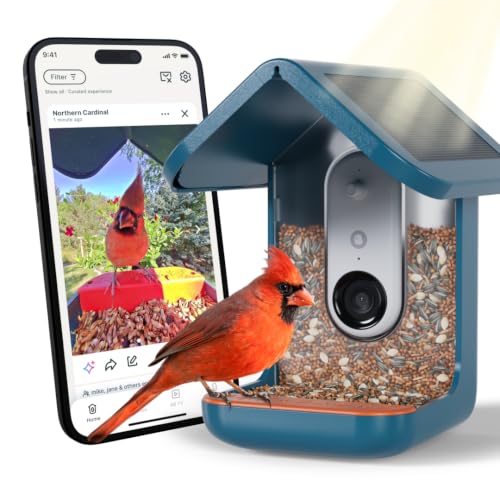
The Bird Buddy Pro Solar Smart Bird Feeder is a smart bird feeder with a camera for people who want to identify visiting birds and capture their visits without relying on observation alone. It combines a seed feeder with photo and video recording, app based bird identification, and alerts when birds arrive. Rather than simply attracting birds, the idea is to make each visit an opportunity to learn more about local wildlife and collect images of individual visitors.
Image capture is a central part of the design. The camera records video in 2K resolution and takes 5MP photos, while its larger sensor and HDR support are intended to handle contrast and color in captured scenes. That gives shoppers two ways to enjoy visits: still images for a collection and video for watching bird behavior. Additional camera features, including slow motion and a wider field of view, are available through the product's extra features, making those options worth investigating if the way footage is captured matters to you.
The companion Bird Buddy app adds an identification and discovery layer. With an active Premium Subscription, its AI can identify bird species and individual birds, recognize other animal visitors, and detect signs of illness. It can also send real time visit alerts, organize personalized collections, and provide insights about local wildlife. These tools suit someone who wants more than a camera feed, especially if keeping track of recurring visitors is part of the appeal. The subscription requirement matters, however, because the full set of advertised smart features depends on continued access to that service.
Getting started follows a guided process rather than an entirely independent installation. Download the app, create an account, charge the camera, pair it over Bluetooth, and connect to a 2.4 GHz Wi-Fi network. The app then helps you choose a location. You can mount the feeder on a pole, which is not included, or hang it from a branch using the included hanger. After adding birdseed, you can check the livestream or wait for visitors. The process offers flexibility, but your preferred location and mounting choice should be considered before purchase.
The main tradeoffs are the subscription dependent features, the separate purchase needed for a pole mount, and the need for a compatible 2.4 GHz Wi-Fi connection. Shoppers interested mainly in feeding birds may not need all the connected functions, while people who enjoy identifying visitors and saving footage may find those functions central to the experience. Verdict: Choose this smart bird feeder if you want camera footage, AI assisted bird identification, and app based ways to follow visiting wildlife. If you prefer a straightforward feeder without a subscription dependent digital experience, a simpler non smart feeder may suit you better.
Who Should Buy It
A great fit if you:
- You want to identify visiting birds and keep track of individual visitors through a dedicated app.
- You enjoy collecting bird photos and video rather than watching feeder activity only while you are nearby.
- You would use visit alerts, personalized collections, and wildlife insights as part of an ongoing birdwatching hobby.
- You can place a feeder where a 2.4 GHz Wi-Fi connection is available and are comfortable following app guided setup.
Consider something else if you:
- You mainly want to provide birdseed without digital features, so a basic feeder may be a better fit.
- You do not want subscription dependent features, so a non connected feeder or camera option without those requirements may suit you better.
Before You Buy
Confirm on the listing:
- Check whether your intended feeder location has access to a 2.4 GHz Wi-Fi network and suits the app guided placement process.
- Confirm which camera features are included without a subscription and which require an active Premium Subscription, particularly slow motion and the wider field of view.
- Review the package contents and mounting plan. The hanger is included, but a pole is not, so check what you will need for your preferred placement.
- Check the charging instructions and ongoing app requirements before deciding whether the setup fits your routine.
How to compare your options: Start with the experience you want: simple feeding, camera based observation, or AI assisted identification and visitor tracking. For this model, weigh 2K video and 5MP photos alongside the subscription requirement, Wi-Fi connection, and mounting flexibility. If you are comparing camera equipped feeders, also consider how important photo quality, visit alerts, identification tools, and your preferred mounting arrangement are to your decision. Choose based on the features you expect to use regularly, not just the number of functions offered.
Getting the Most From It
Begin with the Bird Buddy app and complete the account setup before choosing a permanent location. Charge the camera, pair it through Bluetooth, and connect to your 2.4 GHz Wi-Fi network as directed. Follow the app's placement guidance so you can make an informed choice about where to position the feeder.
Decide how you want to mount it before adding seed. Use the included hanger if a branch suits your space, or plan for a separate pole if you prefer pole mounting. Make sure your chosen arrangement works with the location you have in mind.
Once the feeder is positioned and filled, check the livestream to see whether the camera view meets your expectations. If you use the app's alerts and identification features, explore the available collection tools and wildlife insights to organize the information that interests you most.
Keep the app and subscription requirements in mind as you use the feeder. If you want the advanced identification tools, confirm that your Premium Subscription remains active. For cleaning and routine care, follow the product's supplied instructions rather than assuming a particular method or schedule.
FAQ
What comes with the Bird Buddy Pro Solar feeder?
The listed setup includes a hanger for branch mounting, while a pole is not included. Check the package details for the complete set of included items before ordering.
Does the bird identification feature require a subscription?
Yes, the advertised advanced app experience requires an active Premium Subscription. This includes AI identification of species and individual birds, recognition of other animal visitors, illness detection, alerts, collections, and wildlife insights.
What video and photo quality does it offer?
It records 2K video and captures 5MP photos. The camera also supports HDR, and additional features include slow motion and a wider field of view.
How do I connect and set up the feeder?
Download the Bird Buddy app, create an account, charge the camera, pair through Bluetooth, and connect to 2.4 GHz Wi-Fi. Then choose a location, mount the feeder, add seed, and check the livestream or wait for birds.
Can I hang it instead of using a pole?
Yes, branch hanging is an advertised mounting option, and a hanger is included. Pole mounting is another option, but the pole must be obtained separately.
Product Details
| Brand | Bird Buddy |
| ASIN | B0DHY6B9GY |