BlueParrott
BlueParrott B350-XT Bluetooth Headset | 96% noise canceling headset for truck drivers; lightweight comfort, IP54-rated, 24 hr talk time
Disclosure: We may earn a commission when you buy through links on this page, at no extra cost to you. As an Amazon Associate I earn from qualifying purchases. Learn more
Highlights
- Mic Noise Cancellation: Our headset blocks an industry-leading 96% of noise, suitable for truckers, delivery drivers, RVers, farmers, landscapers, and those in high-noise environments
- Extended Connection Headset: Featuring 24 hours of talk time and an extended reliable wireless range, this trucker headset provides hands-free headset operation using voice control to answer or reject calls
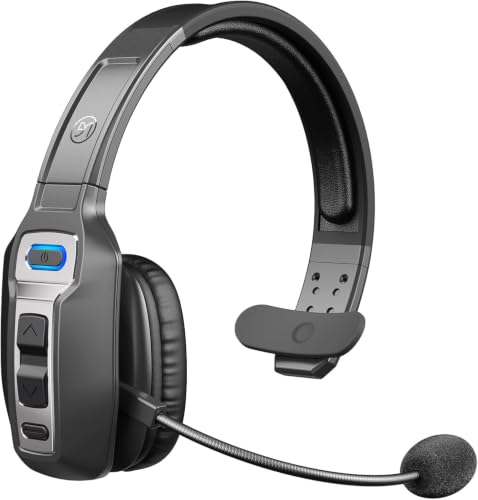
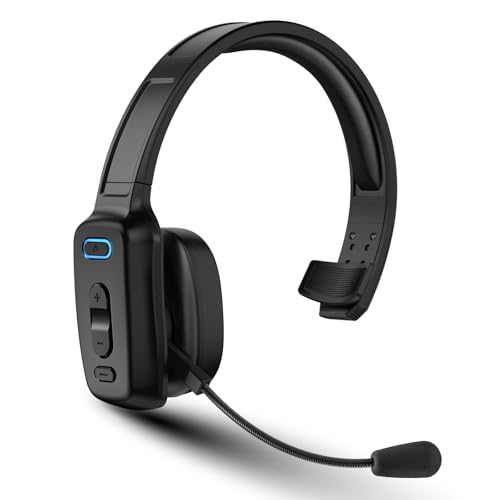
- Lightweight Comfort: Designed with a lightweight, adjustable headband and a flexible gooseneck mic boom, this wireless headset with mic for work provides superior comfort for long hours of wear
- Ultra Durable Design: Wireless headset with mic for work built with IP54-rated protection against dust and moisture; BlueParrott Button offers fast access to features like mute, speed dial, and more
- Package Contents: BlueParrott B350-XT headset, leatherette ear cushion, foam ear cushion, USB cable, vehicle charger, 2 mic windscreens, quick-start guide
- Dual Device Connectivity: Connects with 2 devices simultaneously and provides 500 hours of standby time for maximum convenience and flexibility
- Customizable BlueParrott Button: Program the button with your most-used function such as mute, speed-dial, or Push-to-Talk for instant access to essential features
Why You'll Love It
- Noise cancellation designed to block 96% of background noise for clearer work calls in busy environments
- Up to 24 hours of talk time helps support long workdays without frequent charging interruptions
- Connect two devices simultaneously to manage calls across your connected devices
- Adjustable headband and flexible microphone boom let you position the headset for your wearing preference
- Programmable BlueParrott Button puts frequently used functions, including mute and speed dial, within quick reach
- IP54-rated dust and moisture protection adds practical protection for work in demanding environments
Pros
- +96% advertised noise cancellation
- +24-hour talk time
- +Two-device connectivity
- +Customizable shortcut button
- +Two ear cushion options included
Cons
- -Headset format may not suit buyers who prefer two-ear audio
- -Requires charging to maintain wireless use
- -Voice control and shortcuts may require initial setup
Detailed Review
The BlueParrott B350-XT Bluetooth headset is built for people who need to handle calls while working in noisy surroundings. Truck drivers, delivery drivers, RVers, farmers, and landscapers are among the intended users, but the central appeal is broader: a wireless headset designed to make work conversations easier to manage when background noise is part of the environment. Its advertised microphone noise cancellation blocks 96% of noise, giving the headset a clear purpose beyond simply providing hands-free calling.
Talk time is another important consideration for anyone who spends a substantial part of the workday on calls. The B350-XT provides up to 24 hours of talk time, along with 500 hours of standby time. Its extended wireless range is intended to support hands-free operation, while voice control lets users answer or reject calls. Together, these features make it worth considering for people who want to keep call management separate from the task they are doing. Actual suitability will depend on your working routine and how you use your connected devices.
Wearability and controls also receive attention in the design. The adjustable, lightweight headband gives you room to tailor the fit, while the flexible gooseneck microphone boom can be positioned to suit your preference. A customizable BlueParrott Button provides quick access to a selected function, such as mute, speed dial, or Push-to-Talk. That shortcut is particularly relevant to buyers who repeatedly use the same control during their workday. Rather than relying on a single fixed shortcut, you can program the button around the function you use most.
The headset has IP54-rated protection against dust and moisture, which suits its intended role in work environments where those conditions may be present. The package includes both leatherette and foam ear cushions, two microphone windscreens, a USB cable, a vehicle charger, and a quick-start guide. Having two cushion options gives you a choice of supplied accessories, while the windscreens and charging accessories provide useful starting points for everyday use. Dual-device connectivity is another practical advantage if you need the headset connected to two devices at once.
There are trade-offs to consider before choosing it. The B350-XT is a work-focused Bluetooth headset, so shoppers primarily interested in a different listening format should compare designs before committing. Wireless operation also means charging remains part of ownership, even with the generous stated talk time. The customizable controls offer flexibility, but buyers should be comfortable choosing and configuring their preferred shortcut. Verdict: This Bluetooth headset is a strong candidate for drivers and other workers who prioritize microphone noise cancellation, long talk time, and convenient call controls. If you prefer a different headset format or do not need its work-oriented features, compare simpler alternatives before deciding.
Who Should Buy It
A great fit if you:
- Spend much of your workday on calls and want a headset designed to reduce background noise picked up during conversations.
- Drive for work or handle deliveries and want hands-free calling with voice control for answering or rejecting calls.
- Need one headset connected to two devices simultaneously rather than managing each connection separately.
- Prefer adjusting your headband and microphone boom instead of relying on a completely fixed fit and microphone position.
- Regularly use mute, speed dial, or Push-to-Talk and want one programmable button assigned to a frequent task.
Consider something else if you:
- Prefer listening through a different headset design, in which case an alternative format may better match your everyday listening preferences.
- Rarely make calls or need noise cancellation, in which case a simpler wireless headset may cover your requirements without the same work-focused controls.
Before You Buy
Confirm on the listing:
- Check whether the headset's fit and adjustable headband suit your preferences, especially if you expect to wear it for extended periods.
- Confirm that your intended devices support the Bluetooth connection you need and that simultaneous connections to two devices suit your workflow.
- Review the complete package contents and confirm that the included ear cushions, microphone windscreens, USB cable, and vehicle charger meet your needs.
- Check the instructions for charging, configuring the BlueParrott Button, and maintaining the headset's IP54-rated dust and moisture protection.
How to compare your options: Start with microphone noise cancellation, talk time, wireless range, and the way each headset handles call controls. The B350-XT lists 96% noise cancellation, up to 24 hours of talk time, voice control, and a programmable shortcut button, so these are useful criteria when weighing alternatives. Also consider whether two-device connectivity and the included charging accessories are genuinely useful for your routine. Prioritize the features you will use regularly instead of choosing solely by the length of a feature list.
Getting the Most From It
Begin with the included quick-start guide and follow its directions for getting the headset ready to use. Charge it using the supplied USB cable or vehicle charger as appropriate for your setup, and familiarize yourself with the available controls before relying on them during a busy workday.
Adjust the headband to your preferred fit and position the flexible gooseneck microphone boom comfortably. Try the supplied leatherette and foam ear cushions to decide which option you prefer. Make these adjustments before settling into a long stretch of calls, so you can establish a comfortable arrangement for your routine.
Choose the BlueParrott Button function that best supports your regular tasks. If you frequently mute calls, use speed dial, or rely on Push-to-Talk, program the button around that preference. Learn the voice-control commands for answering and rejecting calls, and check that connecting two devices matches how you intend to use the headset.
Keep charging in mind when planning extended use, and follow the supplied instructions for cleaning and care. Although the headset has IP54-rated dust and moisture protection, follow the manufacturer's guidance for maintaining it rather than assuming that protection removes the need for care. Store the supplied accessories together so they remain available when needed.
FAQ
What comes with the BlueParrott B350-XT?
The package includes the headset, a leatherette ear cushion, a foam ear cushion, a USB cable, a vehicle charger, two microphone windscreens, and a quick-start guide. The two cushion options let you choose between the supplied styles.
How long does the battery last?
The stated talk time is up to 24 hours, and standby time is 500 hours. Your main reference should be talk time if you expect to spend long periods on calls.
Can I connect it to two devices?
Yes, the headset supports simultaneous connections to two devices. Check that this arrangement matches the devices you intend to use and your call-management needs.
Is it suitable for noisy workplaces?
Yes, it is designed for noisy work environments and advertises 96% microphone noise cancellation. Drivers, delivery workers, farmers, and landscapers are among the intended users.
How do I set up the shortcut button?
The BlueParrott Button can be programmed for functions such as mute, speed dial, or Push-to-Talk. Consult the included quick-start guide for setup instructions and check the listing if you need confirmation about a particular device or function.
Product Details
| Brand | BlueParrott |
| ASIN | B07YGHXXVN |