Canon
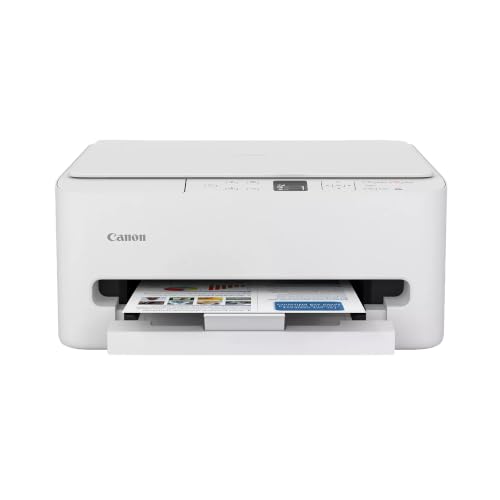
Canon PIXMA G3202 - MegaTank, Wireless All-in-One Printer
Disclosure: We may earn a commission when you buy through links on this page, at no extra cost to you. As an Amazon Associate I earn from qualifying purchases. Learn more
Highlights
- Wireless 3-in-1 (Print | Copy | Scan)
- HIGH PAGE YIELD: Print up to 6,000 Black / 7,000 Color pages with just a single set of inks. ¹
- MOBILE DEVICE PRINTING: Print from your compatible mobile devices using the free Canon PRINT app. ⁸
- WIRELESS CONNECT: Print from any room in the house with Built in Wi-Fi. ⁵
- 30 TIMES MORE INK: Compared to standard ink cartridge sets.²
- 100-SHEET REAR PAPER TRAY: Easily load envelopes, labels, high resolution paper and more in the rear tray.
- POSTER ARTIST: PosterArtist³ is a poster creation software program designed to be used by all levels of users to create professional-posters, banners and more.
- BORDERLESS PHOTO PRINTING: Print beautiful borderless photos up to 8.5” x 11” (Letter size).⁴
- PRINT SPEED: 8.8 ipm (Black) / 5 ipm (Color). ⁷
- 1-YEAR WARRANTY: Have peace of mind with a 1-Year Warranty. ⁶
Why You'll Love It
- High ink yields support up to 6,000 black or 7,000 color pages per ink set
- Wireless printing lets you send documents from compatible mobile devices using the free Canon PRINT app
- Print, copy, and scan functions bring three everyday document tasks together
- The 100-sheet rear tray accommodates envelopes, labels, and high-resolution paper
- Borderless photo printing supports images up to 8.5 x 11 inches
- PosterArtist software helps users create posters, banners, and other printed designs
Pros
- +High black and color page yields
- +Wireless mobile device printing
- +Print, copy, and scan functionality
- +Borderless letter-size photo printing
- +Dedicated rear paper tray
Cons
- -Color printing speed is 5 ipm
- -Rear paper tray holds 100 sheets
Detailed Review
The Canon G3202 wireless all-in-one printer is designed for households and home users who want printing, copying, and scanning in one machine, with an ink supply built around higher page yields. Its MegaTank approach is the main attraction: a single set of inks is rated for up to 6,000 black pages or 7,000 color pages. That makes it worth considering if you regularly print documents, schoolwork, or color materials and would rather focus on the amount of printing available from an ink set than on individual cartridge replacements.
Wireless connectivity gives this printer flexibility around the home. Built-in Wi-Fi allows printing from different rooms, while the free Canon PRINT app supports printing from compatible mobile devices. This is useful for households where documents and images are not always stored on one computer. The three-in-one design also means the same device handles copying and scanning, making it a practical option for everyday paperwork as well as printed projects.
Paper handling and creative printing add another dimension. The rear tray holds 100 sheets and accepts envelopes, labels, and high-resolution paper, giving users options beyond ordinary document printing. For photographs, the printer supports borderless output up to 8.5 by 11 inches, or Letter size. PosterArtist software is another useful inclusion for people who want to create posters and banners, with the seller describing it as suitable for users at different experience levels.
There are some practical trade-offs to consider. Rated print speeds are 8.8 images per minute for black printing and 5 images per minute for color, so the stated figures are worth weighing against your typical workload. The rear tray also has a defined 100-sheet capacity. Buyers should consider whether those speeds and paper-handling arrangements match their routine rather than assuming that a high ink yield automatically means faster printing.
Verdict: The Canon G3202 wireless all-in-one printer is a sensible option for households and home users who value high stated ink yields, wireless printing, copying, scanning, and occasional creative projects. Choose it if those features match your regular printing needs, but consider another printer if your priority is a different print-speed profile or paper-handling capacity.
Who Should Buy It
A great fit if you:
- Print household paperwork, school assignments, and other documents regularly and want a high stated page yield from one ink set.
- Share printing responsibilities with other household members who may want to send jobs from compatible mobile devices.
- Need one machine for printing, copying, and scanning rather than separate devices for everyday document tasks.
- Enjoy producing photographs, labels, posters, or banners and appreciate having several supported printing options.
Consider something else if you:
- Need faster stated color output for your regular workload and would prefer a printer with a higher color printing speed.
- Frequently handle larger paper quantities and would benefit from a model with a larger paper tray capacity.
The strongest reason to consider this model is the combination of high stated ink yields and useful home printing features. Its appeal is less about one specialized task and more about bringing several common printing jobs together.
Before You Buy
Confirm on the listing:
- Check the printer's physical dimensions and measure your intended placement area to make sure it fits your available space.
- Confirm that your mobile devices are compatible with the Canon PRINT app if wireless mobile printing is important to you.
- Review exactly which ink supplies, cables, software, and other items are included in the package before purchasing.
- Check the paper types and sizes you intend to use against the printer's supported printing options, especially for photographs and specialty paper.
How to compare your options: Start with ink yield, because the stated 6,000 black-page and 7,000 color-page figures are central to this printer's appeal. Next, compare the printing functions, wireless connectivity, rated black and color speeds, and paper-handling arrangements against your actual workload. If borderless photos or poster creation matter to you, include those capabilities in your comparison rather than focusing only on document printing. The right choice should match the types and frequency of jobs you expect to handle.
Getting the Most From It
Begin by reviewing the included instructions and following the manufacturer's recommended setup process. If wireless printing is part of your routine, configure the built-in Wi-Fi and check that your compatible mobile devices can use the Canon PRINT app. Keeping the intended printing devices and app compatibility in mind from the beginning can make everyday access more convenient.
Think about paper selection before starting a job. The rear tray supports envelopes, labels, and high-resolution paper, so choose the appropriate paper type for the project and follow the relevant printing instructions. For photographs, use the borderless printing option when you want output up to Letter size.
Make use of the printer's different functions according to the job. Ordinary documents can be printed, while copying and scanning cover other everyday paperwork needs. If you create posters or banners, explore PosterArtist and its available design options.
Finally, pay attention to ink usage and the printer's recommended care instructions. The stated page yields provide a useful reference when planning printing needs, but actual jobs will vary. Follow the manufacturer's guidance for ink handling, paper loading, maintenance, and ongoing care rather than improvising a routine.
FAQ
Does the Canon G3202 print, copy, and scan?
Yes, it is a wireless three-in-one printer with printing, copying, and scanning functions. These capabilities make it suitable for a range of everyday household document tasks.
How many pages can one set of ink print?
The stated yield is up to 6,000 black pages or 7,000 color pages from a single set of inks. These figures provide a reference for buyers who expect to print regularly.
Can I print from my phone?
Yes, compatible mobile devices can print using the free Canon PRINT app. The printer also includes built-in Wi-Fi for wireless printing around the home.
Can it print borderless photographs?
Yes, it supports borderless photo printing up to 8.5 by 11 inches, which is Letter size. It also has a rear tray for high-resolution paper.
What comes in the box, and how do I set it up?
The exact package contents and setup instructions should be confirmed on the product listing. The printer includes a one-year warranty, and its setup should follow the manufacturer's instructions.
Product Details
| Brand | Canon |
| ASIN | B0B2VG5214 |