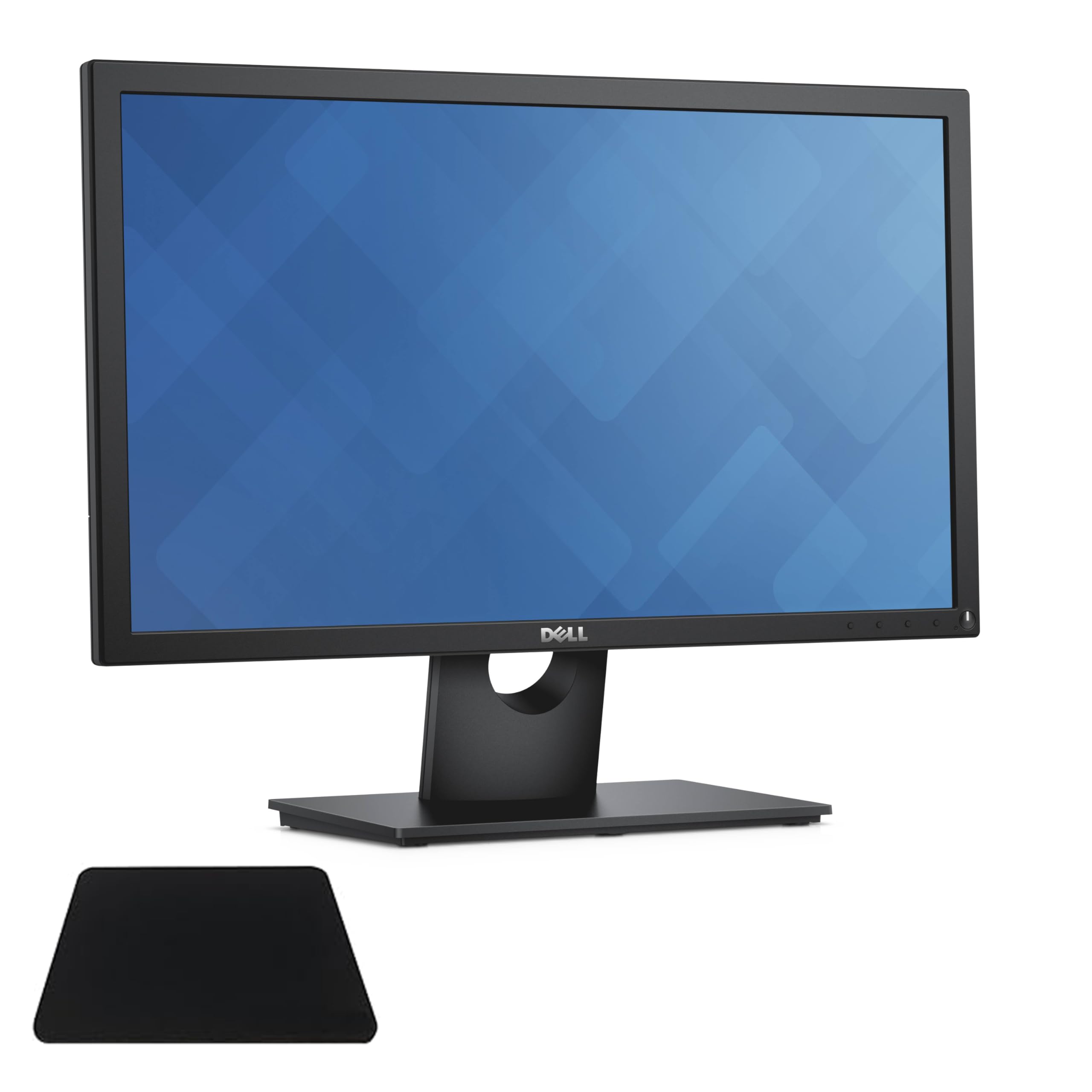
Dell P2219H 21.5 Inch Full HD (1920x1080) Monitor, 60Hz, IPS, 5ms, Ultrathin Bezel, DisplayPort, HDMI, VGA, 5X USB, Adjustable Stand (Height, Pivot, Swivel, Tilt), 3 Years Warranty, Black
Disclosure: We may earn a commission when you buy through links on this page, at no extra cost to you. As an Amazon Associate I earn from qualifying purchases. Learn more
Highlights
- More ways to multitask: Work conveniently across multiple screens and select from predefined templates with the Easy Arrange feature on Dell Display Manager software. Quickly tile and arrange your applications and get back to work faster with Auto-restore, a feature that remembers where you left off.
- Consistent and rich colors: A wide viewing angle enabled by In-Plane Switching (IPS) technology lets you see vibrant colors—no matter where you sit.
- Easy on the eyes: This TUV Certified monitor has a flicker-free screen with ComfortView, a feature that reduces harmful blue light emissions. It’s designed to optimize eye comfort even over extended viewing.
- Adjust to your comfort: Pivot, tilt, swivel and adjust the height of your monitor for a comfortable setup all day long. Or choose from a variety of mounts and stands, including VESA, for even more flexibility.
- 3-year Advanced Exchange Service
Why You'll Love It
- IPS technology delivers consistent and vibrant color representation from a wide range of viewing angles
- Full HD resolution provides sharp, clear visuals for everyday document editing and general productivity tasks
- Customizable stand allows you to tilt, swivel, pivot, and adjust height for an ergonomic workspace
- Integrated ComfortView feature reduces blue light emissions to help minimize eye strain during long hours
- Dell Display Manager software simplifies multitasking with organized window layouts and automatic application memory
Pros
- +Fully adjustable ergonomic stand
- +Wide viewing angles
- +Flicker-free display technology
- +Includes multiple connectivity ports
- +Three-year advanced exchange service
Cons
- -Small screen size for professional video editing
- -Fixed at 60Hz refresh rate
Detailed Review
The Dell P2219H is a 21.5-inch Full HD monitor designed to bring clarity and ergonomic comfort to office environments and home workspaces. By utilizing In-Plane Switching technology, this display ensures that colors remain accurate and vibrant even when you are viewing the screen from an off-center angle. This makes it a reliable choice for users who need consistent visual performance throughout the workday without being tethered to a single, perfectly centered position.
Productivity is at the heart of this monitor's design. It comes equipped with the Dell Display Manager software, which includes the Easy Arrange feature. This tool is particularly helpful for those who juggle multiple applications simultaneously, as it allows you to tile and organize windows into predefined layouts. The Auto-restore feature further enhances efficiency by remembering where you left off, ensuring that your desktop setup is exactly as you left it when you return to your workstation.
Comfort is addressed through both hardware and software integration. The display is TUV Certified and features a flicker-free screen combined with ComfortView technology, which is designed to limit the amount of harmful blue light emitted by the panel. For the physical setup, the monitor includes a highly adjustable stand that supports pivot, tilt, swivel, and height modifications. This flexibility is essential for creating a workspace that matches your specific posture, and the inclusion of VESA mount compatibility provides even more options if you prefer to use a third-party arm or wall mount.
Connectivity is handled via DisplayPort, HDMI, and VGA inputs, providing flexibility for various computer setups. With five USB ports integrated into the design, you gain convenient access to your peripherals directly from the monitor rather than reaching for your computer tower. The inclusion of a three-year Advanced Exchange Service offers peace of mind regarding the long-term reliability of the equipment.
While this monitor excels in general office productivity and document-heavy tasks, it is worth noting that its 60Hz refresh rate and 21.5-inch size are tailored specifically for standard computing rather than intensive gaming or high-end creative design. If your workflow involves massive spreadsheets or dual-monitor configurations, the screen size may feel slightly constrained compared to larger widescreen displays. Verdict: This monitor is an excellent pick for office professionals and students who prioritize ergonomic adjustments, eye comfort, and efficient window management. Those who require a larger canvas for creative work or high-speed gaming should look toward larger or faster-refresh-rate alternatives.
Who Should Buy It
A great fit if you:
- Need a compact monitor that fits well on smaller desks while still offering full high-definition clarity.
- Work long hours at a computer and want features that help reduce eye strain and fatigue.
- Prefer a highly adjustable stand that can tilt, swivel, and change height to suit your specific desk setup.
- Regularly use multiple applications at once and would benefit from software that manages and remembers your window layouts.
Consider something else if you:
- Require a larger screen size for detailed graphic design, video editing, or complex multi-window workflows.
- Are looking for a high-refresh-rate display specifically for fast-paced gaming or professional motion graphics.
- Prefer a curved display to help maintain a consistent viewing distance across a wider field of vision.
Before You Buy
Confirm on the listing:
- Check which specific video cables are included in the box to ensure you have the correct connection for your computer.
- Measure your available desk space to confirm that a 21.5-inch screen meets your visual needs without being too small or too large.
- Verify if your computer supports the required DisplayPort, HDMI, or VGA outputs to avoid needing additional adapters.
- Check the mounting hole pattern on the back if you plan to use a custom VESA mount instead of the included stand.
How to compare your options: When choosing a monitor, focus on the balance between screen size, resolution, and connectivity. This model prioritizes ergonomic flexibility and built-in software tools over sheer size, making it a strong contender for productivity-focused users. Compare the stand capabilities of this model against others to see if the pivot and height adjustments provided here align with your ergonomic requirements.
Getting the Most From It
To maximize your productivity, install the Dell Display Manager software as soon as you connect your monitor. This will allow you to access the Easy Arrange templates, which are designed to help you snap windows into place quickly, keeping your desktop clean and organized throughout the day.
Take advantage of the ergonomic stand by experimenting with the height and tilt settings. Position the top of the screen at or slightly below your eye level to encourage a neutral neck position. If you find the monitor is still not at the ideal height, the VESA-compatible design allows you to easily switch to an aftermarket monitor arm.
If you are sensitive to screen brightness or blue light, navigate the monitor's on-screen menu to ensure the ComfortView feature is active. Keeping the screen clean is also vital; wipe the panel gently with a soft, dry cloth as recommended to avoid scratching the surface, and ensure the ventilation areas remain clear of obstructions to allow for proper airflow during operation.
FAQ
Does this monitor come with a height-adjustable stand?
Yes, the included stand is fully adjustable, allowing you to pivot, tilt, swivel, and change the height of the monitor to suit your needs.
Can I mount this monitor on a wall?
Yes, the monitor is VESA mount compatible, meaning you can attach it to a variety of third-party mounts or stands for more flexibility.
Does this monitor help with eye strain?
Yes, it is TUV Certified and includes a flicker-free screen along with ComfortView, a feature designed to reduce harmful blue light emissions.
What kind of ports does this monitor have for connecting devices?
The monitor includes DisplayPort, HDMI, and VGA inputs for video, along with five integrated USB ports for connecting your peripherals.
Is the software needed to use the monitor features?
The basic display functionality works without extra software, but you should install the Dell Display Manager to enable advanced features like Easy Arrange and Auto-restore.
Product Details
| ASIN | B07FDHHY55 |