drkako
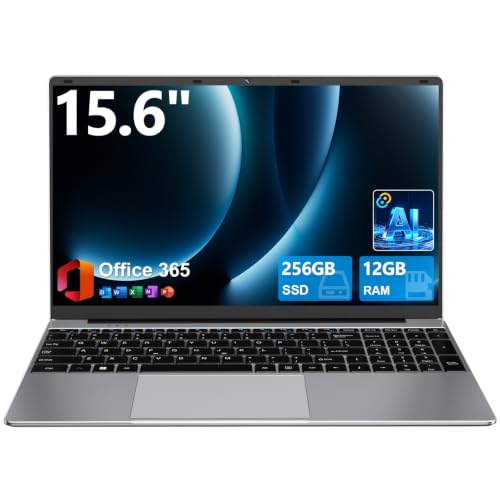
DRKAKO 15.6" FHD IPS Student Laptop, AI Assistant Included, Office 365 | 12GB RAM 256GB SSD, J4105 Quad-Core Processor, 180° Lay-Flat, WiFi 5, Bluetooth, USB 3.2, 53.2Wh Battery, Thin & Lightweight
Disclosure: We may earn a commission when you buy through links on this page, at no extra cost to you. As an Amazon Associate I earn from qualifying purchases. Learn more
Highlights
- Laptop 180° Open Angle: This laptop's hinge opens flat to 180 degrees, giving you the flexibility to adjust the screen for presentations, team collaboration, or your ideal viewing position. Whether working, sharing, or presenting, this adjustable-screen notebook adapts to any situation with ease
- Office 365 & AI Assistance Included: The laptop comes with a 1-year Office 365 subscription preinstalled, supporting your work from day one. Plus, the laptop’s built-in AI assists with chatting, writing, reading, meetings, and drawing—simplifying daily tasks and saving you valuable time
- Performance & Storage: Powered by a Celeron J4105 quad-core processor, 12GB RAM 256GB SSD, this laptop computer handles multitasking with ease. Expand via SSD up to 2TB or TF card up to 1TB. So you never run out of space for files, media, and more
- FHD Ultra-Narrow Display: Featuring a 15.6" FHD display with 1920x1080 resolution and a 16:9 aspect ratio, this laptop offers rich colors and clear detailing. Its narrow bezels optimize the usable screen space, delivering a more engaging viewing experience with lifelike imagery
- 7000mAh Battery & Reliable Connectivity: This laptop packs a 7000mAh battery for work and entertainment without frequent charging. 5G Wi-Fi and Bluetooth 4.2 deliver stable connections for streaming, browsing, and file transfers. With USB 3.2, Type-C, and Mini HDMI ports, easily connect devices and more
Why You'll Love It
- A 15.6-inch Full HD screen provides room for documents, browsing, video, and everyday schoolwork
- 12GB RAM and a 256GB SSD provide the core memory and storage configuration for everyday computing
- A preinstalled one-year Office 365 subscription helps you get started with productivity tasks
- Built-in AI assistance supports chatting, writing, reading, meetings, and drawing from one laptop
- The 180-degree hinge lets you lay the display flat for presentations, collaboration, and shared viewing
- SSD expansion up to 2TB and TF card support up to 1TB offer additional storage options
Pros
- +15.6-inch Full HD IPS display
- +12GB RAM and 256GB SSD
- +One-year Office 365 subscription included
- +180-degree lay-flat hinge
- +Multiple storage expansion options
Cons
- -Celeron J4105 processor
- -256GB SSD in the standard configuration
- -Bluetooth 4.2 connectivity
Detailed Review
The drkako student laptop is a practical option for shoppers who want a large Full HD screen, included productivity software, and built-in AI assistance in one notebook. Its 15.6-inch display gives schoolwork, documents, browsing, and entertainment a generous viewing area, while the 180-degree hinge adds flexibility when sharing the screen or presenting information. The combination of 12GB RAM and a 256GB SSD provides a defined starting configuration for everyday computing, making this model worth considering for students and people organizing routine personal or office tasks.
The display is a central part of the package. It uses an IPS panel with a 1920x1080 resolution and a 16:9 aspect ratio, alongside narrow bezels. That gives shoppers a clearly defined screen size and resolution to compare when deciding how they want to view documents, media, and other content. The hinge opens to 180 degrees, allowing the screen to lie flat rather than remain at a conventional viewing angle. This can be useful when collaborating with someone across a table, showing information to a group, or adjusting the screen to suit a particular working position.
For everyday productivity, the combination of 12GB RAM and a 256GB SSD is paired with an Intel Celeron J4105 quad-core processor. The laptop also includes a one-year Office 365 subscription preinstalled, giving buyers a productivity software subscription as part of the package. Built-in AI assistance is described as supporting chatting, writing, reading, meetings, and drawing. These features may appeal to students and other users who want software support for a range of routine tasks. Storage can also be expanded through an SSD upgrade of up to 2TB or TF card support of up to 1TB, giving users options if their files and media grow beyond the original capacity.
Connectivity and power round out the feature set. The laptop includes Wi-Fi 5, Bluetooth 4.2, USB 3.2, a Type-C port, and Mini HDMI, providing several ways to connect devices and external displays. Its listed battery capacity is 53.2Wh, also described by the seller as 7000mAh. The thin and lightweight design is another stated part of the package, although shoppers should consider the actual dimensions and weight when deciding whether it suits their setup. The main trade-off is the specified Celeron J4105 processor and the included 256GB SSD, so buyers should compare the configuration against the software and storage demands they expect rather than assume it suits every workload.
Verdict: This student laptop is worth considering for shoppers who prioritize a large Full HD screen, everyday productivity features, AI assistance, and flexible storage expansion. Buyers with more demanding computing needs should compare processor and memory configurations carefully before choosing it.
Who Should Buy It
A great fit if you:
- Need a laptop for school assignments, reading, document work, and other routine computing tasks in one place.
- Prefer a 15.6-inch Full HD display for viewing documents and media without choosing a smaller screen format.
- Want a productivity software subscription included rather than sourcing Office 365 separately at the outset.
- Would use AI assistance for writing, reading, chatting, meetings, or drawing as part of your regular workflow.
- Expect your files to grow and value the option to expand SSD or TF card storage later.
Consider something else if you:
- Need a laptop configured for more demanding computing tasks and would prefer an alternative with a processor and memory configuration suited to those workloads.
- Want a larger built-in storage capacity from the start and would rather choose a higher-capacity model than plan an expansion.
Before You Buy
Confirm on the listing:
- Check the laptop's exact physical dimensions and weight if you need it to fit a particular desk, bag, or storage space.
- Confirm which Office 365 activation steps apply to the included one-year subscription and which features are available with it.
- Check whether any accessories you need are included, particularly any cables or other items for connecting your existing devices.
- Verify the SSD and TF card expansion details, including compatible components and the process for increasing storage.
How to compare your options: Start with the processor, RAM, storage capacity, and screen resolution, matching those specifications to the applications and files you expect to use. This model combines a Celeron J4105 quad-core processor, 12GB RAM, a 256GB SSD, and a 15.6-inch Full HD IPS display. Next, weigh the value of its included Office 365 subscription, AI assistance, 180-degree hinge, and connection options against the features you actually need. If storage flexibility matters, include the stated SSD and TF card expansion limits in your comparison rather than focusing only on the starting capacity.
Getting the Most From It
Start by setting up the laptop around the work you expect to do most often. Organize your school documents, personal files, and media into folders so that the 256GB SSD can be managed around your priorities. Review the available storage periodically, especially if you plan to keep a growing collection of files on the device.
Make use of the included Office 365 subscription by checking its activation instructions and setting up the productivity applications you need. Explore the built-in AI assistance in the context of your own tasks, whether that means chatting, drafting text, reading, meetings, or drawing. Choose the functions that fit your workflow instead of assuming every feature will be useful for every project.
Adjust the display angle to suit the task, and use the 180-degree hinge when laying the screen flat would help with shared viewing or collaboration. For connections, identify which of the USB 3.2, Type-C, and Mini HDMI ports matches your intended device or display before connecting equipment.
If your storage needs increase, consider the stated SSD or TF card expansion options after confirming compatibility. Follow the manufacturer's instructions for setup, storage changes, and care, and keep your files organized so you can make better use of the available capacity.
FAQ
Does this laptop include Office 365?
Yes, it comes with a preinstalled one-year Office 365 subscription. Confirm the activation process and subscription details on the listing before purchase.
What processor and memory does it have?
It uses a Celeron J4105 quad-core processor with 12GB RAM and a 256GB SSD. These are the core specifications to compare against the needs of your intended applications.
Can I expand the storage?
Yes, the stated options include SSD expansion up to 2TB and TF card support up to 1TB. Check component compatibility and expansion instructions before choosing additional storage.
Can I connect an external display?
The laptop includes a Mini HDMI port, along with USB 3.2 and Type-C connectivity. Confirm that your intended display and cable are compatible with the connection you plan to use.
Is this laptop suitable for students?
It is aimed at student and everyday productivity use, with a 15.6-inch Full HD IPS display, included Office 365 subscription, and AI assistance for several routine tasks. Compare its processor and storage configuration with your specific schoolwork requirements before deciding.
Product Details
| Brand | drkako |
| ASIN | B0H5BYM75Q |
| Availability | Unavailable |