ELEGOO
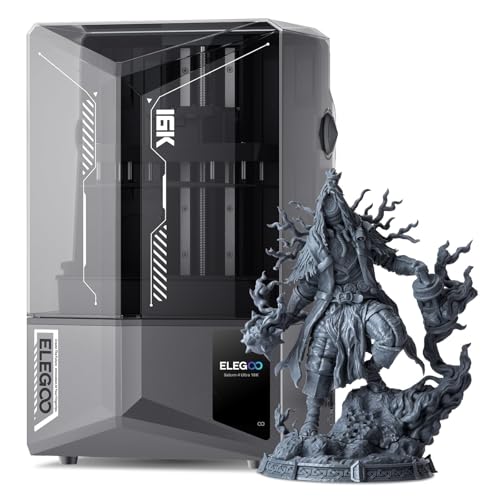
ELEGOO Saturn 4 Ultra 16K Resin 3D Printer | 10" 16K Mono LCD, Smart Mechanical Sensor, Heated Resin Tank, Auto-Leveling, Print Size 8.33 × 4.66 × 8.66 Inch
Disclosure: We may earn a commission when you buy through links on this page, at no extra cost to you. As an Amazon Associate I earn from qualifying purchases. Learn more
Highlights
- 【16K Ultra High Resolution】ELEGOO Saturn 4 Ultra 16K Resin printer features an upgraded 16K LCD screen with an impressive XY resolution of 15120 x 6230 px (14 x 19 μm). It can print large and intricate models--Printing size of 8.33 x 4.66 x 8.66 inches.
- 【Automatic Heated Resin Tank】 Low temperatures can affect resin properties, leading to a decrease in print success rate. The Saturn 4 Ultra 16K resin tank automatically heats the resin, maintaining optimal printing temperatures and improving success rates. The resin tank intelligently detects when the temperature drops below 25°C and activates the heating process.
- 【Upgraded AI Camera】The 3D resin printer quipped with an AI smart camera, you can monitor the printing process at any time, notice errors in time and correct them immediately to ensure smooth printing. You can also enable time-lapse recording — it's a great way to monitor your prints or share the journey with others. Additionally, the AI camera on the ELEGOO Saturn 4 Ultra 16K features an integrated light, ensuring clear monitoring of the printing process day or night.
- 【True High-Speed Printing】 ELEGOO Saturn 4 Ultra with innovative tilted release technology and a 25% increase in light energy intensity, resin curing time is significantly reduced, greatly shortening overall print time. ELEGOO Saturn 4 Ultra achieves a true high-speed print speed of 150mm/h without rapid resin or ACF release films
- 【Smart Monitoring System】Saturn 4 Ultra built-in mechanical sensor that monitors resin dosage, detects foreign objects, checks bulit plate leveling, and alerts you to material shortages.
- 【Easy Setup with High Success Rates】 With features like power-on resume, Wi-Fi transfer and cluster printing, one-click auto self-check on startup, and automatic leveling, the Saturn 4 Ultra 16K is designed for users of all experience levels, ensuring a reliable printing experience.
Why You'll Love It
- A 16K LCD with 14 x 19 μm XY resolution supports detailed models and intricate features
- Automatic resin heating helps maintain printing conditions when cooler surroundings affect resin properties
- An AI camera provides live print monitoring, error visibility, and optional time lapse recording
- Tilted release technology and increased light intensity support printing speeds up to 150 mm/h
- Mechanical monitoring checks resin levels, foreign objects, build plate leveling, and material shortages
- Automatic leveling, startup self checks, Wi-Fi transfers, and print resume simplify everyday operation
Pros
- +16K monochrome LCD resolution
- +Automatic heated resin tank
- +AI camera with time lapse
- +Mechanical error and material monitoring
- +Automatic leveling and Wi-Fi transfer
Cons
- -Fixed build volume limits model dimensions
- -Resin temperature management remains a consideration
- -Advanced monitoring features may be unnecessary for simple printing needs
Detailed Review
The ELEGOO Saturn 4 Ultra 16K resin 3D printer is designed for makers who want fine model detail alongside automated printing assistance. Its 10-inch 16K monochrome LCD delivers an XY resolution of 15120 x 6230 pixels, with 14 x 19 μm resolution, giving buyers a clear reason to consider it for intricate models. The build area measures 8.33 x 4.66 x 8.66 inches, providing room for larger individual pieces or models arranged within those dimensions. It is particularly appealing to users who value detail and want more of the printing process handled by built-in features.
Temperature management is a central part of the design. The heated resin tank detects when the resin temperature falls below 25°C and activates heating automatically. Because cooler conditions can affect resin properties and print success, this feature is intended to help maintain more suitable printing conditions without relying entirely on manual intervention. The printer also uses tilted release technology and a 25% increase in light energy intensity to reduce resin curing time. ELEGOO lists a maximum print speed of 150 mm/h without requiring rapid resin or ACF release films, making speed another consideration for buyers planning repeated print jobs.
The built-in AI camera adds visibility while a model is printing. Users can monitor progress, spot potential problems, and use the integrated light for viewing in different lighting conditions. Time lapse recording is also available for documenting a print or sharing its progress. Alongside the camera, a mechanical sensor monitors resin dosage, checks for foreign objects, examines build plate leveling, and alerts users to material shortages. These systems give the machine several ways to flag issues before they go unnoticed, although monitoring should be treated as assistance rather than a guarantee that every print will succeed.
Setup and operation receive attention through automatic leveling, a one click startup self check, Wi-Fi file transfer, cluster printing, and power on resume. Together, these features aim to reduce routine setup work and make operation more approachable for users at different experience levels. The practical trade off is that the machine still has a defined build volume, so unusually large models may not fit within a single print. Its advanced monitoring and heating features may also be more than someone needs for occasional, straightforward projects.
Verdict: This resin 3D printer is a strong fit for makers who prioritize fine detail, automated resin temperature management, and visibility into the printing process. Choose it if your models fit the stated build volume and you will use its monitoring and automation features. If your main priority is accommodating larger single pieces or keeping the setup simple, consider a different printer suited to those needs.
Who Should Buy It
A great fit if you:
- You create intricate miniatures, figures, or other detailed models and want the fine resolution offered by a 16K LCD.
- You print in surroundings where cooler conditions can affect resin properties and want the tank to manage heating automatically.
- You prefer being able to check print progress remotely through a camera instead of relying only on occasional physical checks.
- You want automated leveling, startup checks, and print resume features to reduce some routine steps during printing.
Consider something else if you:
- Your projects exceed the stated build dimensions, making a printer with a larger build volume a better match.
- You mainly produce simple models and would prefer a more basic resin printer without extensive monitoring and automation features.
Before You Buy
Confirm on the listing:
- Measure the space you intend to use and check the printer's overall dimensions, including room for any routine access it requires.
- Check that your intended models fit within the 8.33 x 4.66 x 8.66 inch build volume, accounting for their planned orientation.
- Confirm resin compatibility and any resin handling or care requirements for your intended projects before choosing your materials.
- Review what comes in the box, the power requirements, and the instructions for setup and ongoing care.
How to compare your options: Start with the detail your models need, the size of the pieces you plan to print, and whether automated heating and monitoring would be useful in your workspace. The Saturn 4 Ultra combines a 16K LCD with a defined build volume, a heated tank, an AI camera, and mechanical monitoring. Compare those capabilities against the features you will actually use rather than choosing on resolution or speed alone. Also consider whether Wi-Fi transfer, automatic leveling, and power on resume address recurring tasks in your workflow.
Getting the Most From It
Begin by reviewing the printer's setup instructions and using its one click startup self check. Take advantage of automatic leveling, but pay attention to any alerts or guidance provided during startup rather than assuming automation removes every setup decision.
Plan models around the stated build dimensions before sending a job. Consider orientation and placement together, especially when preparing intricate pieces, so your intended layout fits the available printing area.
Use the heated resin tank as part of your temperature management routine when cooler conditions may affect the resin. The automatic heating function activates below its stated temperature threshold, but follow the resin and printer instructions for the rest of the process.
Keep an eye on the AI camera during printing and respond when the monitoring system flags a possible issue. Use time lapse recording when you want a record of progress, and take note of alerts about resin levels, foreign objects, build plate leveling, or material shortages. Follow the supplied care instructions for ongoing maintenance.
FAQ
How detailed are prints from the Saturn 4 Ultra 16K?
The printer uses a 10-inch 16K monochrome LCD with an XY resolution of 15120 x 6230 pixels and 14 x 19 μm resolution. These specifications make fine model detail a central part of its appeal.
What is the maximum print size?
The build volume is 8.33 x 4.66 x 8.66 inches. Check your model dimensions and intended orientation before printing.
Does the resin tank heat automatically?
Yes, the tank detects when resin temperature drops below 25°C and activates heating. This is intended to help maintain printing conditions when cooler temperatures affect resin properties.
Can I monitor prints while they are running?
Yes, the built-in AI camera supports live monitoring and time lapse recording. Its integrated light helps keep the printing process visible in different lighting conditions.
What comes with the printer, and what resin works with it?
The supplied feature information does not identify the box contents or list specific compatible resins. Check the product listing for included items and resin compatibility before ordering.
Product Details
| Brand | ELEGOO |
| ASIN | B0DT938SDK |