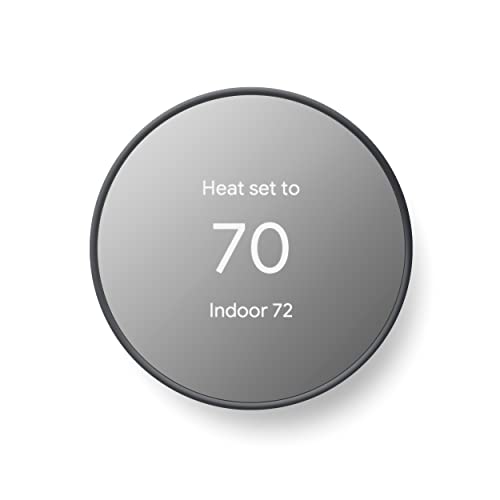
Google Nest Thermostat - Smart Thermostat for Home - Programmable Wifi Thermostat - Charcoal
Disclosure: We may earn a commission when you buy through links on this page, at no extra cost to you. As an Amazon Associate I earn from qualifying purchases. Learn more
Highlights
- ENERGY STAR certified smart thermostat for home that helps you save energy and stay comfortable.Connectivity : Wi-Fi - 802.11b/g/n 2.4 GHz, 802.11a/n 5 GHz Wi-Fi., Wireless interconnect : Bluetooth Low Energy Please refer to the product description section below for all applicable legal disclaimers.Product note: You can also check your system’s compatibility before purchasing a Nest thermostat with our online Nest Compatibility Checker on the Google Nest support page
- The Nest Thermostat is designed to work without a C wire in most homes, but for some systems, including heating only, cooling only, zone controlled, and heat pump systems, you’ll need a C wire or other compatible power accessory
- Nest Thermostat turns itself down when you leave, so you don’t waste energy heating or cooling an empty home. Lock feature: No
- Programmable thermostat that lets you create an energy efficient schedule in the Google Home app on your Android or iPhone
- Remote control lets family members change the thermostat temperature from anywhere on a phone, laptop, or tablet[1]
- Savings Finder looks for more ways your thermostat can help you save, and suggests tweaks to your schedule in the app; check with your energy provider to learn more about rebates and more ways to save on a Nest thermostat
- Smart thermostat with HVAC monitoring, which looks out for your heating and cooling systems; sends an alert if something doesn’t seem right, along with helpful reminders to make maintenance easier[2]
- Control Nest Thermostat with Google Home and other smart home platforms. Compatible with Google Assistant and all Matter-certified voice assistants. Voice control requires a compatible smart device.
- Connectivity : Wi-Fi - 802.11b/g/n 2.4 GHz, 802.11a/n 5 GHz Wi-Fi., Wireless interconnect : Bluetooth Low Energy
- Please refer to the product description section below for all applicable legal disclaimers
Why You'll Love It
- Build an energy conscious heating and cooling schedule through the Google Home app on your phone
- Let the thermostat lower its settings when you leave to help avoid heating or cooling an empty home
- Adjust the temperature remotely from a phone, laptop, or tablet when plans or comfort preferences change
- Get suggested schedule improvements through Savings Finder to identify additional opportunities for energy savings
- Receive HVAC alerts and maintenance reminders when the thermostat detects something that may need attention
- Connect through supported WiFi networks and use compatible Google Assistant or Matter certified voice assistants
Pros
- +Programmable schedules through Google Home
- +Remote temperature adjustments
- +Automatic adjustments when you leave
- +HVAC alerts and maintenance reminders
- +ENERGY STAR certified
Cons
- -Some systems require a C wire or compatible power accessory
- -No built in lock feature
- -Voice control requires a compatible smart device
Detailed Review
The Google Nest Thermostat is a smart WiFi thermostat for homeowners who want more control over heating and cooling schedules without having to adjust the temperature manually every time their routine changes. Its central appeal is the combination of programmable scheduling, automatic adjustments when you leave, and remote access through the Google Home app. It is ENERGY STAR certified, and its energy saving features give households practical ways to manage comfort while being more deliberate about when heating or cooling is needed.
Scheduling is one of the most useful features for everyday household management. You can create an energy conscious schedule in the Google Home app on an Android phone or iPhone, allowing temperature settings to follow your routine rather than relying entirely on manual changes. The thermostat can also turn itself down when you leave, helping avoid heating or cooling an empty home. These functions may appeal to households with predictable daily patterns, as well as people whose schedules change and who prefer to make adjustments remotely.
Remote access adds flexibility when you are away from home or another family member wants to change the temperature. The listed controls support access from a phone, laptop, or tablet, so adjustments do not have to happen at the thermostat itself. Savings Finder adds another layer of guidance by suggesting changes to your schedule that may help you save more energy. Instead of relying only on the schedule you initially create, you can review those suggestions and decide whether they make sense for your household.
The thermostat also offers HVAC monitoring. If something seems wrong with a heating or cooling system, it can send an alert and provide maintenance reminders. Smart home integration is another consideration: the device works with Google Home and other smart home platforms, and supports Google Assistant and Matter certified voice assistants. Voice control depends on having a compatible smart device. Connectivity includes WiFi on the 2.4 GHz and 5 GHz bands, plus Bluetooth Low Energy.
There are important compatibility considerations before choosing this model. It is designed to work without a C wire in most homes, but certain systems, including heating only, cooling only, zone controlled, and heat pump systems, may need a C wire or compatible power accessory. The lack of a lock feature may also matter in households that want to restrict temperature changes. Verdict: This smart WiFi thermostat is worth considering if you want scheduled temperature control, remote adjustments, energy saving suggestions, and HVAC reminders in one connected device. If your system needs a power accessory you do not want to arrange, or a built in lock is essential, consider an alternative that better matches those requirements.
Who Should Buy It
A great fit if you:
- Want your heating and cooling schedule to follow a regular household routine without constant manual temperature adjustments.
- Prefer changing home temperature settings remotely when you are away or another family member needs a different setting.
- Want suggestions for adjusting your schedule to help manage energy use instead of relying on your original settings indefinitely.
- Value heating and cooling system alerts and maintenance reminders as part of managing your home's HVAC equipment.
Consider something else if you:
- Need a thermostat with a built in lock, making a model with an available locking feature a better fit.
- Have a heating or cooling setup that requires a power accessory you do not want to obtain, making a compatible alternative more suitable.
The best match is a household that wants connected controls and is willing to use the Google Home app to manage schedules and review suggestions. Before committing, consider how often you change your routine, whether remote control would be useful, and whether your existing system is compatible. If you rarely adjust temperature settings and do not want app based management, the connected features may offer less practical value for your needs.
Before You Buy
Confirm on the listing:
- Check your existing heating and cooling system with Google's Nest Compatibility Checker before purchasing, particularly if you have a heating only, cooling only, zone controlled, or heat pump system.
- Confirm whether your current setup needs a C wire or another compatible power accessory, since working without a C wire is possible in most homes but not every system.
- Check what is included with the thermostat and whether any required power accessory must be obtained separately before planning your setup.
- Confirm that you can use the Google Home app on your Android phone or iPhone and that your home network supports the listed WiFi connectivity.
How to compare your options: Start with system compatibility and power requirements, because a thermostat needs to suit your existing setup. Next, compare scheduling, remote access, HVAC monitoring, and smart home controls against the features you will actually use. This model combines automatic adjustments, Savings Finder suggestions, and maintenance reminders, so it makes the most sense if you want those functions together. If restricting temperature changes is important, compare available lock features before deciding.
Getting the Most From It
Start by checking compatibility before planning your setup. Use the Nest Compatibility Checker and confirm whether your heating or cooling system needs a C wire or another compatible power accessory. Resolving these questions before purchase can help you avoid choosing a thermostat that does not suit your existing equipment.
Once you are ready to use the device, create a schedule in the Google Home app that reflects your household's normal routine. Think about when the home is occupied and when temperature adjustments would be useful. The automatic adjustment feature can help reduce unnecessary heating or cooling when you leave, while a planned schedule gives you a starting point for everyday control.
Review Savings Finder suggestions in the app rather than treating your initial schedule as permanent. Consider each suggested change in the context of your household's comfort preferences and routine, then adjust your schedule when appropriate. Remote access can also help when plans change, so family members can make temperature adjustments from a supported phone, laptop, or tablet.
Pay attention to HVAC alerts and maintenance reminders as they appear. If an alert indicates that something may be wrong, use the accompanying guidance to decide what follow up is appropriate. If you want voice control, confirm that you have a compatible smart device and supported assistant. Check your preferred smart home setup as part of your normal configuration rather than assuming every platform supports identical controls.
FAQ
Does the Google Nest Thermostat work without a C wire?
Yes, it is designed to work without a C wire in most homes. Some heating only, cooling only, zone controlled, and heat pump systems require a C wire or another compatible power accessory, so check compatibility first.
Can I control the thermostat when I am away from home?
Yes, you can change the temperature remotely using a phone, laptop, or tablet. The programmable schedule and automatic adjustment feature also help manage settings without relying entirely on manual changes.
Does it work with Google Assistant and other smart home systems?
Yes, it works with Google Home and other smart home platforms, and supports Google Assistant and Matter certified voice assistants. Voice control requires a compatible smart device.
Does the thermostat help with energy savings?
Yes, it can turn itself down when you leave, and Savings Finder suggests schedule changes that may help you save energy. It is also ENERGY STAR certified, but individual savings will depend on how the thermostat is used.
What comes in the box, and how do I set it up?
The listing does not state the complete box contents or provide detailed installation steps. Check the product listing for included items and use the compatibility guidance to confirm your system and power requirements before proceeding.
Product Details
| Brand | |
| ASIN | B08HRPDBFF |