Hisense
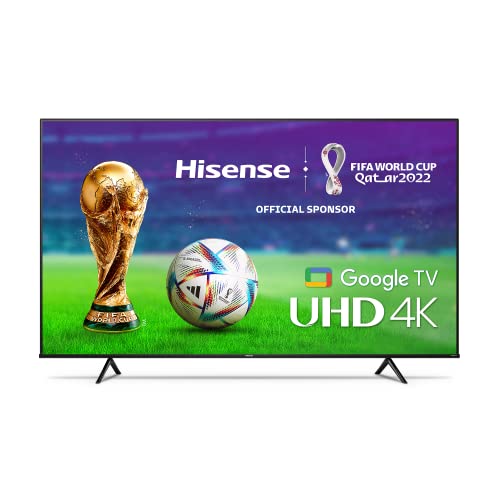
Hisense 55-Inch Class A6 Series 4K UHD Smart Google TV with Alexa Compatibility, Dolby Vision HDR, DTS Virtual X, Sports & Game Modes, Voice Remote, Chromecast Built-in (55A6H) , Black
Disclosure: We may earn a commission when you buy through links on this page, at no extra cost to you. As an Amazon Associate I earn from qualifying purchases. Learn more
Highlights
- 4K Ultra High Definition: More pixels on the screen produces a more clear and succinct picture making content look more realistic and true to life. Combined with Hisense's AI UHD Upscaler , non 4K content will get enhanced to near 4K quality.
- Google TV: The entertainment you love. With a little help from Google. Google TV brings together movies, shows, live TV and more from across your apps and subscriptions and organizes them just for you.
- Dolby Vision HDR and HDR10: Innovative visual technology, Dolby Vision, brings the characters to life with darker darks, brighter brights , and a remarkable color range you can't get anywhere else. HDR10 is an HDR format that delivers HDR content via compatible over the air signals.
- Game Mode Plus: A collection of technologies come together to create a dynamic gaming experience. A 60Hz panel, variable refresh rate, and auto low latency mode makes sure that the television can handle the rigors of next generation gaming consoles.
- Sports Mode: With sports mode's preset settings, the television automatically adjusts itself to optimize sports content. Motion is smoother and color is adjusted for the best sports experience the television is capable of.
Why You'll Love It
- 4K resolution and AI UHD upscaling help both 4K programs and non 4K content look sharper
- Google TV gathers movies, shows, live TV, and subscription content across apps in one organized interface
- Dolby Vision HDR and HDR10 support compatible content with enhanced contrast and a wider range of visual detail
- Game Mode Plus combines variable refresh rate and auto low latency mode with a 60Hz panel
- Sports Mode adjusts motion and color settings to suit sports programming
- Voice remote, Alexa compatibility, and built in Chromecast offer flexible ways to control and share entertainment
Pros
- +4K UHD picture resolution
- +AI UHD upscaling for non 4K content
- +Google TV content organization
- +Dedicated sports and gaming modes
- +Built in Chromecast and voice remote
Cons
- -60Hz panel
- -Upscaling cannot turn non 4K sources into native 4K content
Detailed Review
The Hisense 55A6H is a 55 inch 4K smart TV aimed at households that want a central screen for streaming, live television, sports, and gaming. Its main appeal is the combination of 4K UHD resolution, Google TV, and picture settings tailored to different types of content. Rather than focusing on one activity, it brings several everyday entertainment needs together, making it worth considering if you want one television for movies, shows, sporting events, and console gaming.
Picture resolution is a key part of the package. The 4K UHD display provides the stated resolution for compatible content, while AI UHD Upscaler enhances non 4K material toward near 4K quality. That gives the television a way to handle a mixture of sources instead of limiting its picture processing to content already produced in 4K. Dolby Vision HDR and HDR10 add support for compatible high dynamic range content. Dolby Vision is designed to represent darker darks, brighter brights, and a broader range of color, although the result will depend on the content being viewed.
Google TV is the other major reason to consider this model. It brings movies, shows, live television, and content from apps and subscriptions into an organized interface. For a household that switches between different entertainment sources, this arrangement can make browsing feel more centralized. The product also includes a voice remote, Alexa compatibility, and built in Chromecast, giving buyers additional ways to interact with the television and share content. These features make the overall experience about more than picture resolution alone.
Sports and gaming receive their own attention through dedicated picture and response settings. Sports Mode automatically adjusts motion and color for sports programming, while Game Mode Plus combines a 60Hz panel with variable refresh rate and auto low latency mode. These are useful distinctions for someone who alternates between watching matches and playing console games. DTS Virtual X is also identified as part of the product, adding an audio feature to consider alongside the picture and smart TV functions.
The main trade off to weigh is the 60Hz panel, which should be part of your decision if gaming display characteristics are a priority. The television's game settings support a particular combination of technologies, but they do not change the panel's stated refresh rate. Similarly, AI upscaling enhances non 4K sources rather than making them native 4K material. Verdict: This 4K smart TV is a sensible candidate for households that want organized streaming, HDR support, and dedicated sports and gaming settings in one screen. Consider another type of television if your priorities depend on display specifications beyond its stated 60Hz panel or on features that matter more to your particular gaming setup.
Who Should Buy It
A great fit if you:
- Want a single television for movies, shows, live TV, sports, and console gaming rather than a screen dedicated to one activity.
- Watch a mix of 4K and non 4K content and appreciate picture processing intended to enhance lower resolution sources.
- Prefer an entertainment interface that organizes content from different apps and subscriptions in one place.
- Watch sporting events regularly and want a dedicated mode that adjusts motion and color for that type of programming.
- Play games on a compatible console and value variable refresh rate and auto low latency mode as part of the feature set.
Consider something else if you:
- Prioritize a display with a higher refresh rate, and would prefer a television whose stated panel specification better matches that requirement.
- Need a particular gaming, audio, or smart home capability beyond the functions identified here, and would rather choose a model explicitly offering it.
Before You Buy
Confirm on the listing:
- Measure the space where you intend to place the television and confirm that the 55 inch screen size suits your room and viewing arrangement.
- Check the complete product details for the physical dimensions, mounting or placement requirements, and any accessories included with the television.
- Confirm that your existing devices and preferred services work with Google TV, Alexa compatibility, and the built in Chromecast in the way you intend to use them.
- Review the full specifications and instructions for connection options, power requirements, remote operation, and any setup steps relevant to your home.
How to compare your options: Start with screen size, resolution, and the types of content you watch most often. This model combines 4K UHD, AI upscaling, Dolby Vision HDR, and HDR10 with Google TV, so it is worth considering when picture detail and content organization are priorities. For gaming, compare the stated refresh rate and available display features against the requirements of your console and the experience you want. Also compare the smart features and content sharing options with the devices and services you already use. Choose based on the combination you will actually use, rather than treating one specification as the whole decision.
Getting the Most From It
Begin by following the supplied setup instructions, if included, and connecting the television in the way recommended for your intended use. Take time to explore Google TV and organize your entertainment around the apps and subscriptions you regularly watch. Its purpose is to bring movies, shows, live TV, and subscription content together, so learning the interface can help you make better use of that central feature.
Choose picture settings according to what is on screen. Sports Mode is intended to adjust motion and color for sports, while Game Mode Plus brings together the listed gaming technologies. Switching to the relevant mode when changing activities can help you use the settings designed for each type of content.
For picture quality, remember that 4K sources and non 4K sources are handled differently. The AI UHD Upscaler enhances non 4K content toward near 4K quality, while Dolby Vision HDR and HDR10 apply to compatible material. Matching your expectations to the source can make the available picture features easier to understand.
Explore the voice remote, Alexa compatibility, and built in Chromecast if these suit your household's devices and habits. For routine care, follow the manufacturer's instructions for the screen, remote, and other components. Check the instructions before choosing any cleaning method, and use the guidance provided for the specific product.
FAQ
Does the Hisense 55A6H support 4K resolution?
Yes, it has a 4K UHD display. AI UHD Upscaler also enhances non 4K content toward near 4K quality.
Does this TV have Google TV and Chromecast?
Yes, Google TV organizes movies, shows, live TV, and content from apps and subscriptions. Chromecast is built in for content sharing.
Is the Hisense 55A6H suitable for gaming?
Yes, it includes Game Mode Plus, variable refresh rate, and auto low latency mode alongside a 60Hz panel. Compare those specifications with your console and preferred gaming experience before buying.
Does it have a special setting for watching sports?
Yes, Sports Mode automatically adjusts motion and color for sports programming. It is intended to tailor the picture to that type of content.
What comes in the box, and how do I clean the screen?
The product name identifies a voice remote, but the listing details should be checked for the complete box contents. Follow the manufacturer's care instructions for cleaning and setup rather than assuming a particular method is suitable.
Product Details
| Brand | Hisense |
| ASIN | B09WQC4XJQ |