KEEPRO
KEEPRO Stylus Pen for iPad 2018-2026, USB-C Fast Charging Pencil, Pixel-Perfect Tilt
Disclosure: We may earn a commission when you buy through links on this page, at no extra cost to you. As an Amazon Associate I earn from qualifying purchases. Learn more
Highlights
- [How to Use]- Long press the control button 3S to turn ON/OFF the pen, when the light is flashing, the pen is discoverable via Bluetooth, when connected, you can display the power of the pen on your iPad and use the shortcut function. If the pen doesn't work after turning on, please follow the steps to disconnect the Bluetooth connection between your iPad and Apple Pencil: Settings > Bluetooth > Apple Pencil > tap "i" > Forget this device
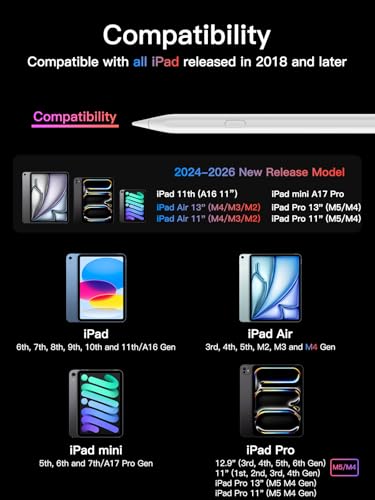
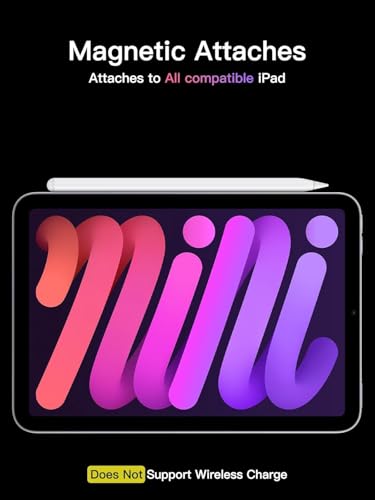
- [Importand *Compatible Models*]- This pen are compatible with all iPad released in 2018 or later. The compatible Models are: iPad A16 11th/10th/9th/8th/7th/6th Gen, iPad mini A17 Pro, iPad Mini 7th/6th/5th Gen, iPad Air 13-inch (M4/M3/M2), iPad Air 11-inch (M4/M3/M2), iPad Air 7th/6th/5th/4th/3rd Gen, iPad Pro 13-inch (M5/M4), iPad Pro 11-inch (M5/M4), iPad Pro 12.9"(3rd, 4th, 5th, 6th Gen), iPad Pro 11"(All Generations) ***Please confirm your iPad's model before placing order***
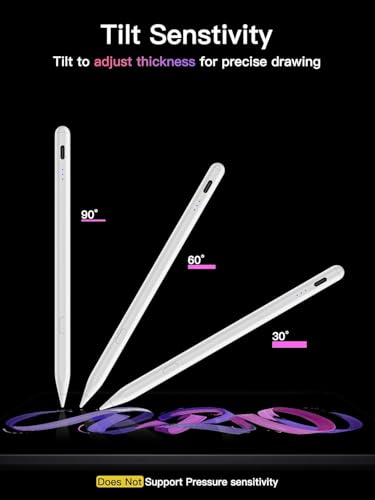
- [Tilt Sensitivity & Pixel Precision]- Equipped with the replaceable original Apple Pencil tip (include 3 extra tips), our device offers pixel-perfect precision and industry-leading low latency. With tilt sensitivity, it enables effortless drawing, sketching, coloring, note-taking, and PDF markup, providing a natural and seamless experience, just like using a real pencil. ***Note: The pen has NO pressure sensitivity
- [USB-C Fast Charging]- This iPad pencil charges fully within 30 minutes, charges to 80% within 15 minutes, and allows up to 10 hours of continuous use. It auto shuts down after 5 minutes of inactivity to save power
- [One-Click To Revoke]- Support Bluetooth connection to display battery percentage in the status bar, one-click to undo the previous action (long press 3s to turn On/Off) Note: You can also use the pencil directly without a Bluetooth connection. However, without a Bluetooth connection, you will not have access to the shortcut functions
Why You'll Love It
- Reaches an 80 percent charge in 15 minutes and full power in 30 minutes
- Provides up to 10 hours of continuous writing and drawing on a single charge
- Supports tilt sensitivity for natural sketching, coloring, and taking notes
- Includes three extra replaceable tips to extend the life of your stylus
- Connects via Bluetooth to show iPad battery levels and enable one-click undo
- Shuts down automatically after five minutes of inactivity to conserve battery life
Pros
- +Fast 30-minute full charge via USB-C
- +Includes three extra replacement tips
- +Bluetooth shortcut for one-click undo
- +Up to 10 hours of battery life
- +Works without Bluetooth for basic writing
Cons
- -Lacks pressure sensitivity for varied line weight
- -Requires forgetting original Apple Pencil to pair
- -Shortcut functions require an active Bluetooth connection
Detailed Review
The KEEPRO Stylus Pen offers a direct input option for modern iPad users looking to write notes, sketch, or mark up documents without high accessory costs. It works across various iPad models released from 2018 onward, including standard iPad, Mini, Air, and Pro lines. This makes it a practical tool for students, professionals, and casual creators who need an accurate writing instrument.
Daily usability centers around quick power management and precise input. The stylus features USB-C fast charging that reaches 80 percent capacity in 15 minutes and fully charges in 30 minutes, giving you up to 10 hours of continuous use. It also shuts off automatically after five minutes of idle time. With built-in tilt sensitivity and low latency, you can shade drawings or write smoothly, and the package includes three spare replacement tips.
Connectivity provides helpful convenience shortcuts. Pairing over Bluetooth allows your iPad status bar to display the remaining battery percentage, and a single click on the control button functions as an undo command. You can also write with the stylus immediately without pairing Bluetooth, though you will miss out on the battery display and undo shortcut.
There are clear trade-offs to note before buying. The stylus does not include pressure sensitivity, so line thickness depends on tilt rather than how hard you press down. Setting it up may also require you to disconnect and forget an existing Apple Pencil in your iPad Bluetooth settings before this stylus will register input.
Verdict: The KEEPRO Stylus Pen is a reliable choice for note-takers, students, and everyday tablet users who want quick charging and responsive tilt drawing. If you do not require pressure sensitivity for advanced digital painting, it delivers solid utility for your compatible iPad.
Who Should Buy It
A great fit if you:
- Need a fast-charging stylus for school lectures or work meetings.
- Want a one-click undo shortcut and visible battery status on your iPad.
- Annotate PDFs, navigate apps, and sketch using tilt shading.
- Use an iPad model released in 2018 or later.
Consider something else if you:
- Rely on pressure sensitivity for professional digital art and varied line weights.
- Use an iPad model released prior to 2018.
FAQ
How long does the battery last and how quickly does it charge?
The stylus provides up to 10 hours of continuous use. It charges to 80 percent in 15 minutes and reaches a full charge in 30 minutes via USB-C.
Does this stylus have pressure sensitivity?
No, it features tilt sensitivity for shading and drawing, but it does not support pressure sensitivity.
Can I use the pen without connecting to Bluetooth?
Yes, you can write and draw without Bluetooth. However, connecting via Bluetooth is required to see the battery percentage on your iPad and use the one-click undo shortcut.
What should I do if the pen is turned on but does not write?
Go to your iPad Settings, select Bluetooth, locate your previous Apple Pencil, tap the info icon, and choose 'Forget this device' to allow the new stylus to write.
Photos




Product Details
| Brand | KEEPRO |
| ASIN | B0D1YLVQYR |