KOORUI
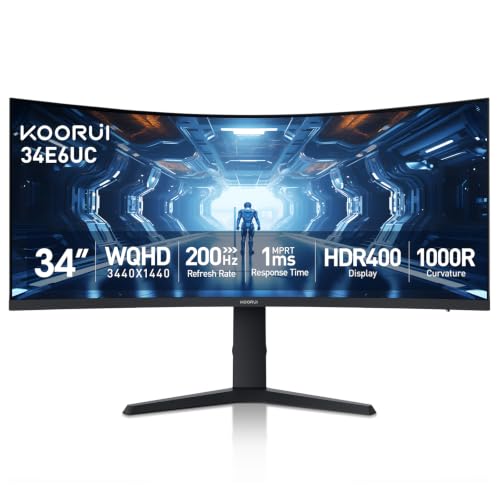
KOORUI 34 Inch 200Hz Ultrawide Curved WQHD 3440×1440p Gaming Monitor 1000R | 1ms HDR400, 95% DCI-P3, PIP/PBP, FreeSync Premium, 1 x DP 1.4 & 2 x HDMI 2.0, Tilt Height Swivel Adjustment
Disclosure: We may earn a commission when you buy through links on this page, at no extra cost to you. As an Amazon Associate I earn from qualifying purchases. Learn more
Highlights
- ULTRAWIDE CURVED GAMING MONITOR: The 34 inch ultrawide gaming monitor (3440×1440) with 1000R design and 21:9 aspect ratio brings a truly immersive experience that offers more realistic visuals and comfortable viewing.
- VIVID AND VIBRANT COLORS: The 34 inch monitor is equipped with the DCI-P3 95% wide color gamut, 125% sRGB, 400nits brightness and HDR 400 so that you can enjoy the beauty and accuracy of 16.7 million colors on the big screen, and the 4000:1 contrast ratio gives you deeper insight into dark images.
- SMOOTHEST GAMING EXPERIENCE: The 34" ultrawide monitor with HDMI 2.0 interface supports 100Hz/120Hz refresh rate and the DisplayPort 1.4 interface supports up to 200Hz refresh rate. Easily accessible 5-Way Joystick allows you to quickly adjust display parameters to different games. FreeSync & G-Sync, 1ms(MPRT) respond time, RTS, FPS, Timer, and Crosshair Functions allow you to target enemies faster in the game and win in one move.
- EAGLE WING DESIGN: The design of the 34 inch computer gaming monitor is inspired by an eagle spreading its wings. The ergonomically shaped stand enables the 200Hz Gaming Monitor to be tilted for -5~20°, swivel for -15~15°and height adjustment up to 110mm. The curved monitor 34 inch is VESA compatible 75x75mm and allows you to save more space in your environment.
- PIP PBP AND BLACK EQUALIZER:The KOORUI 34E6UC features Picture-in-Picture and Picture-by-Picture modes, allowing you to handle multiple tasks on one ultra-wide screen. Combined with the Black Equalizer to reveal hidden details in dark scenes, it provides a tactical advantage in gaming and maximum efficiency for professional workflows.
- RELIABLE QUALITY&SUPPORT: KOORUI owns superb strength from monitor quality to premium service. With a 3-year spare parts replacement warranty, 12-month replacement service, and calling technical support. If you find any damage, malfunction, or missing accessories, please feel free to contact us.
Why You'll Love It
- The 3440×1440 ultrawide display gives games and multitasking layouts more horizontal room on one screen
- A 200Hz maximum refresh rate over DisplayPort 1.4 supports high refresh rate gaming with compatible equipment
- The 1000R curve wraps the wide screen around your viewing area for a more immersive presentation
- DCI P3 95% color coverage, HDR400 and 4000:1 contrast support colorful images and more visible dark scene details
- Picture in Picture and Picture by Picture let you display content from multiple sources on one monitor
- Height, tilt and swivel adjustments help you position the screen, while FreeSync and G Sync support address gaming compatibility
Pros
- +34 inch ultrawide WQHD resolution
- +Up to 200Hz through DisplayPort
- +1000R curved screen
- +Adjustable stand with height, tilt and swivel
- +PIP and PBP multitasking modes
Cons
- -HDMI refresh rate is lower than DisplayPort
- -The 1000R curve may not suit every workspace
- -Full refresh rate depends on the connection used
Detailed Review
The KOORUI 34E6UC ultrawide gaming monitor is aimed at players who want a wide, high refresh rate display without giving up space for everyday computer tasks. Its 34 inch screen combines a 3440×1440 WQHD resolution with a 21:9 aspect ratio and a pronounced 1000R curve. That combination gives games a broader horizontal view and creates room for multiple windows during work. It is particularly appealing if gaming and multitasking share the same desk, and you want one large display to handle both.
Refresh rate is a central reason to consider this model. Through DisplayPort 1.4, the monitor supports up to 200Hz, while its HDMI 2.0 connections support 100Hz or 120Hz. Its listed 1ms response time uses the MPRT measurement, and FreeSync and G Sync support are included for gaming setups that use compatible equipment. A five way joystick provides access to display adjustments, while the included gaming functions cover RTS and FPS modes, a timer, a crosshair and Black Equalizer. The latter is intended to reveal details in darker scenes, giving players another setting to consider when choosing how a game looks.
Image presentation receives attention alongside speed. The screen is specified for 95% DCI P3 coverage, 125% sRGB, 400 nits of brightness, HDR400 and a 4000:1 contrast ratio. It displays 16.7 million colors, with the contrast specification aimed at preserving distinctions between darker and lighter parts of an image. These features make it worth considering for colorful games and general visual work, although the stated color coverage and HDR designation should not be treated as a guarantee of professional color accuracy. Picture in Picture and Picture by Picture also allow content from multiple sources to share the screen, which can help when gaming or working alongside another display source.
The physical design offers useful positioning options. The stand tilts from -5 to 20 degrees, swivels from -15 to 15 degrees and provides up to 110mm of height adjustment. A 75x75mm VESA mounting pattern gives buyers another positioning option if they have a compatible mount. The 1000R curvature is a defining design choice, though, so shoppers should consider whether that shape suits their preferred viewing arrangement. This is a 34 inch ultrawide display rather than a conventional narrower format, and its high refresh rate also depends on using the appropriate connection.
Verdict: Choose this ultrawide gaming monitor if you want a curved WQHD screen, a high refresh rate through DisplayPort and practical multitasking features in one package. Consider another monitor if you prefer a flatter screen or need the same maximum refresh rate through HDMI. Its combination of gaming controls, image specifications and adjustable positioning makes it a versatile option for buyers who will use those features.
Specifications
- Brand: KOORUI
- Model: 34E6UC
- Screen size: 34 inches
- Resolution: 3440×1440 WQHD
- Aspect ratio: 21:9
- Curvature: 1000R
- Maximum refresh rate: Up to 200Hz through DisplayPort 1.4
- HDMI refresh rate: 100Hz or 120Hz through HDMI 2.0
- Response time: 1ms MPRT
- Color coverage: 95% DCI P3 and 125% sRGB
- Brightness: 400 nits
- HDR: HDR400
- Contrast ratio: 4000:1
- Colors: 16.7 million
- Connections: 1 x DisplayPort 1.4 and 2 x HDMI 2.0
- Gaming support: FreeSync and G Sync
- Stand adjustments: Tilt -5 to 20 degrees, swivel -15 to 15 degrees, height up to 110mm
- VESA mounting: 75x75mm
- Display modes: Picture in Picture and Picture by Picture
Who Should Buy It
A great fit if you:
- You play games that benefit from a wide field of view and want a 3440×1440 screen for detailed visuals.
- You prioritize a high refresh rate and can connect your gaming system through DisplayPort 1.4.
- You switch between gaming, browsing and work, and want room for multiple windows on one display.
- You want to adjust your screen height, tilt and swivel instead of relying on a fixed viewing position.
- You value gaming controls such as crosshairs, a timer and Black Equalizer alongside color and contrast features.
Consider something else if you:
- You prefer a flatter display, so a monitor with a less pronounced curve would better match your viewing preference.
- You need your chosen connection to deliver the full 200Hz refresh rate, so compare displays with connection capabilities that match your setup.
Before You Buy
Confirm on the listing:
- Measure your desk and intended viewing area to check that a 34 inch ultrawide screen with a 1000R curve fits your workspace.
- Check which video outputs your computer or gaming system has, and confirm whether you can use DisplayPort 1.4 or need HDMI 2.0.
- Verify what is included in the box, including any cables or other accessories needed for your intended connection.
- If you plan to use a separate monitor mount, confirm that it supports the 75x75mm VESA mounting pattern and suits your intended placement.
How to compare your options: Start with screen size, resolution, curvature and refresh rate, then match the connection specifications to your computer or console. For this model, the advertised maximum of 200Hz applies through DisplayPort 1.4, while HDMI 2.0 supports 100Hz or 120Hz. Also weigh the stated color coverage, contrast, HDR400 and adjustment options against your priorities. If you mainly multitask, consider whether Picture in Picture and Picture by Picture would be useful in your regular workflow.
Getting the Most From It
Start by choosing a position that makes good use of the curved, ultrawide screen. Adjust the stand's height, tilt and swivel to suit your desk arrangement, and consider compatible VESA mounting if that better fits your setup. Leave enough room for the full display and its stand before settling on a permanent position.
Match the connection to your refresh rate priority. DisplayPort 1.4 supports up to 200Hz, whereas HDMI 2.0 supports 100Hz or 120Hz. Check your computer's display settings and the monitor's available options so that the selected configuration matches your intended use.
Explore the five way joystick and gaming settings rather than treating the default image as your only choice. Try the available RTS or FPS mode where appropriate, and consider the timer, crosshair and Black Equalizer functions according to the game you play. For image work, pay attention to how the colors and contrast appear in your own workflow.
Use Picture in Picture or Picture by Picture when you want multiple sources visible together. For routine care, follow the manufacturer's cleaning and handling instructions, and consult its support guidance if the monitor arrives damaged, malfunctions or is missing accessories.
FAQ
Can this monitor reach 200Hz over HDMI?
No, the listed maximum of 200Hz is available through DisplayPort 1.4. HDMI 2.0 supports 100Hz or 120Hz, so choose the connection according to your refresh rate needs.
Does it support FreeSync and G Sync?
Yes, both are listed as supported gaming features. Check that your computer or graphics setup is compatible with the intended configuration.
Can I use it with a monitor arm?
Yes, it has a 75x75mm VESA mounting pattern. Confirm that your intended mount supports that pattern and works with your planned setup.
Can I show two sources at once?
Yes, Picture in Picture and Picture by Picture modes let you display content from multiple sources on the same screen. Check your source connections and choose the mode that suits your workflow.
What comes with the monitor, and how is it cleaned?
The listing does not state the complete box contents or provide specific cleaning instructions. Check the included accessories and manufacturer's care guidance before connecting or cleaning the display.
Product Details
| Brand | KOORUI |
| ASIN | B0C4P2KB9K |