Nelko
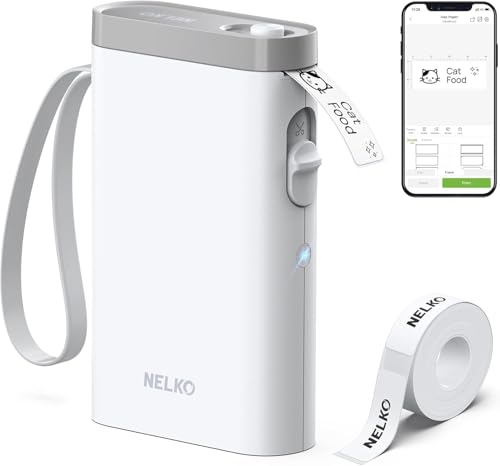
Nelko P21 Label Maker Machine with Tape, Bluetooth Label Printer, White
Disclosure: We may earn a commission when you buy through links on this page, at no extra cost to you. As an Amazon Associate I earn from qualifying purchases. Learn more
Highlights
- 2026 New Version: Compared with traditional label makers, Nelko P21 handheld label maker has half the weight and size, making it smaller, smarter, and ultra-portable. The wireless Bluetooth label maker can slip into your pocket, allowing you to print anytime, anywhere. For great printing results, we recommend using our NELKO thermal label paper. Important Note for iOS Users: Please make sure you have updated your Nelko P21 app to the latest version (V4.8.0) for a great experience
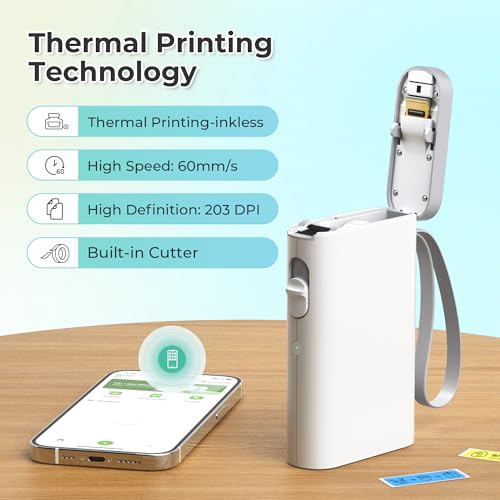
- High-quality Printing: The P21 label maker features BPA-Free Direct Thermal Technology. Equipped with high-speed chips and 203 DPI, the P21 label maker delivers high-definition printing without ink or toner, perfect for back to school supplies. The label maker comes with a long-lasting built-in rechargeable battery for extended use. This label maker prints in monochrome (black text only), and you can create color labels by using color pattern label tapes. Note: Charging adapter not included
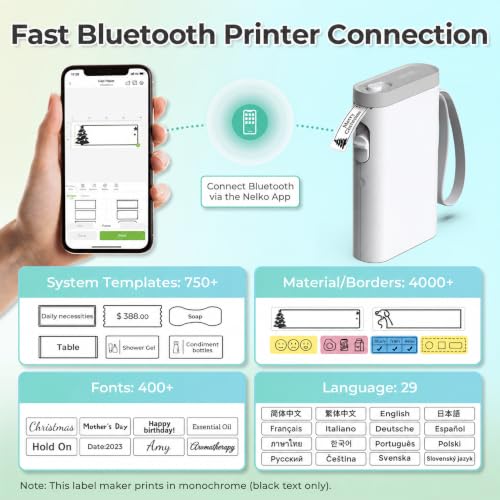
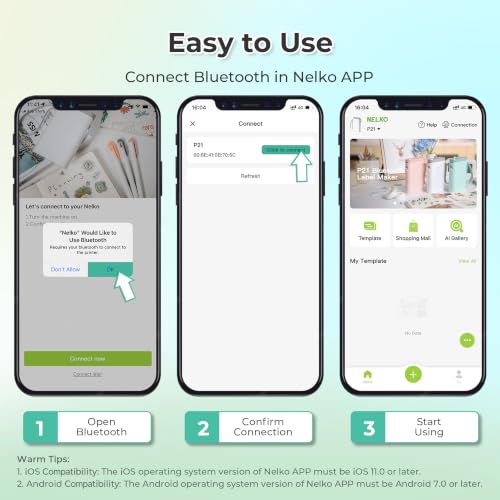
- Easy to Use: NELKO label printer connects with iOS & Android phones via Bluetooth. Step 1: Download "Nelko" app from Google Play or App Store. Step 2: Install paper roll. Step 3: Connect P21 via Bluetooth in the APP. Step 4: Choose a quick template and print. It is not compatible with Google Pixel phones running Android 14. This label maker's APP includes 3600+ icons, 700+ borders, 5500+ materials, 750+ templates, 29 languages. Note: This label maker doesn't work with computers
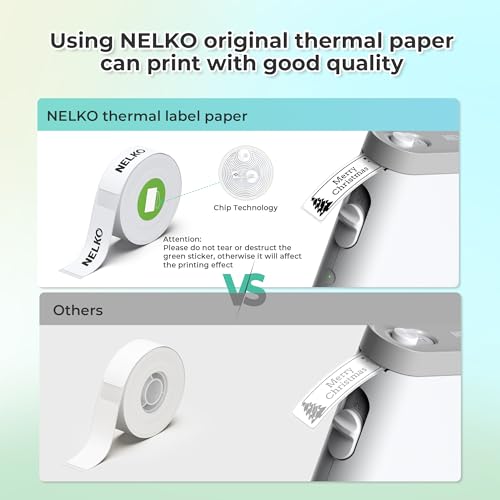
- Multiple Creative Functions & Templates: This app for the label maker provides various features and templates, making it easy to create various designed label stickers in the App with text, QR code, barcode, materials, images, time and borders, etc. The length of labels is fixed, including 14×40mm, 14×50mm, 14×75mm, and more. Please do not tear or damage the green sticker on the back of the label strip, otherwise it will affect the printing effect. Note: Continuous label tapes are not supported
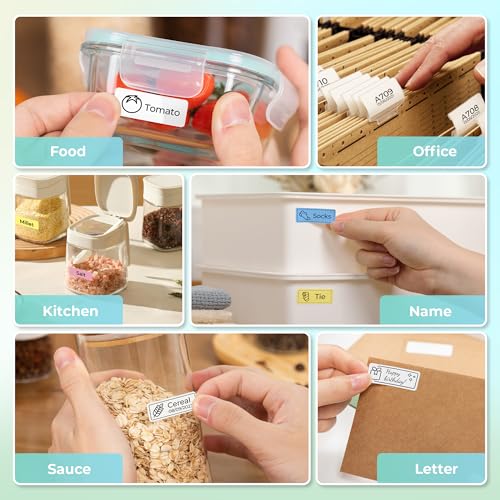
- Design Your Own Labels: This label maker machine with tape is widely used at home, in the office, and at school. At home, it helps organize clothes, food storage, cosmetics, and mailings. In the office, it is ideal for notebook tags, price tags, reminder labels, and other office supplies. At school, it supports teachers and students with name tags, item identification, and classroom organization. You can also use it to create unique back-to-school decorations and fun school supplies for kids
- Classroom Must Haves: The P21 Bluetooth label maker is one of the classroom must haves and teacher must haves for organizing school supplies efficiently. It serves as a smart mini label maker for classroom teachers to sort books, bins, and student folders, while also being a waterproof label maker for kids' school items like lunch boxes, pencil cases. With its portable design, you can print labels anywhere to keep everything in its place, so your classroom always stays tidy and well-organized
Why You'll Love It
- Direct thermal printing delivers crisp 203 DPI black text without buying ink or toner
- Compact pocket-sized design lets you print labels anywhere using a rechargeable battery
- Companion mobile app offers hundreds of templates, icons, borders, and barcodes for quick design
- Pairs directly with iOS and Android smartphones via Bluetooth for simple mobile editing
- Produces fixed-length labels suited for organizing home storage, office files, and school supplies
Pros
- +No ink or toner cartridges needed
- +Pocket-sized and highly portable
- +Built-in rechargeable battery
- +Rich app design library
Cons
- -Does not work with computers
- -Incompatible with Google Pixel on Android 14
- -Wall charging adapter not included
- -Does not support continuous tapes
Detailed Review
The Nelko P21 is a compact, handheld Bluetooth label printer built for quick labeling tasks at home, in the office, or around the classroom. It provides a lightweight, pocket-friendly alternative to bulky traditional label makers, pairing directly with your smartphone so you can create labels on the go.
Using BPA-free direct thermal technology and a 203 DPI print head, the unit produces sharp monochrome text without requiring replacement ink or toner. Power comes from an integrated rechargeable battery, eliminating the need to keep disposable batteries on hand. Through the Nelko app on iOS and Android, you can customize fixed-length labels with text, borders, images, QR codes, and barcodes using thousands of built-in icons and pre-set templates.
Operation involves four basic steps: installing the label roll, downloading the app, pairing via Bluetooth inside the app, and printing your layout. When using the label rolls, take care not to remove or damage the green sticker on the back of the label strip, as doing so will interfere with printing performance.
There are several hardware and compatibility limits to keep in mind. The P21 is strictly a mobile printer and does not connect to desktop or laptop computers. It also does not support Google Pixel devices running Android 14. Additionally, you cannot print continuous tape lengths, all prints are black ink only, and the package does not include a wall charging adapter.
Verdict: The Nelko P21 is a practical, ink-free labeling tool for parents, teachers, and organizers who want fast, phone-controlled label printing. If you need computer compatibility or continuous tape lengths, you will want a different machine, but for basic smartphone labeling, it gets the job done efficiently.
Specifications
- Print Technology: BPA-Free Direct Thermal
- Print Resolution: 203 DPI
- Print Color: Monochrome (black text only)
- Supported Fixed Label Sizes: 14x40mm, 14x50mm, 14x75mm, and more
- Connectivity: Bluetooth
- Power Source: Built-in rechargeable battery
- App Assets: 3600+ icons, 700+ borders, 5500+ materials, 750+ templates, 29 languages
Who Should Buy It
A great fit if you:
- Need a portable labeler to organize pantry items, cosmetics, folders, or kid gear.
- Want to design and print labels directly from an iPhone or compatible Android phone.
- Prefer an ink-free thermal printer with a rechargeable battery.
- Are a teacher organizing classroom bins, folders, and student supplies.
Consider something else if you:
- Need to print custom-length continuous tape rather than fixed sizes.
- Plan to design and print labels from a PC or Mac computer.
- Use a Google Pixel phone running Android 14.
FAQ
Can this label maker print in color?
The printer itself prints in monochrome black text only. You can produce colorful labels by loading colored or patterned label tape rolls into the machine.
Can I connect the P21 to my computer?
No, the P21 does not work with computers. It connects exclusively to compatible iOS and Android smartphones via the Nelko mobile app over Bluetooth.
Does it support continuous label rolls?
No, continuous label tapes are not supported. The machine uses fixed-length label sizes such as 14x40mm, 14x50mm, and 14x75mm.
Why is there a green sticker on the label tape roll?
The green sticker on the back of the label strip helps ensure proper printing. You should avoid tearing or damaging it to maintain print quality.
Photos


Product Details
| Brand | Nelko |
| ASIN | B0C3L93F2Q |