Roku
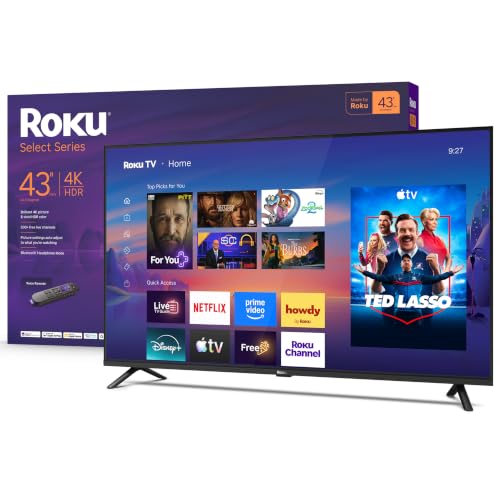
Roku 43-Inch Select Series Smart TV 2026-4K (2160p) HDR TV - RokuTV
Disclosure: We may earn a commission when you buy through links on this page, at no extra cost to you. As an Amazon Associate I earn from qualifying purchases. Learn more
Highlights
- A treat for the eyes: Sharp 4K brings out rich detail on our 43" flat screen TV, while colors pop off in lifelike clarity with HDR10. Roku Smart Picture cleans up incoming TV signals, optimizes them, and chooses the right picture mode.
- Seamless streaming: With fast Wi-Fi and apps that launch in a snap, Roku Select Series TVs get you to your entertainment quickly. You get excellent picture quality, clear sound, automatic updates, and more. It’s simple to use. Hard to outgrow.
- TV, simplified: With setup that only takes minutes, a simple-to-navigate Home Screen, and an uncluttered remote control that does all you need—Roku makes it easier to watch the TV you love.
- A world of free entertainment: Enjoy a huge selection of free live TV, news, sports, movies, shows, and much more—all just a click away.
- More streaming, less searching: With personalized picks right on your Home Screen, quick access to the sports and entertainment you watch most, and fast and easy search in one place—the days of endless scrolling are over.
- Play before you press play: Experience TV’s biggest moments, find special collections across your favorite genres and interests, or add friendly competition to movie nights with interactive games. With Roku, TV is a lot more fun.
- A perfect fit for any smart home: Enjoy easy voice control with Roku Voice, Siri, Alexa, or Google Assistant. Effortlessly share videos, photos, music, and more from your Apple devices to your smart TV with Apple AirPlay.
- No-nonsense voice remote: Use your voice to search across thousands of apps, play entertainment, control your streaming, and more.
- How sound should sound: Not all TV speakers are created equal. Roku Select Series TVs are designed for clear speech and louder sound so you can catch every word. Use Bluetooth Headphone Mode to listen to your entertainment without waking the house.
- Effortlessly clean design: Make the screen the star of the show with a sleek, frameless design that modernizes your entertainment setup.
Why You'll Love It
- Sharp 4K resolution and HDR10 bring detailed images and lifelike color to everyday viewing
- Roku Smart Picture adjusts incoming TV signals and selects a suitable picture mode automatically
- A straightforward home screen, quick launching apps, and a voice remote simplify streaming
- Free live TV, news, sports, movies, and shows offer entertainment without relying on paid options alone
- Voice control, Apple AirPlay, and Bluetooth Headphone Mode support different ways to enjoy entertainment
- A frameless design, clear speech focused sound, and automatic updates round out everyday convenience
Pros
- +Detailed 4K picture with HDR10
- +Simple Roku home screen
- +Voice search across streaming apps
- +Free live entertainment options
- +Apple AirPlay and voice assistant support
Cons
- -Limited to a 43 inch screen
- -Sound design emphasizes clear speech
- -Picture optimization depends on incoming TV signals
Detailed Review
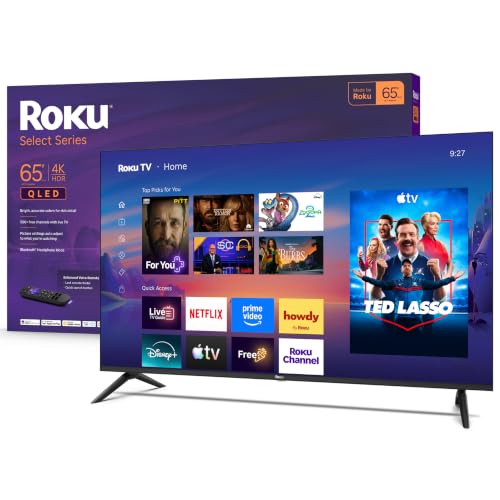
The Roku 43 Inch 4K Smart TV is a straightforward choice for shoppers who want sharp everyday viewing and easy access to streaming without a complicated interface. Its 43 inch flat screen combines 4K resolution with HDR10, while the Roku platform brings apps, free entertainment, search, and personalized recommendations together on one home screen. That combination suits viewers who value convenient access to their favorite shows as much as picture detail.
Picture quality is a central part of the appeal. The 4K display is designed to reveal fine details, and HDR10 supports lifelike color. Roku Smart Picture also works on incoming TV signals, optimizing them and selecting a picture mode automatically. This gives viewers a simpler approach to picture adjustments, particularly if they prefer the television to handle routine optimization rather than choosing settings for every viewing situation.
The Roku interface focuses on making entertainment easy to find. Apps launch quickly according to the seller, and personalized picks appear on the home screen alongside convenient access to frequently watched sports and entertainment. Search works across thousands of apps through the voice remote, reducing the need to browse individual services one by one. Free live TV, news, sports, movies, and shows add more viewing choices, while interactive games and curated collections offer additional ways to explore entertainment.
Sound and connectivity add practical flexibility. The speakers are designed to make speech clear and louder, helping dialogue remain the focus of everyday viewing. Bluetooth Headphone Mode provides a private listening option, while Roku Voice, Siri, Alexa, and Google Assistant support voice control. Apple AirPlay allows compatible Apple devices to share videos, photos, and music with the television. A frameless design keeps attention on the screen, and automatic updates help keep the software current.
The main trade off is that this is a 43 inch television, so the screen size needs to suit the intended room and viewing arrangement. Its sound features emphasize intelligible speech rather than making broader claims about immersive audio, and automatic picture optimization may not suit viewers who want to manage every adjustment themselves. Verdict: This 4K smart TV is a good fit for shoppers who want a manageable screen size, straightforward streaming, HDR10 picture detail, and useful voice features in one set. Buyers who need a larger screen or want more control over picture and sound choices should compare alternatives against those priorities before deciding.
Who Should Buy It
A great fit if you:
- You want a 43 inch television for everyday viewing, with 4K detail and HDR10 color support.
- You prefer a simple home screen that brings streaming apps, personalized recommendations, and search into one place.
- You enjoy free live news, sports, movies, and shows alongside entertainment available through streaming apps.
- You want voice search, smart assistant options, or Apple AirPlay for sharing entertainment from compatible devices.
- You sometimes watch privately and would appreciate the option to listen through Bluetooth Headphone Mode.
Consider something else if you:
- You need a larger viewing area, in which case a larger screen television would better suit your space.
- You want sound features focused on a broader audio experience, so compare televisions with audio capabilities suited to that preference.
Before You Buy
Confirm on the listing:
- Measure the intended space and check the television's full dimensions to confirm that the 43 inch screen will fit your setup.
- Check which accessories are included and whether they cover what you need for your intended arrangement.
- Confirm compatibility with your preferred voice assistant, existing smart home setup, and any Apple devices you plan to use with AirPlay.
- Review the available connection options and any setup requirements relevant to your existing entertainment equipment.
How to compare your options: Start with screen size and picture features. This model combines 4K resolution, HDR10, and automatic picture optimization, so compare those features against the viewing experience you want. Next, consider how you find entertainment, whether through free live channels, apps, personalized recommendations, or voice search. Finally, review sound options, headphone listening, smart assistant compatibility, and device sharing. Prioritize the features you will actually use rather than choosing solely by the number of functions advertised.
Getting the Most From It
Begin with the on screen setup and follow the television's instructions to connect it to your home Wi Fi and access the Roku interface. Setup is designed to take only minutes, and the home screen provides a central place to find entertainment. Review the available settings and arrange your viewing habits around the apps and content you use most.
Make the most of the search and recommendation features instead of browsing every app separately. Use the voice remote to look for entertainment across supported apps, and explore free live TV, news, sports, movies, shows, and curated collections when you want something different.
Choose picture settings that suit your preferences while allowing Roku Smart Picture to optimize incoming signals automatically. If a particular source looks different from another, consider the incoming signal and available picture mode before assuming every source will look identical.
For shared viewing, explore voice control through a compatible assistant and use Apple AirPlay to share content from Apple devices. When private listening is preferable, try Bluetooth Headphone Mode. Keep automatic software updates enabled as intended, and follow the manufacturer's care instructions for routine cleaning and upkeep.
FAQ
Is this Roku television a 4K TV?
Yes, it has a 4K display with 2160p resolution and HDR10 support. Roku Smart Picture also optimizes incoming TV signals and selects a picture mode automatically.
Can I watch free content without relying only on paid streaming?
Yes, the Roku platform offers free live TV, news, sports, movies, and shows. Other entertainment is accessible through streaming apps and the integrated search experience.
Does it work with Alexa, Siri, or Google Assistant?
Yes, the listed features include voice control through Roku Voice, Siri, Alexa, and Google Assistant. Check compatibility with your particular devices and setup before buying.
Can I use headphones or share videos from my phone?
Yes, Bluetooth Headphone Mode supports private listening, and Apple AirPlay lets you share videos, photos, and music from Apple devices. Confirm compatibility with the devices you plan to connect.
What comes in the box, and how do I set it up?
The television is designed for setup in minutes and includes an uncluttered voice remote as part of the described experience. The listing does not specify the complete box contents, so confirm included accessories and connection requirements before ordering.
Product Details
| Brand | Roku |
| ASIN | B0FZF9BG95 |