Samsung
Samsung Chromebook Plus V2, 2-in-1, 4GB RAM, 32GB eMMC, 13MP Camera, Chrome OS, 12.2", 16:10 Aspect Ratio, Light Titan (XE520QAB-K01US)
Disclosure: We may earn a commission when you buy through links on this page, at no extra cost to you. As an Amazon Associate I earn from qualifying purchases. Learn more
Highlights
- Aspect Ratio:16:10
- LIGHTWEIGHT 2-in-1 DESIGN At just under 3 pounds, the Chromebook Plus is incredibly lightweight. You can easily fold it into tablet mode for comfortable viewing and browsing
- BUILT-IN PEN Experience the power of the incredibly precise built-in pen that never needs charging. It's always ready to write, sketch, edit, magnify and even take screenshots
- DUAL CAMERA Fold your laptop into tablet mode to capture clear shots and even zoom in for a closer look with the revolutionary 13MP world-facing camera with autofocus
- CHROME OS AND GOOGLE PLAY STORE Create, explore and browse on a bigger screen with the tools you use every day —all on the secure Chrome OS
- POWER AND PERFORMANCE Tackle anything with a long-lasting battery and Intel Celeron processor. Store more with 32GB of built-in memory and add up to 400GB with a microSD card
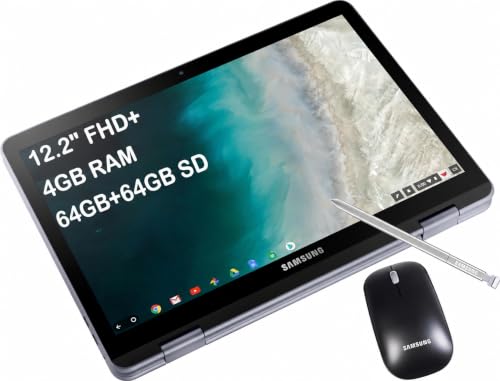
- 360° rotating display
Why You'll Love It
- A lightweight design under 3 pounds folds into tablet mode for browsing and viewing
- The built-in pen works without charging, making writing, sketching and screenshot editing convenient
- A 13MP rear-facing camera with autofocus lets you capture photos while using tablet mode
- The 360-degree rotating display gives you the flexibility to switch between laptop and tablet use
- Chrome OS and Google Play Store provide access to everyday browsing, creation and exploration tools
- Expandable storage supports a microSD card up to 400GB beyond the built-in 32GB
Pros
- +Flexible 2-in-1 design
- +Built-in pen needs no charging
- +13MP camera with autofocus
- +Lightweight under-3-pound construction
- +Expandable microSD storage
Cons
- -Only 4GB of RAM
- -32GB of built-in storage
- -Intel Celeron processor
Detailed Review
The Samsung XE520QAB 2-in-1 Chromebook is designed for buyers who want a straightforward laptop that can also serve as a tablet. Its standout feature is the combination of a 360-degree rotating display and a built-in pen, giving you different ways to interact with the same device. At just under 3 pounds, it is also relatively easy to handle when folded into tablet mode. For everyday browsing, viewing content, writing and casual creative activities, this flexible design offers a useful mix of functions.
The built-in pen is one of the more practical additions. It does not need charging, so it is always ready for writing, sketching, editing and magnifying content. It can also be used to take screenshots, adding another way to interact with what is on the display. Rather than relying exclusively on a traditional laptop-style approach, you can turn the device into tablet mode and use the pen for tasks that benefit from direct input. The 12.2-inch display has a 16:10 aspect ratio, giving this convertible Chromebook its own viewing format.
Photography is another distinguishing feature. The device has a dual-camera setup, including a 13MP world-facing camera with autofocus. When you fold the display into tablet mode, you can use this camera to capture photos and zoom in on subjects. That arrangement gives the convertible design another purpose beyond browsing and viewing. Chrome OS provides the operating environment, with Google Play Store access included for the tools you use every day. This makes the device relevant to buyers who want browsing, creation and exploration in one compact package.
Under the hood, the configuration includes an Intel Celeron processor, 4GB of RAM and 32GB of eMMC storage. The battery is described as long-lasting, and built-in storage can be expanded with a microSD card up to 400GB. These specifications are worth considering before buying, particularly if your preferred activities involve keeping substantial amounts of content on the device. The relatively modest built-in storage makes the expandable option an important part of the overall package.
Verdict: This 2-in-1 Chromebook makes sense for shoppers who value a convertible display, a charging-free built-in pen and a camera that can be used in tablet mode. It is particularly appealing for browsing, note-taking, sketching and everyday Chrome OS activities. Buyers who need more built-in memory, greater storage capacity or a different processor configuration should compare alternatives before committing.
Specifications
- Brand: Samsung
- Model: XE520QAB-K01US
- Product type: 2-in-1 Chromebook
- Operating system: Chrome OS
- Processor: Intel Celeron
- RAM: 4GB
- Built-in storage: 32GB eMMC
- Display size: 12.2 inches
- Aspect ratio: 16:10
- Weight: Just under 3 pounds
- Camera: 13MP world-facing camera with autofocus
- Design: 360-degree rotating display
- Pen: Built-in, no charging required
- Expandable storage: Supports microSD cards up to 400GB
- Battery: Described as long-lasting
- Additional software access: Google Play Store
- Color: Light Titan
Who Should Buy It
A great fit if you:
- Want one device that can switch between conventional laptop use and tablet viewing without requiring separate equipment.
- Prefer writing notes, sketching or marking up content with a built-in pen rather than relying exclusively on conventional input.
- Regularly browse websites, explore Google Play Store tools and handle everyday activities within Chrome OS.
- Would appreciate a world-facing camera for capturing photographs when the display is folded into tablet mode.
- Want a relatively lightweight convertible device that weighs just under 3 pounds.
Consider something else if you:
- Need substantial built-in memory or storage for your preferred activities, in which case a higher-capacity Chromebook may be a better fit.
- Want a different processor configuration or more RAM, making a Chromebook with upgraded hardware worth considering.
Before You Buy
Confirm on the listing:
- Check the exact model number, XE520QAB-K01US, so you are comparing the intended Samsung configuration rather than another model.
- Consider whether the 12.2-inch display and 16:10 aspect ratio suit your preferred viewing and working arrangement.
- Check whether a microSD card is included if you plan to expand the built-in 32GB storage, and confirm the card capacity you intend to use is supported.
- Review the package contents and any included accessories, particularly if you expect additional items beyond the built-in pen.
How to compare your options: Start with the combination of processor, RAM and storage, since these are important parts of the device configuration you are choosing. Then compare the convertible design, pen functionality, camera arrangement and display format against the way you plan to use your Chromebook. If tablet functionality and direct pen input are priorities, the rotating display and built-in pen deserve particular attention. If storage is more important, consider how the microSD expansion option fits your needs rather than focusing only on the built-in capacity.
Getting the Most From It
Make the most of the convertible design by choosing the display position that suits your current activity. Use the traditional laptop arrangement for your regular browsing and creation activities, then fold the display into tablet mode when you prefer a more direct viewing experience.
Keep the built-in pen in mind as part of your everyday workflow. It is ready without charging and can be used for writing, sketching, editing, magnifying and taking screenshots. Exploring these functions can help you find practical uses for the pen beyond occasional note-taking.
For photography, take advantage of the 13MP world-facing camera and its autofocus when using tablet mode. The ability to zoom in also provides another way to examine subjects more closely.
Think about storage as part of your regular device habits. The built-in 32GB capacity can be supplemented with a microSD card up to 400GB. If you decide to expand it, check the card's specifications and compatibility before purchasing. Follow the device's supplied care and operating instructions to maintain an appropriate routine.
FAQ
Can the Samsung XE520QAB be used as a tablet?
Yes. Its 360-degree rotating display folds into tablet mode, allowing you to switch between laptop and tablet-style use.
Does this Chromebook come with a built-in pen?
Yes. It has an integrated pen that does not require charging. You can use it for writing, sketching, editing, magnifying and taking screenshots.
Can I expand the 32GB storage?
Yes. The device supports a microSD card up to 400GB, providing an option to supplement its built-in 32GB of eMMC storage.
What camera does this Chromebook have?
It features a dual-camera arrangement with a 13MP world-facing camera and autofocus. This camera can be used in tablet mode to capture photos and zoom in.
Is this Chromebook suitable for everyday browsing?
Yes. It runs Chrome OS and provides Google Play Store access for everyday browsing, creation and exploration. Its Intel Celeron processor, 4GB of RAM and 32GB of built-in storage are worth considering when deciding whether its configuration matches your particular needs.
Product Details
| Brand | Samsung |
| ASIN | B07J1SY5QQ |