TCL
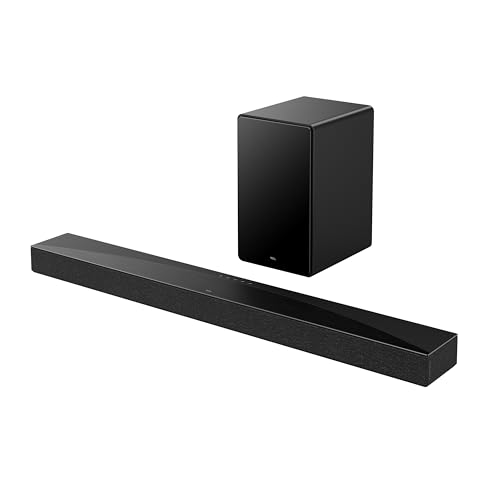
TCL Q65H 5.1 Surround Sound Bar with Wireless Subwoofer for Smart TV | Dolby Atmos DTS:X Calibration | 580W Power Bluetooth Home Theater Speaker with Bass | App Control & Remote Control | Latest Model
Disclosure: We may earn a commission when you buy through links on this page, at no extra cost to you. As an Amazon Associate I earn from qualifying purchases. Learn more
Highlights
- Why Choose TCL: TCL is a global leader in TVs and audio, combining innovative technology with reliable performance. Enjoy award-winning sound, durable design, and customer support that keeps your entertainment experience worry-free
- True Surround Sound - No Rear Speakers, No Clutter: Get real 5.1 immersive sound without extra speakers. Built-in side-firing drivers project sound around your room, creating surround effects without messy wires or complicated setup
- Dolby Atmos 3D Sound That Moves Around You:Feel sound from every direction with Dolby Atmos and DTS Virtual:X. Hear action above, around, and behind you for a more lifelike movie and gaming experience
- Powerful, Room-Filling Sound for Any Space: High output power delivers bold, dynamic audio that fills small bedrooms to large living rooms. Turn it up and enjoy clear, distortion-free sound at any volume
- Smart Sound That Adapts to Where You Sit: Not sitting in the center? No problem. AI Sonic optimization tunes the sound to your room and seating position, so you always get balanced, immersive audio. Easy one-time setup through the TCL app
- Hear Every Detail, Not Just Noise: Purpose-built speakers separate dialogue, bass, and effects so nothing gets lost. From deep bass to crisp highs, every sound comes through clearly; not blended or muddy like lower-power systems
- Room-Shaking Bass for a Cinematic Experience: Feel every moment with deep, powerful bass that fills your room. From subtle rumbles to intense action scenes, the low-end detail makes everything sound bigger and more immersive
- Easy Setup; Works with All Smart TVs & Music Streaming: Plug and play in minutes. Connect via HDMI eARC/ARC, optical, Bluetooth for seamless use with any smart TV and wireless music streaming from your phone or tablet
Why You'll Love It
- Create a surround sound experience with built in side firing drivers without adding separate rear speakers
- Dolby Atmos and DTS Virtual:X support add a more dimensional sound experience for movies and games
- A wireless subwoofer brings deeper bass to action scenes, music, and other entertainment
- AI Sonic optimization adjusts sound for your room and seating position through the TCL app
- Connect through HDMI eARC or ARC, optical, or Bluetooth for TV audio and wireless music playback
- Use app control or the included remote control to manage your home theater audio
Pros
- +Surround effects without separate rear speakers
- +Dolby Atmos and DTS Virtual:X support
- +Wireless subwoofer for deeper bass
- +Room and seating position optimization
- +Multiple connection options for TV and music
Cons
- -Surround effects depend on built in side firing drivers
- -Room optimization requires setup through the TCL app
- -A separate wireless subwoofer still occupies space
Detailed Review
The TCL Q65H is a 5.1 surround sound bar designed for TV owners who want a more immersive home theater experience without placing separate rear speakers around the room. Its combination of a sound bar, wireless subwoofer, and built in side firing drivers aims to create surround effects while keeping the speaker arrangement relatively simple. Dolby Atmos and DTS Virtual:X support add to its appeal for movie watching and gaming, while Bluetooth makes it useful for playing music from a phone or tablet. It is especially worth considering if you want fuller TV audio and stronger bass without building a setup around multiple separate speakers.
Its surround sound approach is one of the main reasons to consider this model. Rather than relying on additional rear speakers, the Q65H uses side firing drivers to project sound around the listening space. Dolby Atmos and DTS Virtual:X are designed to add a sense of dimension to compatible entertainment, making this a relevant option for shoppers who want movie sound to feel more enveloping. These features are the intended design benefits, though the result will depend on the room and seating arrangement rather than guaranteeing the same effect in every home.
The wireless subwoofer gives the system a dedicated way to deliver low frequency effects, which can add weight to movie action, game sound effects, and music. The seller also describes the speakers as designed to keep dialogue, bass, and sound effects distinct, with the aim of making spoken lines easier to follow without losing the impact of other audio. The stated 580W power rating positions this as a system intended to provide room filling sound, from smaller bedrooms to larger living rooms. That makes it worth considering for more than occasional TV watching, particularly if music and gaming are also part of your routine.
Another useful feature is AI Sonic optimization, which adjusts the sound for the room and your seating position through a one time setup in the TCL app. This may appeal to households where viewers do not always sit directly in front of the television. Connections include HDMI eARC or ARC, optical, and Bluetooth, giving you several ways to connect the system to your entertainment devices. App control and a remote control provide two ways to manage it, while the stated plug and play setup is intended to keep installation straightforward.
The main trade off is that a simplified speaker layout is not the same as having separate rear speakers positioned around the listener. The wireless subwoofer also needs a place in the room, so this is not a completely speaker free solution. Getting the intended sound depends on choosing a suitable connection and completing the app based calibration. Verdict: This 5.1 surround sound bar is a strong candidate for TV owners who want immersive movie audio, substantial bass, and fewer separate speakers to arrange. Consider another type of home theater system if physically separate rear speakers are a priority or if you want to avoid accommodating a separate subwoofer.
Who Should Buy It
A great fit if you:
- Want a more cinematic sound experience for movies and shows without arranging separate rear speakers around your seating area.
- Watch action movies or play games and want a wireless subwoofer to give bass and sound effects more presence.
- Share a living room with family members who watch from different seats and value room and seating position optimization.
- Switch between television audio and music from a phone or tablet and want Bluetooth as another listening option.
- Prefer having both app control and a remote control for managing a home theater sound system.
Consider something else if you:
- Want dedicated physical rear speakers around your seating position, making a system with separate surround speakers a better match.
- Prefer a single compact speaker without a separate bass unit, making an all in one sound bar a more suitable alternative.
Before You Buy
Confirm on the listing:
- Check the sound bar and subwoofer dimensions, then measure your intended placement areas to make sure both components will fit comfortably.
- Confirm which cables, power accessories, and other items are included in the box rather than assuming every connection accessory is supplied.
- Check whether your television has HDMI eARC or ARC, an optical output, or another connection you intend to use.
- Review the TCL app requirements and setup instructions to confirm that you can complete AI Sonic optimization with your available devices.
How to compare your options: Start with the type of surround experience you want, particularly whether built in side firing drivers meet your needs or separate rear speakers matter more. Next, compare bass arrangements, supported audio formats, connection options, and the controls you will use most often. The Q65H combines Dolby Atmos, DTS Virtual:X, a wireless subwoofer, Bluetooth, and several TV connection choices. Give the most weight to the features that match your existing television, room layout, and usual entertainment habits rather than choosing by power rating alone. Also consider where the subwoofer will go and whether you are comfortable completing the app based sound optimization before regular use.
Getting the Most From It
Start by choosing a suitable location for the sound bar and wireless subwoofer. Keep your room layout and usual viewing position in mind, since the system is designed to project surround effects through built in side firing drivers rather than separate rear speakers. Check the product instructions for any placement recommendations before settling on a final arrangement.
Choose a connection that matches your television. The listed options are HDMI eARC or ARC, optical, and Bluetooth. If you plan to use the sound bar primarily for TV audio, check your television's available outputs first. Bluetooth also provides a way to play music wirelessly from a phone or tablet.
Complete the AI Sonic optimization setup through the TCL app and consider the seating position you use most often. If several people regularly watch from different places, think about which listening position should guide your initial setup. Revisit the available settings if your room arrangement or usual viewing position changes.
Use the remote control or app to manage everyday listening, and pay attention to dialogue, music, bass, and effects when choosing your preferred sound settings. Follow the manufacturer's care instructions for routine cleaning and maintenance, and check the connection instructions if you change televisions or switch between audio sources.
FAQ
Does the TCL Q65H include surround sound without rear speakers?
Yes, it uses built in side firing drivers to create surround effects without separate rear speakers. Dolby Atmos and DTS Virtual:X support are also listed for a more dimensional listening experience.
Does this sound bar come with a subwoofer?
Yes, the product name identifies a wireless subwoofer as part of the system. Check the current package details to confirm the included components and accessories.
Will it work with my smart TV?
It is described as compatible with smart TVs and supports HDMI eARC or ARC and optical connections. Check your television's available audio outputs to determine which connection is suitable for your setup.
Can I play music from my phone?
Yes, Bluetooth supports wireless music streaming from a phone or tablet. This gives the system a use beyond television audio, including listening to music through the sound bar and subwoofer.
How do I calibrate the sound for my room?
Use the TCL app to complete the one time AI Sonic optimization setup. The feature is designed to adjust sound for the room and seating position, so follow the app instructions when configuring the system.
Product Details
| Brand | TCL |
| ASIN | B0F2ST16NN |