TOPDON
TOPDON TC001 Mini 384×384 Thermal Imaging Camera for iPhone Android iPad | 25Hz Refresh Rate, -4°F~1022°F Temp Range, ±2% Accuracy, 40mK NETD, 96 x 96 IR Resolution Imager, Blue
Disclosure: We may earn a commission when you buy through links on this page, at no extra cost to you. As an Amazon Associate I earn from qualifying purchases. Learn more
Highlights
- SEE MORE THERMAL DETAIL: A 96×96 IR sensor with patented TISR processing produces 384×384 thermal images. ≤40 mK thermal sensitivity and a 25 Hz refresh rate provide responsive detail for quick checks
- WORKS ACROSS DEVICES: Use the thermal imaging camera with compatible iOS, Android, and Windows devices. TopInfrared supports mobile imaging, while TopView PC software provides analysis and reporting
- BUILT FOR DIY INSPECTIONS: Measure from -4 °F to 1,022 °F (-20 °C to 550 °C) to investigate HVAC issues, heat loss, electrical problems, automotive concerns, suspected leaks, and pest activity
- ADVANCED THERMAL TOOLS: Detect hot and cold spots, analyze isotherms, customize measurement points and areas, set temperature limits and alarms, and generate thermal reports
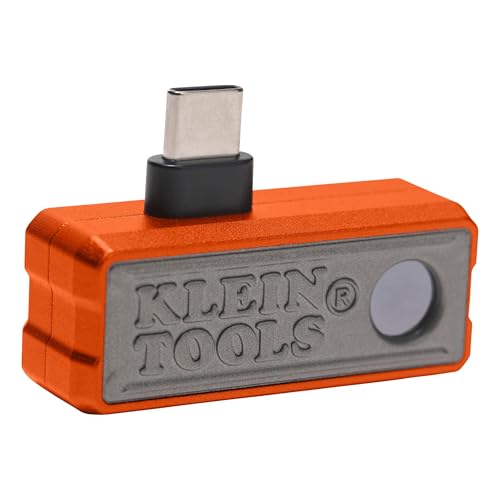
- EASY PLUG-AND-PLAY: Connect to a compatible phone or Windows device for thermal imaging without a built-in battery, charging, or wireless pairing. Its compact 30 g design travels easily
- AI-POWERED INSIGHTS: TopFix AI analyzes thermal images and offers plain-language explanations, possible causes, and next steps. Built-in inspection guides support common inspections
- HEAT LEAVES CLUES: Get a fast first look at temperature differences around your home, workshop, HVAC system, or vehicle, so you know where to investigate next
Why You'll Love It
- Turns a 96 x 96 infrared sensor into 384 x 384 thermal images through TISR processing
- Tracks temperature differences with 40 mK sensitivity and a responsive 25 Hz refresh rate
- Connects to compatible iOS, Android, and Windows devices for inspections at home or in the workshop
- Measures temperatures from -4°F to 1,022°F to help investigate HVAC, electrical, automotive, and suspected leak issues
- Uses adjustable measurement areas, temperature alarms, and thermal reports to organize inspection findings
- Provides AI generated explanations and inspection guidance to help interpret thermal images and decide what to investigate next
Pros
- +384 x 384 processed thermal images
- +Broad temperature measurement range
- +Compatible with multiple device platforms
- +Detailed temperature analysis tools
- +Compact 30 g plug and play design
Cons
- -96 x 96 native infrared sensor resolution
- -Requires a compatible connected device
- -No built in battery or standalone operation
Detailed Review
The TOPDON TC001 is a phone connected thermal imaging camera for people who want to investigate temperature differences around a home, workshop, HVAC system, or vehicle. Instead of relying only on visible signs of a problem, you can use its thermal images to identify areas that deserve closer attention. That makes it a practical option for DIY homeowners, automotive enthusiasts, and people who regularly inspect equipment. Its main appeal is the combination of a compact attachment, a broad measurement range, and software tools that help turn an image into useful information.
Image detail is an important part of the package. The camera uses a 96 x 96 infrared sensor with TISR processing to produce 384 x 384 thermal images. Its thermal sensitivity is 40 mK, and its refresh rate is 25 Hz. Together, these specifications describe a camera designed to show temperature patterns in a responsive image. For a homeowner, those patterns can help direct attention toward suspected heat loss or an HVAC concern. For someone working on a vehicle or electrical equipment, they can help identify areas that merit further investigation. The images are a starting point for finding potential issues, rather than a guarantee that a particular fault has been identified.
The measurement and analysis features give the TC001 more to offer than simply displaying thermal imagery. It measures from -4°F to 1,022°F, or -20°C to 550°C, with stated accuracy of ±2%. Users can examine hot and cold spots, analyze isotherms, customize measurement points and areas, establish temperature limits, and set alarms. Thermal reporting is also available. These functions are useful when you want to focus on a particular area or keep inspection findings organized instead of relying on a general view of the image. TopInfrared supports mobile imaging, while TopView PC software provides analysis and reporting on Windows.
Setup follows a straightforward plug and play approach. The camera connects to a compatible iOS, Android, or Windows device without requiring its own battery, charging, or wireless pairing. At 30 g, it is designed to be easy to carry between inspection locations. TopFix AI adds another layer of guidance by analyzing thermal images and providing plain language explanations, possible causes, and suggested next steps. Built in inspection guides also support common inspection tasks. These tools can help users work through unfamiliar images, although their explanations should be treated as guidance for deciding what to investigate, not as definitive confirmation of a fault.
The central trade off is that this is a connected imaging accessory, not a standalone thermal camera. You need a compatible device to use it, and the infrared sensor itself is 96 x 96 even though processed images are presented at 384 x 384. The camera is best suited to locating temperature patterns and narrowing down where to investigate, rather than replacing every form of diagnostic work. Verdict: This thermal imaging camera is a strong fit for DIY homeowners, workshop users, and vehicle enthusiasts who want portable temperature visualization, adjustable analysis tools, and AI assisted guidance. Consider another type of camera if you need standalone operation or require a different imaging setup for your particular inspection work.
Specifications
- Brand: TOPDON
- Model: TC001
- Product type: Thermal imaging camera
- Color: Blue
- Infrared sensor resolution: 96 x 96
- Processed thermal image resolution: 384 x 384
- Thermal sensitivity: ≤40 mK
- Refresh rate: 25 Hz
- Temperature range: -4°F to 1,022°F (-20°C to 550°C)
- Temperature accuracy: ±2%
- Weight: 30 g
- Compatible platforms: Compatible iOS, Android, and Windows devices
- Mobile software: TopInfrared
- PC software: TopView
- AI assistance: TopFix AI
- Power approach: No built in battery or charging required
Who Should Buy It
A great fit if you:
- You want to investigate possible heat loss at home and use thermal images to decide where closer inspection is worthwhile.
- You handle HVAC maintenance or DIY repairs and need to identify temperature differences around equipment and suspected problem areas.
- You work on vehicles or workshop projects and want a compact way to visualize hot and cold spots.
- You prefer using a compatible phone or Windows device for image viewing, analysis, and organizing inspection findings.
- You are new to thermal imaging and would appreciate AI explanations, possible causes, and built in inspection guidance.
Consider something else if you:
- You need a standalone camera that operates independently of a connected phone or Windows device, so a self contained model would suit you better.
- You require a different imaging configuration for your inspection work, so compare alternatives based on their native sensor resolution and measurement capabilities.
Before You Buy
Confirm on the listing:
- Check compatibility with your exact iPhone, iPad, Android device, or Windows device before ordering, including whether your intended device works with the relevant software.
- Confirm which connection arrangement your device requires and whether the package includes any adapters or other accessories you need for that connection.
- Review the software requirements for TopInfrared, TopView, and TopFix AI, particularly if you plan to use mobile imaging, PC reports, or AI guidance.
- Check the included documentation for instructions on handling, cleaning, and maintaining the camera, along with any setup requirements for your device.
How to compare your options: Start with the inspection you plan to perform, then compare native infrared resolution, processed image resolution, temperature range, stated accuracy, and refresh rate. The TC001 combines a 96 x 96 sensor with 384 x 384 processed images, a 25 Hz refresh rate, and a range from -4°F to 1,022°F. Also compare software analysis features and device compatibility, since a camera is only useful for your workflow if you can connect it and interpret its output.
Getting the Most From It
Begin by confirming that your phone, tablet, or Windows device is compatible with the camera and the software you intend to use. Follow the supplied setup guidance if available, and make sure you understand how the connection and imaging application work before starting an inspection. The plug and play design avoids charging the camera itself, but a compatible connected device remains necessary.
Give each inspection a clear purpose. If you are investigating possible heat loss, HVAC concerns, electrical problems, vehicle issues, suspected leaks, or pest activity, focus on the area related to that question. Use the thermal image to locate temperature differences that deserve closer attention instead of assuming that every unusual pattern identifies a specific cause.
Make deliberate use of the analysis controls. Custom measurement points and areas can help focus attention, while hot and cold spot detection and isotherms offer additional ways to examine the image. Temperature limits and alarms can help highlight readings that meet your chosen criteria. Interpret those features in the context of the inspection rather than treating a single reading as a complete diagnosis.
For more organized records, use the available reporting functions when they suit your task. TopInfrared supports mobile imaging, and TopView provides PC analysis and reporting. TopFix AI can offer possible explanations and next steps, so use its guidance to plan further investigation. Follow the camera's instructions for care and handling, and review the relevant software guidance if a feature behaves differently than expected.
FAQ
What can the TOPDON TC001 be used for?
It can help investigate HVAC issues, heat loss, electrical problems, automotive concerns, suspected leaks, and pest activity. Thermal images reveal temperature patterns that can guide further inspection.
Does it work with iPhone, Android, and Windows?
Yes, it supports compatible iOS, Android, and Windows devices. TopInfrared handles mobile imaging, while TopView provides PC analysis and reporting. Confirm compatibility with your particular device before buying.
Does the camera need charging?
No, it has no built in battery and does not require charging. It connects to a compatible device for operation without wireless pairing.
What is the difference between 96 x 96 and 384 x 384 resolution?
The infrared sensor has a 96 x 96 resolution, while TISR processing produces 384 x 384 thermal images. These are the sensor and processed image specifications, respectively.
Does TopFix AI diagnose a problem automatically?
TopFix AI analyzes thermal images and offers plain language explanations, possible causes, and next steps. Its guidance can help you decide what to investigate, but the feature description does not establish that it can definitively diagnose every fault. Check the listing for the specific AI features and software requirements available for your intended device.
Product Details
| Brand | TOPDON |
| ASIN | B0HGLDGV9W |