TP-Link
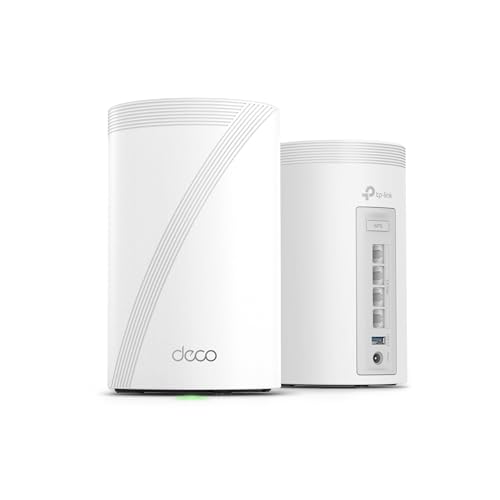
TP-Link Deco X55 AX3000 WiFi 6 Mesh System, Deco X55(1-Pack)
Disclosure: We may earn a commission when you buy through links on this page, at no extra cost to you. As an Amazon Associate I earn from qualifying purchases. Learn more
Highlights
- WiFi 6 Mesh Wi-Fi - Next-gen Wi-Fi 6 AX3000 whole home mesh system to eliminate weak Wi-Fi for good(2×2/HE160 2402 Mbps plus 2×2 574 Mbps)¹²
- More than a WiFi Router - Deco X55 can work as a standalone Wi-Fi Router. All the TP-Link Deco Mesh can work together. Better than traditional WiFi Router and Range Extender
- Whole Home WiFi Coverage - Covers up to 2500 square feet with 1 Deco X55. Simply add more Deco if you need more coverage. Enjoy seamless high-performance Wi-Fi 6 and eliminate dead zones and buffering¹
- Our Cybersecurity Commitment - TP-Link is a signatory of the U.S. Cybersecurity and Infrastructure Security Agency’s (CISA) Secure-by-Design pledge. This device is designed, built, and maintained, with advanced security as a core requirement
- More Gigabit Ports - Each Deco X55 has 3 Gigabit Ethernet ports(6 in total for a 2-pack) and supports Wired Ethernet Backhaul for better speeds. Any of them can work as a Wi-Fi Router
- AI-Driven Mesh - Intelligently learns the network environment to provide ideal WiFi unique to your home
- Easy Setup and Management - The Deco app helps you set up your network in minutes with clear visual guidance and keeps you in control even when you are not home
- TP-Link HomeShield - This router includes TP-Link's premium security service, HomeShield, to keep your home network safe. No-cost features include (1) Basic Network Security, (2) Quality of Service, and (3) Parental Controls
- Works with all internet service providers, such as Comcast, Charter, ATandT, Verizon, Xfinity, Spectrum, RCN, Cox, CenturyLink, Frontier, etc.( a modem is required for most internet service providers)
Why You'll Love It
- WiFi 6 connectivity combines two wireless bands for a stated AX3000 class connection
- One unit covers up to 2500 square feet, with the option to add compatible Deco units
- Three Gigabit Ethernet ports support wired connections and Ethernet backhaul for the mesh network
- The Deco app guides setup and lets you manage your network while away from home
- HomeShield includes basic network security, Quality of Service and parental controls at no cost
- Works with internet providers when paired with the required modem for most services
Pros
- +WiFi 6 mesh networking
- +Up to 2500 square feet per unit
- +Three Gigabit Ethernet ports
- +Expandable with other Deco units
- +App guided setup and management
Cons
- -One unit may not cover every home layout
- -A modem is required for most internet providers
- -Additional Deco units may be needed for wider coverage
Detailed Review
The TP Link Deco X55 mesh WiFi system is a practical option for households that want to extend wireless coverage beyond a single router's location. This one unit supports WiFi 6 and is rated to cover up to 2500 square feet, making it worth considering if weak signal areas are a concern within your home. It can also operate as a standalone WiFi router, so you can choose between using it on its own and expanding into a mesh network with additional Deco units. The right choice depends on the space you need to cover and whether one unit is enough for your layout.
Wireless capacity is a central part of the package. The AX3000 specification combines a 2x2 connection with HE160 support rated at 2402 Mbps and a separate 2x2 connection rated at 574 Mbps. These figures describe the listed wireless capabilities rather than guaranteeing the speed every connected device will receive. For shoppers comparing network equipment, the useful distinction is that this model offers WiFi 6 connectivity and can form part of a larger Deco mesh setup. Its AI driven mesh feature is designed to learn the network environment and adapt WiFi operation to the home.
Wired connectivity gives the unit another role beyond providing wireless access. Each Deco X55 has three Gigabit Ethernet ports, and the system supports wired Ethernet backhaul. That gives buyers the option to use Ethernet connections as part of their network arrangement rather than relying entirely on wireless links between mesh units. All TP Link Deco mesh products can work together, according to the seller, which gives existing Deco owners a potential route to extending their setup. Check compatibility with your current equipment before choosing additional units.
Setup and network management are handled through the Deco app, which provides visual guidance and allows control even when you are away from home. HomeShield also includes basic network security, Quality of Service and parental controls at no cost. TP Link states that the device is designed with security as a core requirement and that the company signed CISA's Secure by Design pledge. For internet access, the product works with providers such as Comcast, AT&T, Verizon, Spectrum and Cox, although most providers require a modem.
The main trade off is choosing a single unit when the coverage needs of a home may call for more. The stated coverage is up to 2500 square feet, but adding Deco units is the seller's suggested way to extend coverage. Buyers should also account for the modem requirement with most internet providers and decide whether wired connections are useful in their setup. Verdict: This mesh WiFi system is a sensible fit for shoppers who want WiFi 6, app based management and the option to expand coverage later. Consider a multi unit arrangement instead if your home needs coverage beyond what one Deco X55 is intended to provide.
Who Should Buy It
A great fit if you:
- Want WiFi 6 connectivity and expect one unit to cover the areas where you need wireless access.
- Prefer managing network settings through an app with visual setup guidance and remote control.
- Need several wired network connections and want three Gigabit Ethernet ports on the same unit.
- Already use Deco mesh equipment and want to explore adding another compatible unit to your network.
Consider something else if you:
- Need coverage across a larger or more complex home and would rather buy a complete multi unit system.
- Want a networking option that does not depend on a modem when your internet provider requires one.
Before You Buy
Confirm on the listing:
- Check your home's layout and the areas needing coverage against the stated maximum of 2500 square feet for one unit.
- Confirm whether your internet provider requires a modem and whether your existing modem is suitable for your service.
- Check what is included in the box and whether you need additional Deco units to cover your intended spaces.
- If you already own Deco equipment, confirm that your particular units are compatible with the planned network arrangement.
How to compare your options: Focus on WiFi generation, stated coverage, wireless capacity, Ethernet ports and the ability to expand the network. The Deco X55 combines WiFi 6, AX3000 wireless specifications, three Gigabit Ethernet ports and support for wired backhaul, while one unit is intended to cover up to 2500 square feet. Compare those features with the space you need to serve and the connections you plan to use. Also consider whether app based management and the included HomeShield features match your preferences.
Getting the Most From It
Start with the Deco app and follow its visual setup guidance. Have your internet service details and modem arrangement ready, since most providers require a modem for this product to connect to their service. Follow the app's instructions for configuring the network rather than assuming a particular setup sequence.
Consider coverage as a whole rather than focusing only on the location of the router. The stated coverage for one unit is up to 2500 square feet. If your home has areas that remain outside your desired coverage, consider adding Deco units to extend the mesh network.
Make use of the three Gigabit Ethernet ports if wired connections suit your equipment and layout. The product also supports wired Ethernet backhaul, so consider whether a wired link is appropriate when planning a network with multiple Deco units.
Review the available app controls, including Quality of Service and parental controls, to decide which settings fit your household. HomeShield includes basic network security, Quality of Service and parental controls at no cost. Check the product instructions for any care or maintenance guidance that applies to your particular setup.
FAQ
Can the Deco X55 work as a standalone router?
Yes, it can work as a standalone WiFi router. You can also add compatible Deco units to build a larger mesh network.
How much space does one Deco X55 cover?
One unit is listed to cover up to 2500 square feet. Your coverage needs determine whether a single unit or an expanded mesh setup is the better fit.
Does it work with my internet provider?
Yes, it is listed as compatible with providers including Comcast, AT&T, Verizon, Spectrum and Cox. A modem is required for most internet providers, so confirm your existing setup before buying.
What security and parental controls are included?
HomeShield includes basic network security, Quality of Service and parental controls at no cost. The Deco app provides access to network management.
What comes in the one pack?
The product name identifies this version as a one pack, meaning the advertised configuration is one Deco X55 unit. Check the listing's package details to confirm included accessories and any other items supplied.
Product Details
| Brand | TP-Link |
| ASIN | B09VJ5CSD6 |