
2 in 1 vs Laptop: Which Is Better in 2026?
Disclosure: We may earn a commission when you buy through links on this page, at no extra cost to you. As an Amazon Associate I earn from qualifying purchases. Learn more

2 in 1 vs laptop: what touch and tablet modes add, what you give up in weight, battery and cost, and who should choose which.
Deciding on 2 in 1 vs laptop comes down to how you hold, carry and use your computer. A 2 in 1 folds or detaches into a tablet and usually has a touchscreen, while a traditional laptop keeps a fixed clamshell and typically gives you more power and ports for the money. The product table right after this introduction lists models of both kinds.
Here is how they differ in comfort, speed, battery, price and durability, and which type fits a student, a traveler, an artist or a desk worker.




Design and How You Use Them
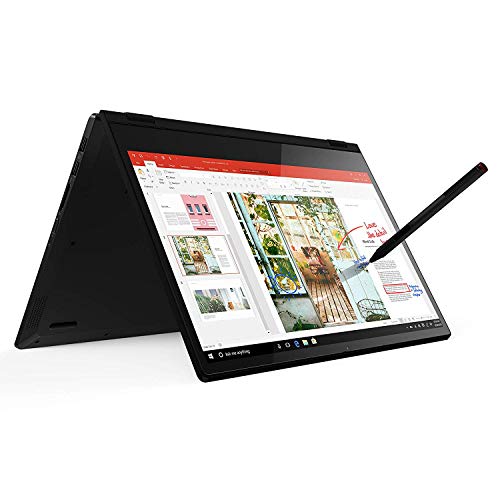
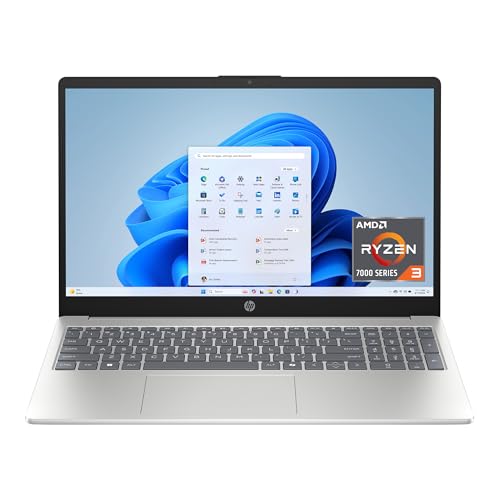
A regular laptop is built around one posture: screen up, keyboard down. That focus lets makers fit a bigger keyboard, a stronger hinge and better cooling. A 2 in 1 gives up some of that to offer tent mode for videos, stand mode for presenting, and tablet mode for reading or drawing.
Ask yourself how often you would flip the screen. People who read on a couch, sketch ideas, sign documents or show slides get daily value. People who type and browse at a desk all day may never leave laptop mode, and in that case the extra mechanism is just cost and weight.
Performance and Cooling
Thin convertibles often have less room for fans and heatsinks. The same processor can therefore run slower in a slim 2 in 1 than in a thicker laptop that cools it better. For documents, browsing and video calls the gap is invisible. For long video exports, gaming or heavy multitasking, a standard laptop usually sustains higher speeds.
Gaming is the clearest dividing line. Laptops with dedicated graphics cards and strong cooling are built for it, and most 2 in 1 models do not include them. If gaming matters, look at laptops first. A flexible machine like the one in our Lenovo Yoga 7i review handles everyday work well, and a console or desktop can cover the gaming.
Screen and Input
Touch and pen input is the headline feature. Taking handwritten notes, marking up PDFs and sketching are much easier on a screen that responds to a stylus. Many 2 in 1 screens are also brighter and sharper than the budget laptop screens they sit beside, though that is not guaranteed.
The trade-off is glare. Touch panels are often glossy, which makes them vivid but reflective. Standard laptops offer more matte options, which suit bright rooms and long reading sessions. Keyboard feel can differ too, since a convertible's thin body leaves less key travel.
- 2 in 1: touch, pen, tablet and stand modes, good for notes and art.
- Laptop: stronger cooling, bigger battery options, more ports and gaming choices.
Battery, Weight and Durability
Convertibles are often light and thin, but touch screens and pen digitizers use extra power, and a slim body leaves less room for battery. Laptops can pack a larger battery in the same footprint, though that adds weight. Check independent battery estimates for any model, since the manufacturer figures are optimistic.
Durability differs too. A 2 in 1 has a more complex hinge that carries the screen through a wide arc, and over years that hinge can loosen if cheaply made. A standard laptop has a simpler mechanism that has been refined for decades. Choose a model with a strong warranty, and handle a convertible's screen gently when folding.
Price
Dollar for dollar, a regular laptop usually gives you more processor, memory and storage at a given price. The convertible premium pays for the hinge, the touch layer and often the pen. If your budget is tight and you do not need touch, spending that premium on a better processor, 16GB of memory or a faster drive can be the smarter play.
On the other hand, a good convertible can replace both a laptop and a basic tablet, which may save money overall for people who would have bought both. For a broader view of the category, read our best 2 in 1 laptop guide.
Real-World Scenarios
A college student who writes essays, reads PDFs and attends lectures might love a convertible with a pen, since handwritten notes can sit beside typed ones. A student who mainly types, codes or edits video is better off with a standard laptop that has a bigger battery and stronger cooling for the same price.
A frequent traveler values low weight and flexible modes on a plane tray table, where a flip-around screen can make a cramped seat workable. A desk worker who docks the laptop to a monitor and keyboard barely touches the screen, so the extra cost is wasted. A designer who sketches will find a tablet-style pen experience useful, but should look at a proper drawing tablet if drawing is the main job.
Resale and Longevity
Standard laptops tend to hold their value in a predictable way, and parts are easy to find. Convertibles are more varied: premium models keep their resale value, while budget ones with weak hinges depreciate faster. If you plan to sell in a few years, a well-known model with a good reputation is easier to sell.
Longevity depends mostly on battery health, storage space and software support, so the same advice applies to both types. Choose enough memory, keep the battery between low and high extremes when you can, and protect the hinge from being forced.
2 in 1 vs Laptop: Which Should You Choose?
Choose a 2 in 1 if you
- Take handwritten notes, draw or annotate files.
- Read or watch videos in tablet or tent mode.
- Present often and like a flexible stand.
Choose a standard laptop if you
- Want the most performance and ports for the price.
- Game or edit video on the machine.
- Type for long periods and prefer a matte screen and a deeper keyboard.
Software and Accessories
Windows and ChromeOS both have tablet-friendly modes, but not every desktop program works well with touch. Check that the apps you rely on, like drawing tools or note-taking software, support pen input. A pen is not always included, so budget for one if you plan to draw.
A sleeve or case is wise for either type, and a stand or dock turns both into desk machines. A 2 in 1 benefits from a screen protector if you use a pen heavily.
FAQ
Is a 2 in 1 slower than a laptop?
Often slightly, because of thinner cooling, but for daily tasks you will not notice.
Do 2 in 1 laptops break more easily?
The hinge is the weak point on cheap models. A well-built one holds up fine with normal care.
Can I game on a 2 in 1?
Light games work well, but heavy games need a laptop with dedicated graphics.
Which is better for students?
A 2 in 1 suits note takers, and a standard laptop suits those who mainly type and need long battery life at a low price.
The simple verdict on 2 in 1 vs laptop: choose the convertible for touch, pen and tablet use, and the standard laptop for raw performance, battery and value.


