
8BitDo Ultimate 2C Review for 2026: Buying Guide
Disclosure: We may earn a commission when you buy through links on this page, at no extra cost to you. As an Amazon Associate I earn from qualifying purchases. Learn more

8bitdo ultimate 2c review: Hall Effect sticks and triggers, extra bumpers and 1000Hz polling at a low price, and where it falls short.
The 8bitdo ultimate 2c review question is simple: how much controller do you get for a price that sits far below most pads with similar sensors? The Ultimate 2C is a no-frills wireless gamepad for Windows and Android that keeps Hall Effect sticks, Hall triggers and a fast 1000Hz connection while dropping extras like a dock. The product table right after this introduction lists the 2C and comparable pads.
Below you will find its features, what it leaves out, how it compares with pricier options and who it suits.




Core Features
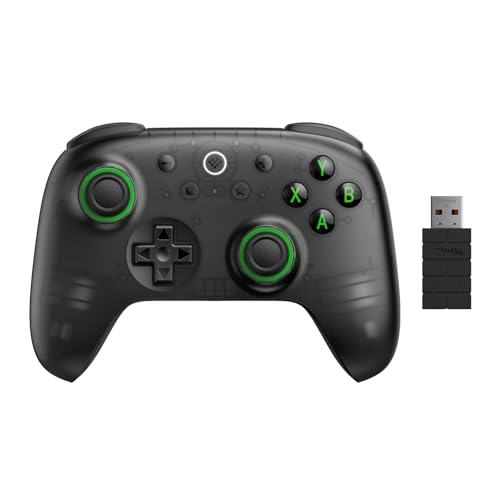
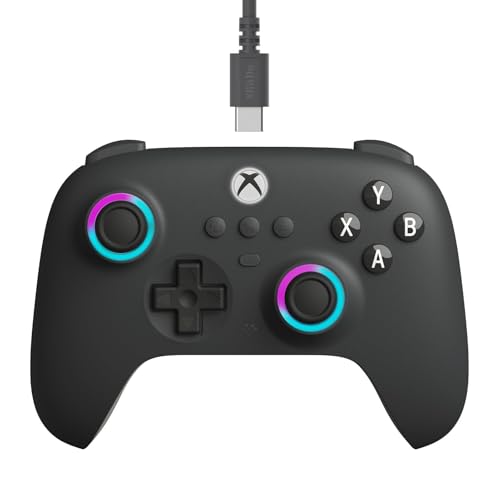
According to its listing, the Ultimate 2C offers Hall Effect joysticks and Hall triggers, a 1000Hz polling rate over 2.4G wireless and wired connections, and wear-resistant metal rings on the sticks. Hall sensing uses magnets instead of rubbing parts, so wear and drift are less of an issue than on older pads.
It adds two extra back-style bumpers, labeled R4 and L4, and lets you map buttons directly on the controller, without software. A turbo function is included, and the maker describes the bumpers and D-pad as light but tactile. That is a lot of capability for a controller in this price class.
- Hall Effect sticks and triggers.
- 1000Hz polling in 2.4G and wired modes.
- Extra L4 and R4 bumpers and on-controller mapping.
What It Leaves Out
Compared with the full Ultimate 2, the 2C does not list a charging dock, motion control or the switchable trigger modes. The sticks use Hall Effect rather than the newer TMR sensors, and the controller targets Windows and Android rather than Apple devices and Steam as headline platforms.
These omissions keep the price low, and for many players they are no loss. If you do not use motion aiming, do not care about a dock and are happy to charge by cable, you give up very little in actual play.
Design and Feel
The 2C uses a familiar twin-stick shape that fits most hands, with a lightweight body that suits long sessions. The listing describes the bumpers and D-pad as light but tactile, which points to a crisp response. Several colors and a transparent version are sold, which adds some personality.
Because the unit is light, it can feel less premium than expensive pads with heavier shells and rubber grips. If you prefer a weighty feel, check the dimensions and return policy before you commit.
Connectivity and Versions
The wireless version uses a 2.4G dongle, which gives low latency and a stable link on PC. A wired model exists for those who want a single cable and no battery, and a Bluetooth version is sold for the Switch and Switch 2. Make sure you pick the version that matches your device, because they are separate listings.
For PC play, the 2.4G dongle is the better choice, since Bluetooth can add delay and reconnection quirks. For a handheld or couch setup, the Bluetooth model is more flexible.
Everyday Performance
Hall Effect sticks give smooth, accurate movement and resist drift, which is a major reason people choose them. Hall triggers provide an analog feel suited to racing and aiming, though they are a single mode, unlike the switchable triggers on pricier models. The 1000Hz polling rate keeps input fast and consistent.
For platformers, action games and most shooters, the controller handles everything well. Competitive players who want back paddles might miss them, since the 2C uses bumpers on the back instead of full paddles. Our 8BitDo Ultimate 2 review covers the upgrade path.
Value Versus the Competition
At a price well below the full Ultimate 2, the 2C is one of the best-value pads with Hall sensors. It beats budget gamepads that still use older sticks, and it competes with other low-cost wireless controllers from several brands. Our best PC controller list compares options at each price level.
If you want more features, move up to the Ultimate 2 for a dock and switchable triggers, or to a premium model. If you want less, wired budget pads exist but usually without the sensors.
Wired, Wireless and Bluetooth Models Explained
The 2C name covers several versions, which can confuse shoppers. The 2.4G wireless pad with a dongle is the all-round PC model. The wired version is the cheapest, and removes battery and charging from the equation, which suits desktop players who never move the pad. The Bluetooth version is aimed at Switch and Switch 2 owners and pairs without a dongle.
Check the title of the listing for the platform it names, and read the compatibility line. A pad bought for the wrong platform is a common cause of returns, and the packaging for each model looks nearly identical.
Making the Most of a Budget Pad
A few small steps lift a low-priced controller. Update the firmware when the maker offers it, set dead zones in the game or in Steam so that small stick movements register cleanly, and use the on-controller mapping to place a frequent action on the back bumpers. These tweaks cost nothing and make the pad feel closer to a pricier model.
Keep the sticks clean and avoid pressing hard on the rings, since dirt and grit shorten the life of any joystick. A gentle wipe now and then keeps the feel consistent for years.
8bitdo ultimate 2c review: Who Should Buy It
Buy it if you
- Want Hall Effect drift resistance on a small budget.
- Play on PC or Android and want 1000Hz input.
- Prefer on-controller button mapping.
Skip it if you
- Want a charging dock, motion control or switchable triggers.
- Need true back paddles for competitive play.
- Mainly play on an Xbox or PlayStation console.
A look at the Nintendo Switch 2 Pro Controller review may help if a console-first pad is more your style.
Getting Started
Plug in the dongle, switch the controller on and wait for the link light to settle. Windows treats it as a standard gamepad, and most games recognize it. For button mapping, hold the mapping button and press the keys as the instructions describe, which takes a minute.
Charge the controller by cable before first use, and keep the dongle near it to avoid interference. If a game does not recognize the pad, try Steam Input or the alternate input mode on the controller.
FAQ
Does the Ultimate 2C have a dock?
The listing does not mention one, so plan on charging by cable.
Does it support Hall Effect sticks?
Yes, both the joysticks and the triggers use Hall Effect sensors.
Is it good for PC gaming?
Yes, with a 2.4G dongle and 1000Hz polling, it suits PC play well.
Can I use it on Switch?
A separate Bluetooth version is made for Switch and Switch 2.
The summary of this 8bitdo ultimate 2c review is that it is a great-value PC pad with modern Hall sensors, best for players who can live without a dock and extras.


