
Apple Magic Keyboard Review for 2026: Mac and iPad Versions
Disclosure: We may earn a commission when you buy through links on this page, at no extra cost to you. As an Amazon Associate I earn from qualifying purchases. Learn more

Typists and Mac owners get a clear apple magic keyboard review covering the Mac keyboards, Touch ID models and the iPad case.
Anyone shopping for an apple magic keyboard review is usually deciding between two very different products that share a name: the wireless desktop keyboard made for the Mac, and the Magic Keyboard case made for the iPad. This guide separates them, explains what each one does well, and shows who should look elsewhere.
The product table right after this intro lists the Mac versions and the iPad cases that are currently buyable, so you can compare layouts and prices before reading the details.

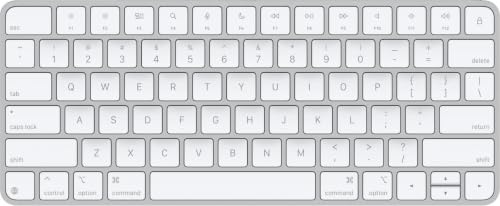


Apple Magic Keyboard for Mac: What You Get
The Mac version is a slim, rechargeable Bluetooth keyboard with a low, flat profile. It charges and pairs through a USB-C cable, and a full charge lasts for roughly a month of normal use according to the listing. Because it pairs automatically with a Mac, setup takes seconds.
Three layouts are sold. The compact one is the cheapest and leaves the most desk space for your mouse. The version with a numeric keypad adds the number block and the navigation keys, which matters if you work in spreadsheets or accounting software. The top version adds Touch ID, so a fingerprint unlocks the Mac and approves purchases and password prompts.
Touch ID Is Limited to Apple Silicon Macs
The fingerprint models are listed for Macs with Apple silicon. If your Mac is older, you still get the typing feel, but you lose the fingerprint reader. Check the model line on the listing before you pay the premium.
Typing Feel and Daily Comfort
The keys use a shallow scissor mechanism. Travel is short, the keys are stable, and the sound is a soft tap rather than a click. People who type on a laptop all day usually feel at home right away, which is the main reason this keyboard stays popular on Mac desks.
The flat design has a cost. There is no wrist rest and no height adjustment, so tall typists or anyone with wrist discomfort may want a separate palm rest. If you like tall, clicky keys, a mechanical board will feel better than this one.
Layout and Shortcuts
The function row carries Mac-specific controls for brightness, volume and media. Full-size arrow keys on the extended version also work well in games and editing timelines. The compact version squeezes the arrows into a smaller cluster, which some people find cramped.
The iPad Magic Keyboard Case
The iPad case is a different tool. It clips on magnetically, adds a backlit keyboard, a glass trackpad with haptic feedback and a function row, and it passes charging through a USB-C connector. A floating hinge lets you tilt the screen, and the case folds shut to protect the front and back of the tablet.
Each case is made for specific iPad sizes and generations, so match the exact model name on the listing to your tablet. A case for the wrong generation will not fit, and returns are the most common complaint about these cases.
The cost is the other thing to weigh. The iPad cases sit well above the Mac keyboards in price, so decide whether you will really use the tablet as a laptop replacement before paying for one.
Which Version Fits Which Buyer
- Choose the compact Mac keyboard if desk space is tight and you rarely type numbers.
- Choose the numeric keypad version if you do data entry or use a lot of shortcuts.
- Choose a Touch ID model if you unlock your Mac or approve payments many times a day.
- Choose the iPad case if the tablet is your main travel computer.
Who Should Skip It
Gamers who want fast key response, programmers who want programmable layers, and anyone who needs a Windows layout will do better with a different keyboard. A wireless keyboard from another brand, made for the Mac, often costs less and offers more key travel.
Compatibility Notes Before You Order
Look at the language and layout in the title, since the listings are labeled US English. Confirm the Mac model or iPad generation, and note whether the keyboard ships with a charging cable. Keep the box for the first few days so a mismatch is easy to return.
If you switch between devices often, remember that the Mac version pairs with one computer at a time in practice, so switching means going into Bluetooth settings. Some competing keyboards keep several pairings and switch with one key.
Battery, Charging and Care
The Mac keyboards charge through a USB-C port on the back edge, and the included woven cable doubles as the pairing cable. Plug it in when the light on your Mac warns you, and it will be ready again after a short charge. Because the battery is built in, there are no batteries to swap or recycle.
To keep it looking new, wipe the keys with a barely damp, lint-free cloth and never spray liquid directly on the board. Avoid blowing hard into the key gaps, since dust is better lifted out with a soft brush. A light case or pouch protects the aluminum edge when the keyboard travels in a bag.
Wired Use for Setup and Recovery
Plugging in the cable also works as a wired connection, which helps when you are setting up a new Mac, changing a login screen, or recovering a system and cannot rely on Bluetooth. Keep the cable somewhere easy to find.
Comparing With Third-Party Mac Keyboards
Other brands sell backlit Mac keyboards with multi-device switching, and several cost about the same as the numeric keypad version. They add features Apple skips, such as a backlight on the desktop models or a solar-powered design, but the Apple board is the one that matches the Mac's own keys and pairing flow most closely.
FAQs
Does the Apple Magic Keyboard work with Windows?
It connects over Bluetooth, so it will type on a Windows PC. Mac-specific keys such as the Command key and the function row shortcuts will not behave the way they do on a Mac, and Touch ID will not work.
Is the version with a numeric keypad worth the extra money?
It is if you use numbers daily. The wider body also gives your hands a more natural resting position. If you rarely touch the number block, the compact model leaves more room for your mouse.
How long does the battery last?
The listing says about a month or more between charges, depending on how much you type and whether the backlight on the iPad case is on. A short charge from a USB-C cable restores several days of use.
Can I use the iPad Magic Keyboard with a Mac?
No. The iPad case is built around the tablet's connector and hinge, so it only works with the iPad models named on its listing.
Final Verdict
Our apple magic keyboard review comes down to fit. The Mac keyboards give a quiet, comfortable, nearly maintenance free typing experience that matches the machine, and the iPad case turns a tablet into a small laptop. Pick the layout you will use every day, confirm compatibility, and check the product page for current pricing.


