
Are Gaming Chairs Good for Your Back? An Honest Guide
Disclosure: We may earn a commission when you buy through links on this page, at no extra cost to you. As an Amazon Associate I earn from qualifying purchases. Learn more

Are gaming chairs good for your back? An honest look at lumbar support, adjustability, materials and setup.
The honest answer to are gaming chairs good for your back is: some are, many are average and the bucket seat look has little to do with it. What helps your back is adjustability, support in the right places and how you sit, and a good office chair can do all of that as well as a gaming chair.
The product table right after this intro lists gaming chairs with lumbar support and adjustable parts, so you can compare features and prices while you read the guide.


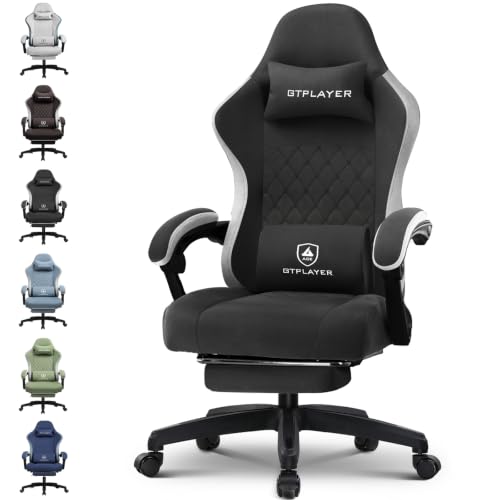


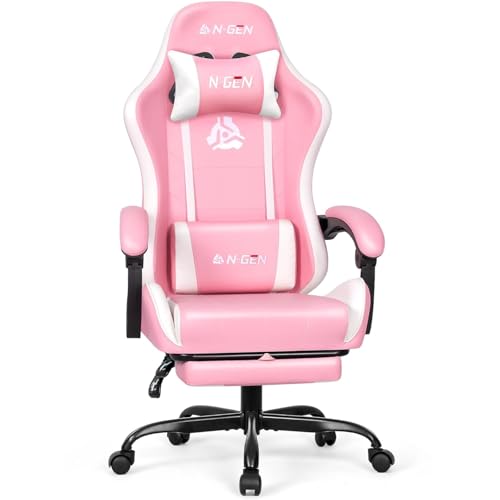
Are Gaming Chairs Good for Your Back? The Short Answer
A gaming chair can be comfortable and supportive if it fits your body and you can adjust it. Many cheaper models rely on a racing style bucket shape and a couple of pillows rather than real adjustment, and those can feel good for an hour and tiring after four. The chairs that help most have an adjustable lumbar support, a seat that fits your thigh length and armrests that move.
No chair is a treatment for back pain. If you have ongoing pain, speak to a doctor or physiotherapist, and treat any chair as one piece of a healthy routine.
What Helps Your Back in a Chair
Lumbar Support
The lower back curves inward, and a chair that supports that curve lets the spine rest in a neutral position. Look for built-in lumbar support that moves up and down or adjusts in depth. A fixed pillow often sits in the wrong place for your body.
Seat Height and Depth
You should be able to place both feet flat on the floor with your knees near a right angle. A seat that is too deep presses behind the knees, and one that is too short leaves your thighs unsupported. Look for a seat depth that suits your height.
Armrests
Adjustable armrests let your shoulders relax. If the arms are too high, your shoulders shrug, and if they are too low, you lean to one side. Four way armrests that move in height, width, depth and angle are the best.
Recline and Tilt
A chair that tilts back with the seat lets your hips open and spreads load. Being able to change position during the day matters more than any single posture.
Where Gaming Chairs Fall Short
Many gaming chairs use thick foam and a faux leather cover that holds heat and can make you sweat. The bolsters on the sides of the seat can press into your thighs, and the tall headrest pillow may push your head forward. A chair with mesh and fewer styling features can be more comfortable and healthier for long sessions.
Big and Tall Options
Some gaming chairs are built for larger bodies, with a wider seat and a higher weight rating. If you are tall or heavy, look for a chair that lists a weight capacity that suits you, and check the seat width.
Gaming Chair or Office Chair?
A well made ergonomic office chair often beats a gaming chair on support and breathability, but costs more. A good gaming chair can be a fair middle choice, with a bold style and decent adjustment at a lower price. Think about how long you sit and how much you can spend.
- Short sessions and a tight budget: a gaming chair with lumbar support.
- Long workdays: an ergonomic office chair with adjustable lumbar and mesh.
- Large frames: a big and tall model with a high weight rating.
For picks, see the best gaming chair guide, or learn how to assemble a gaming chair correctly.
Setting Up Your Chair Properly
Start with the seat height so your feet are flat and your thighs are level. Slide back until your hips touch the backrest, then adjust the lumbar support to fill the gap in your lower back without pushing you forward. Set the armrests so your elbows rest at about a right angle and your shoulders stay relaxed.
Put the monitor at arm's length with the top edge at or just below eye level. If you game with a controller, keep your hands in front of you and avoid leaning forward over a keyboard. Recheck the settings after a week, because you may notice small changes that need adjusting.
Cushions and Pillows
The neck and lumbar pillows that come with many gaming chairs can help if they are adjustable, but they often shift. Use them to fine tune the fit rather than as a fix for a poor shape. If a pillow pushes your head forward, move it lower or remove it.
What to Check Before Buying
- Weight rating and seat width for your body.
- Adjustable lumbar support, not just a pillow.
- Four way armrests.
- Material: faux leather, fabric or mesh, depending on your climate.
- Footrest or recline options if you like to stretch out.
- Warranty length and the return policy.
If you can, sit in the chair before buying, or choose a seller with an easy return policy. A chair that looks great in photos may not fit you.
Habits That Matter as Much as the Chair
Get up and move every half hour. Keep the screen at eye level, keep your feet supported and avoid sitting for hours without a break. A chair helps, but it cannot replace movement. Stretching, walking and a standing break go a long way.
Cleaning and Care
Wipe faux leather with a damp cloth and a mild soap, and avoid harsh cleaners that dry it out. Vacuum fabric and mesh to remove dust. Check the bolts and the gas lift now and then, and tighten anything that has loosened, since a wobbly chair is both annoying and unsafe.
FAQs
Can a gaming chair cause back pain?
A poorly fitting chair can add strain. Choose one you can adjust, and take breaks.
Is lumbar support important?
Yes, a good fit supports the natural curve of the lower back.
Are mesh chairs better?
For breathability, often yes.
Should I see a doctor?
If you have ongoing back pain, ask a doctor or physiotherapist.
Final Verdict
So, are gaming chairs good for your back? They can be, when they have real lumbar support, adjustable arms and a fit that suits you. Compare the table, adjust the chair to your body and check the product page for current pricing.


