Asus ROG Rapture GT-BE98 Pro Review for 2026: WiFi 7 Router
Disclosure: We may earn a commission when you buy through links on this page, at no extra cost to you. As an Amazon Associate I earn from qualifying purchases. Learn more

This asus rog rapture gt be98 pro review covers the quad band WiFi 7 router: 10G and 2.5G ports, game acceleration, mesh and price versus rivals.
Routers rarely get this much attention, and this asus rog rapture gt be98 pro review explains why ASUS's flagship gets it. The GT-BE98 Pro is a quad band WiFi 7 gaming router with two 10 gigabit ports, four 2.5 gigabit ports and a claimed 30 Gbps of combined wireless speed. It costs around $685, so it targets households with fast internet, many devices and wired gaming PCs.
The product table lists the GT-BE98 Pro with other WiFi 7 routers at lower prices, so you can compare what the extra money buys.

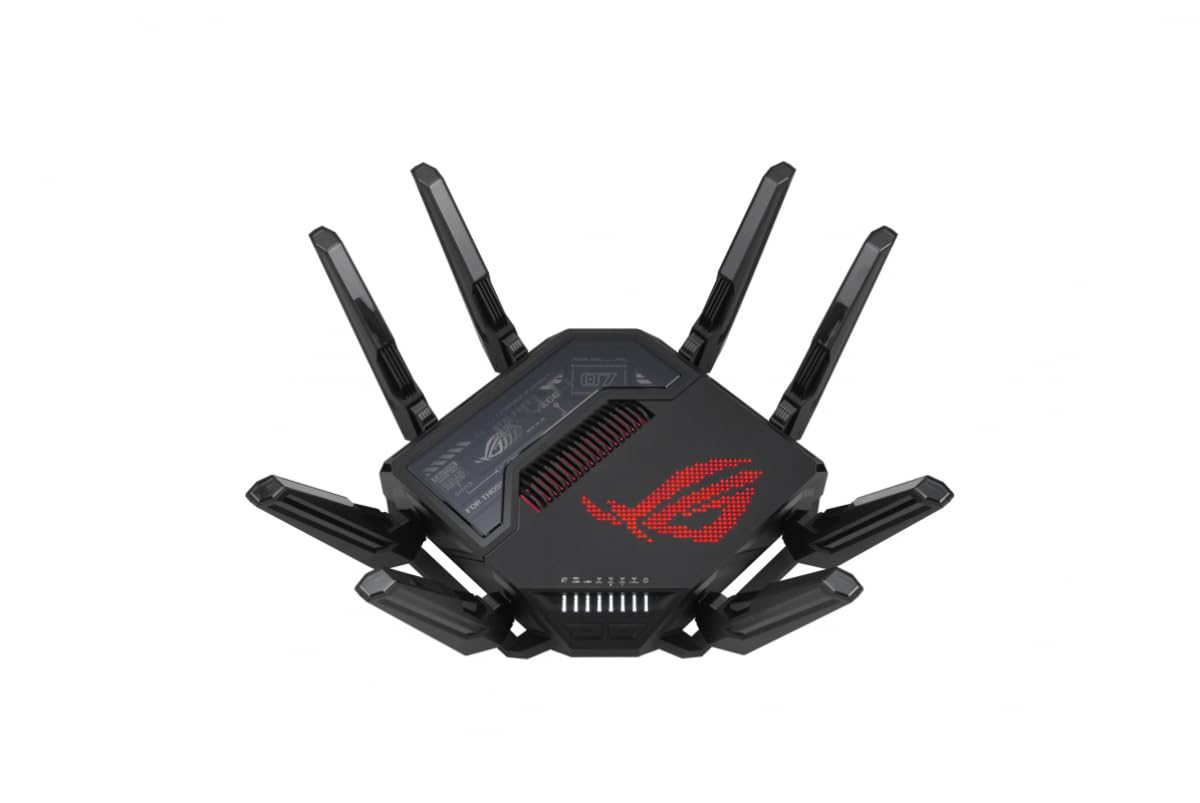



Asus Rog Rapture Gt Be98 Pro Review: Wireless Hardware
The listing describes WiFi 7 with 320 MHz channels on the 6 GHz band and 4096-QAM modulation, which raise capacity and throughput. A quad band design adds a fourth radio compared with tri band routers, giving more room for many devices. Multi Link Operation lets a device use several bands at once for stable connections.
External dual feeding antennas improve signal strength, and the listing quotes coverage up to 3,500 square feet. Real coverage depends on walls and layout, so treat that figure as a best case. For large homes, the router also supports mesh with other ASUS units.
Wired Ports and Network Features
Two 10 gigabit ports and four 2.5 gigabit ports are the headline wired features. They suit fast internet plans, network storage and gaming PCs that use multi gig adapters. Most homes will not use all of them, but they future proof the router.
VPN support, parental controls and Game Boost features are listed. Triple level game acceleration prioritizes gaming traffic from the PC to the game server. It helps most when other devices compete for bandwidth.
Mesh and expansion
If one router does not cover the house, add a second ASUS unit as a mesh node, ideally with a wired backhaul. A wired link between nodes keeps speeds high. Plan cable runs before you decide on placement.
Who Needs a Router This Powerful
Households with gigabit or faster internet, many streaming devices and several gaming PCs benefit most. Creators who move large files to a home server will appreciate the multi gig ports. Everyone else may find a cheaper WiFi 7 router plenty.
Most games need low latency more than raw bandwidth. A good mid range router with a wired connection to your PC gives most of the benefit of a flagship at a fraction of the price.
Setup and Settings
Place the router in an open, central position, away from metal and thick walls. Use the app to run the setup, create separate network names if you want, and update the firmware. Turn on Game Boost only if you play online games, and set priority devices.
Use a wired connection for gaming PCs and consoles. WiFi 7 is fast, but a cable is still the most stable choice. Keep the router firmware updated for security and bug fixes.
What the 30 Gbps Number Means
The 30 Gbps figure adds up the maximum theoretical speeds of all radios, and no single device reaches it. A WiFi 7 phone or laptop will connect at a fraction of that number, usually on one band. The combined figure shows capacity, meaning how many devices the router can serve at once without slowing down.
In practice you will notice the benefit when many people stream, download and play at the same time. A single laptop on a quiet network will feel fast on a cheaper router as well. Capacity matters more than peak speed in a busy home.
Security, Updates and Parental Controls
A router is the gatekeeper of your network, so firmware updates matter. ASUS releases updates regularly, and the router can check for them automatically. Turn on automatic updates, change the default admin password and disable features you do not use.
Parental controls and VPN options are part of the package. They let you schedule internet access for children's devices and connect remotely to your home network. Review each setting once, and keep a note of your configuration so you can restore it after a reset.
Guest and smart home networks
Create a separate guest network for visitors and one for smart home gadgets. That keeps cheap devices away from your computers. It takes a few minutes in the app and improves security noticeably.
Placement and Wired Backhaul
Put the router high and central, with the antennas upright. Avoid cabinets and the area behind a television, which block signal. If you use mesh nodes, connect them to the router with Ethernet whenever possible, since a wired backhaul keeps speeds high.
The multi gig ports are well suited to that job. A 2.5 gigabit link to a second unit leaves plenty of room for traffic between floors. Plan cable runs before you decide where to place the nodes.
Price and Alternatives
At about $685 this router costs several times more than good mid range WiFi 7 models. The non Pro GT-BE98 and the lower tier Strix gaming routers cost differently, and the table shows them with other brands. The flagship is aimed at enthusiasts, not at the typical home.
Compare with the best gaming router guide, the ASUS RT-BE88U review and the ASUS RT-BE86U review to see what cheaper ASUS models offer.
Frequently Asked Questions
Is the GT-BE98 Pro worth it?
For fast internet and heavy use, yes. For average homes, a cheaper WiFi 7 router is enough.
Does it support mesh?
Yes, it works with other ASUS routers in a mesh setup.
What ports does it have?
Two 10 gigabit ports and four 2.5 gigabit ports.
Do I need WiFi 7 devices?
To get WiFi 7 speeds, yes. Older devices still connect at their own speeds.
How large an area does it cover?
The listing quotes up to 3,500 square feet, depending on the home layout.
Final Verdict
This asus rog rapture gt be98 pro review concludes that the router is a powerful, feature rich flagship for demanding homes. Buy it if you need multi gig ports, quad band capacity and mesh. Otherwise compare cheaper WiFi 7 routers in the product table and spend the savings on devices that benefit.
Prices and availability can change, so check the product page before ordering.