
ASUS RT-BE88U Review for 2026: Dual 10G WiFi 7 Router for Power Users
Disclosure: We may earn a commission when you buy through links on this page, at no extra cost to you. As an Amazon Associate I earn from qualifying purchases. Learn more

This asus rt be88u review looks at the 7200 Mbps WiFi 7 radio, SFP+ and 10G ports, eight extra LAN ports, security tools and who should pick it over cheaper routers.
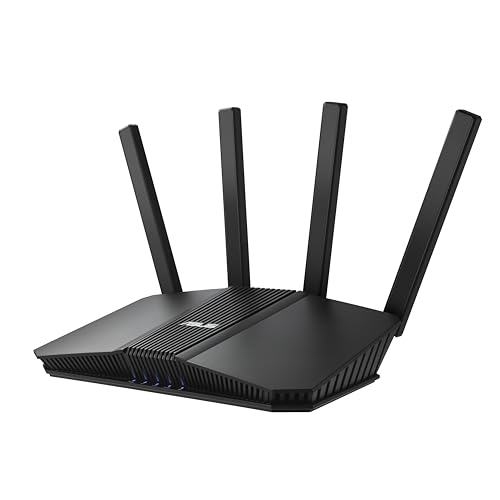
The ASUS RT-BE88U is built for people whose home network is more than a few phones on WiFi: a NAS, a home lab, a fiber connection or a stack of wired gaming and streaming devices. This asus rt be88u review explains what the router adds over cheaper WiFi 7 models, and where its limits are.
The key to understanding it is the wired side. Its wireless radios are strong but not unique, while its port selection is what makes it stand out in the ASUS lineup below the ROG Rapture routers.



WiFi 7 Performance
The wireless side is a dual-band WiFi 7 design rated by ASUS at up to 7200 Mbps, with Multi-Link Operation and 4096-QAM support. It does not include the extra 6 GHz band that tri-band routers offer, so the speed comes from the 2.4 GHz and 5 GHz bands working together. Compatible WiFi 7 devices can take advantage of both bands at once.
In daily use that means strong, stable WiFi for phones and laptops and enough capacity for many devices. If you want the 6 GHz band for a congested neighborhood, look at tri-band models instead.
Ports That Set It Apart
The listing describes two 10 Gigabit ports: one 10G SFP+ port and one standard 10G WAN or LAN port, with ASUS quoting wired capacity of up to 34 Gbps. There are also four 2.5G ports and four 1G ports, which gives you ten wired connections in total. That is plenty for a desk, a NAS, a media server and a couple of consoles without a separate switch.
The SFP+ port accepts fiber modules or direct attach cables, which suits home lab users and fiber customers. The second 10G port can serve as WAN or LAN depending on your setup.
Processor, Memory and Features
A quad-core 2.6GHz 64-bit processor handles routing, VPN and security scanning without slowing down. ASUS lists AI WAN detection, versatile WAN options and a USB port for 4G LTE and 5G tethering, which gives you a backup internet source when the main line fails.
The router supports up to five SSIDs with Guest Network Pro, instant VPN connections and site-to-site VPN, which is a feature normally seen on business equipment. It also includes AiProtection Pro, powered by Trend Micro, with one-tap security scanning.
Mesh and Whole-Home Coverage
AiMesh lets you add other compatible ASUS routers as nodes. Because this model has no dedicated backhaul band, the best approach is a wired link between the main router and each node using the 2.5G or 10G ports. With wired backhaul the mesh behaves like a professionally installed network.
Who Should Buy the RT-BE88U
Choose it if you have a multi-gig internet plan, a NAS or a lot of wired devices, or if you need site-to-site VPN. It also makes sense for people who want to keep a router for many years. For a normal apartment with a standard plan, the smaller RT-BE86U or a cheaper router covers the need. The RT-BE88U vs RT-BE86U guide compares the two in detail.
Home Lab and Small Office Uses
The SFP+ port and the extra LAN connections make the BE88U a flexible hub for a small office. You can connect a NAS over 10G, link a switch over SFP+ and still have 2.5G ports left for workstations and access points. Guest Network Pro separates visitors and smart devices from your main network, and the VPN options let you reach home files from outside.
If you run security cameras, a network storage box or a media server, the strong CPU and wired ports help keep video and backups from clogging WiFi.
Setup and Placement Notes
Place the router in the middle of the home and off the floor. Update the firmware right after setup, use the app for a guided start and then explore the web interface for advanced settings such as VPN and QoS. Use Cat 6A or better cabling to the 10G ports so you can reach their full speed, and keep fiber modules from reputable makers.
Compared With Other ASUS Options
The cheaper RT-BE82U and RT-BE58U offer WiFi 7 at lower speeds and fewer ports, and the tri-band RT-BE90U adds a 6 GHz band with a 2.5G WAN. At the very top the ROG Rapture GT-BE98 adds quad-band radios for large homes. The BE88U sits in the sweet spot for people who value ports over extra radio bands.
Cost and Longevity
A router in this price range is an investment you can keep through several upgrades of phones and laptops. WiFi 7 support, multi-gig ports and a strong processor leave room to grow,, and regular firmware updates keep it secure. Weigh the price against what you will really use, and skip the ports and features you will not touch.
Things to Check Before You Buy
Confirm that your modem or fiber terminal can deliver more than gigabit speed, because the router cannot exceed what the provider supplies. Check how many wired devices you actually have, and whether a cheaper router with a small switch would do the same job. Look at the seller and warranty, and keep the box for the first weeks. Finally, think about where the router will sit, since a model with ten wired ports and heavy cabling is easiest to live with in a closet or a media cabinet with good airflow.
Frequently Asked Questions
Does the RT-BE88U have two 10G ports?
Yes. It has one 10G SFP+ port and one 10G WAN or LAN port.
Is it tri-band?
No. It is a dual-band WiFi 7 router rated at up to 7200 Mbps.
Does it support VPN?
Yes. ASUS lists VPN support, instant VPN connections and site-to-site VPN.
Does it need a subscription for security?
No. It includes subscription-free network security and parental controls.
Final Verdict
The RT-BE88U is a strong choice for power users who value wired speed and features. This asus rt be88u review finds it excellent for fiber homes and home labs. Check the seller and warranty before you order.


