
ASUS ROG vs MSI: Which Gaming Brand Is Better for You?
Disclosure: We may earn a commission when you buy through links on this page, at no extra cost to you. As an Amazon Associate I earn from qualifying purchases. Learn more

This asus rog vs msi guide compares the two gaming brands across laptops, motherboards, monitors and graphics cards, covering price, design, cooling and support.
ASUS ROG and MSI compete in almost every part of PC gaming: laptops, motherboards, graphics cards and monitors. Shoppers search asus rog vs msi because they want to know which badge deserves their money. The honest answer is that it depends on the category, the price and the model, and this guide breaks it down.
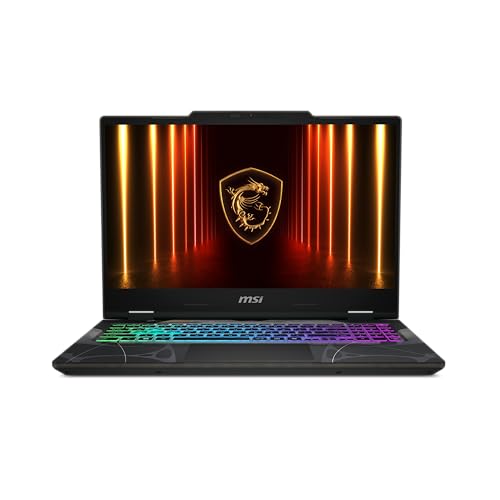
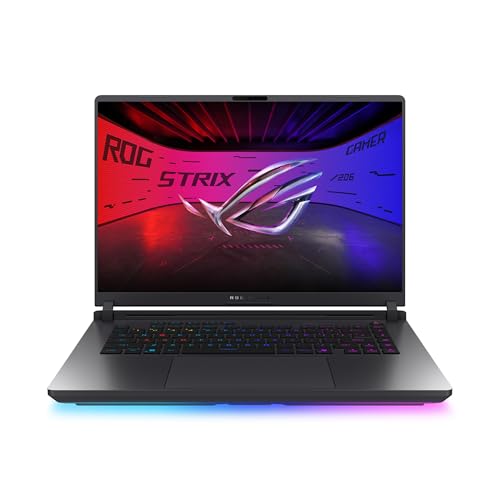
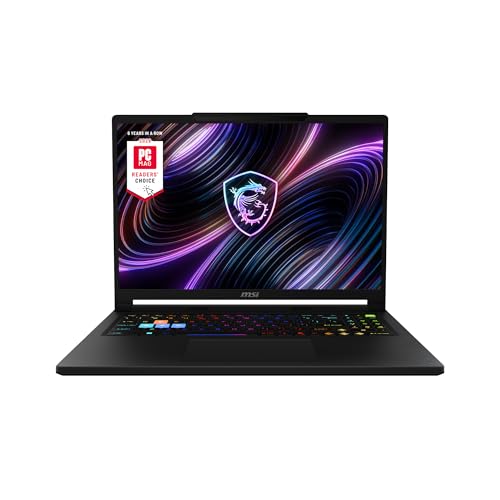
The product table shows gaming laptops from both brands, since laptops are the most common reason people make this comparison. The sections below widen the view to other parts of a gaming setup.






What Each Brand Stands For
ROG is ASUS's premium gaming sub-brand, known for bold design, excellent screens and a wide ecosystem of matching parts and peripherals. MSI is a gaming specialist that focuses on aggressive pricing, strong mid-range value and a long history in graphics cards and motherboards. Neither is a clear overall winner, and each has areas where it leads.
ROG tends to charge a premium for polish. MSI tends to give more hardware for the money, particularly in entry and mid-range models.
Gaming Laptops
ROG's Strix lineup offers 16-inch laptops with 165Hz and 240Hz panels, from an RTX 4060 or RTX 5050 up to an RTX 5080. MSI's lineup includes the Thin and Cyborg models for lower budgets, the Katana for mid-range play and the Raider for high performance. In the table you can see ROG Strix G16 versions next to MSI Thin, Katana, Cyborg and Raider models.
If you want a larger display and better cooling headroom, ROG often feels more refined. If you want the lowest entry price with a decent graphics card, MSI is hard to beat. For a closer look, read our ROG vs MSI gaming laptop guide.
Motherboards
ROG motherboards cover the high end with Crosshair, Maximus and Strix models, and the TUF Gaming line serves mid-range builders. MSI offers MEG, MPG, MAG and PRO lines in descending order. Both brands support the current AMD and Intel platforms, and the differences are in power delivery, connectivity and BIOS design rather than raw gaming speed. The ASUS vs MSI motherboard guide goes deeper.
Graphics Cards
ASUS offers ROG Strix and ROG Astral at the top, TUF Gaming in the middle and Prime or Dual for value. MSI offers Suprim at the top, Gaming and Ventus lower down. Both use the same NVIDIA and AMD chips, so the real differences are cooler size, noise, clock speeds and price. See the ASUS vs MSI graphics card comparison for specifics.
Monitors
ROG monitors are known for high refresh rates and OLED options, while MSI offers a strong range of QD-OLED and fast IPS models at competitive prices. TUF Gaming sits in ASUS's value tier. The ASUS vs MSI gaming monitor guide compares the two in detail.
Software, Support and Ecosystem
ROG laptops and boards use Armoury Crate and Aura Sync lighting, while MSI uses MSI Center and Mystic Light. Both are capable, and both can be annoying when they run in the background. Warranty and service reputation vary by region and by seller, so read recent feedback and confirm what the listing includes.
Price and Value
MSI usually wins at entry and mid-range prices, where a Cyborg, Thin or Katana laptop costs less than a comparable ROG. ROG tends to win on screen quality, design and premium features. For top-end hardware the two are close in price, and the best choice depends on the specific model and the current deals.
- Choose MSI when price and value matter most.
- Choose ROG when screen, design and polish matter most.
- Always compare the exact model, not just the brand.
Building a Matching Setup
Some players like to match brands across a build, because lighting software and color themes are easier to manage within one ecosystem. A ROG motherboard, graphics card and monitor sync through Aura, and an MSI set does the same through Mystic Light. This is a cosmetic benefit, not a performance one, so do not pay a large premium for it. A mixed build performs the same as a matched one.
How to Decide in Three Steps
First, set a budget and list the parts you need, since the brand choice changes by category. Second, compare the exact model in each brand at your price, looking at cooling, noise, screen quality and warranty. Third, read recent buyer feedback for problems such as coil whine, fan noise or software bugs, which can matter more than a spec sheet.
Following these steps keeps you from paying for a name. Many buyers end up choosing different brands for different parts, which is perfectly sensible.
Long-Term Ownership
Both brands release firmware and driver updates for their laptops and boards, and both offer service networks in major regions. A gaming laptop is the product where after-sales matters most, because repairs are harder than swapping a desktop part. If you plan to keep a laptop for several years, buy from a seller that clearly states the warranty and register the device when it arrives.
Which Brand for Which Buyer
Students and first-time gamers on a tight budget are often happiest with MSI's Thin or Cyborg laptops, which give an entry graphics card at a low price. Players who want a standout screen, a refined look and a wide choice of matching parts often prefer ROG. Streamers and creators who need strong cooling and a large display should look at the higher ROG Strix and MSI Raider or Crosshair models and compare the screens carefully. Whatever the brand, the graphics card tier and the cooling design decide how a gaming laptop feels after a year of use.
Frequently Asked Questions
Is ROG better than MSI?
Not always. ROG leads on design and screens, while MSI leads on price in the entry and mid-range tiers.
Which brand has better laptops?
It depends on your budget. MSI offers more graphics power per dollar at the low end, and ROG offers more premium models.
Are the graphics cards different?
Both use the same NVIDIA and AMD chips. Cooler design, noise and price are what differ.
Can I mix ROG and MSI parts?
Yes. Parts from different brands work together, although lighting software may need separate installs.
Final Verdict
For value pick MSI, and for polish pick ROG. When deciding asus rog vs msi, compare exact models and the seller's warranty before you order.


