
ASUS ROG Zephyrus G14 vs ASUS ROG Strix G16: Which Gaming Laptop Is Better?
Disclosure: We may earn a commission when you buy through links on this page, at no extra cost to you. As an Amazon Associate I earn from qualifying purchases. Learn more
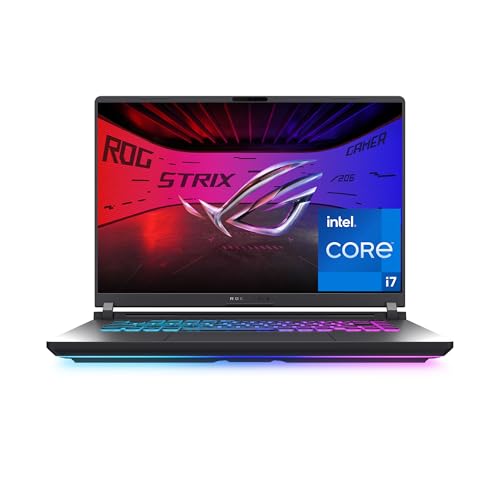
This asus rog zephyrus g14 vs asus rog strix g16 guide compares the compact OLED G14 with the larger, better-cooled Strix G16 on screen, power, weight and cost.
ROG sells two very different ideas of a gaming laptop. The Zephyrus G14 is small, stylish and built around an OLED screen, while the Strix G16 is bigger, louder and focused on raw performance for the money. This asus rog zephyrus g14 vs asus rog strix g16 comparison explains the differences so you can pick the right one.
The short answer: choose the G14 if you carry your laptop every day and want a premium screen. Choose the Strix G16 if the laptop mostly stays on a desk and you want more cooling and a larger display for the price. The product table shows configurations of both.





Size, Weight and Design
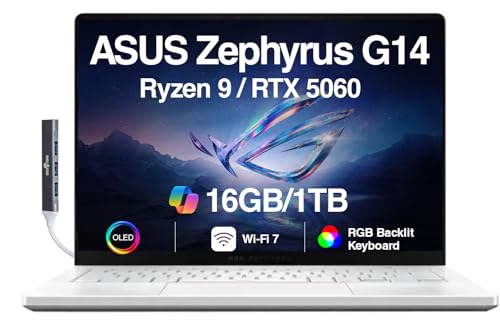
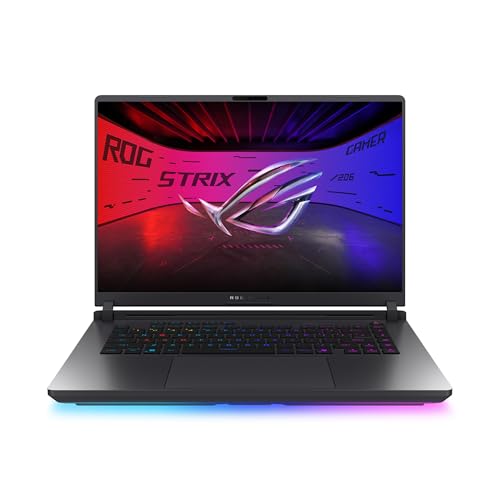
The G14 uses a 14-inch CNC aluminum body that fits easily in a backpack and looks understated in a meeting. The Strix G16 has a 16-inch body with a 360 degree RGB light bar around the chassis, which you can turn off with Stealth Mode. It is bigger and heavier, and it looks more like a gaming laptop.
If you travel, study on campus or share a desk with others, the smaller body is a real advantage. If your laptop lives on one table, the extra size costs you almost nothing and brings a bigger screen.
Display Quality
The G14 listings describe a 14-inch 3K OLED panel at 120Hz with a 0.2ms response time, which delivers deep blacks and vivid colors. The Strix G16 offers two display tiers. Entry configurations use a 16-inch FHD+ panel at 165Hz, while higher configurations use a 2.5K ROG Nebula panel at 240Hz with a 3ms response time.
OLED is the more striking picture. The Strix G16 counters with higher peak refresh rates and a larger canvas, which many competitive players prefer. Neither is wrong, so decide whether color or speed matters more.
Processors and Graphics
G14 configurations use AMD chips, with a Ryzen AI 9 HX 370 on higher models and a Ryzen 9 270 on the RTX 5060 version. Strix G16 configurations use Intel chips, from a Core i7 14650HX to a Core Ultra 9 275HX or 290HX Plus. Graphics span RTX 5050 through RTX 5080 across the two lines.
The key point is power. Both can pair with a similar graphics name, but the Strix G16 has more room and a bigger power budget, so it usually holds higher frame rates when the load is heavy.
Cooling and Noise
The Strix G16 lists an end-to-end vapor chamber, a tri-fan design and Conductonaut Extreme liquid metal. Those are serious cooling features, and the larger body gives them space to work. The G14 is cooled in a much smaller chassis, so its fans run harder under load.
In quiet rooms, both are audible while gaming. Under light use, both can stay calm.
Battery Life
The G14's efficient processor and OLED panel help it last longer away from the charger than the Strix G16. All gaming laptops give up battery quickly during games, so plan to be plugged in for serious play. For browsing, video and office work, the G14 comes out ahead.
Price and Value
The Strix G16 usually delivers more graphics power per dollar, particularly in the RTX 5060 and 5070 Ti ranges. The G14 charges a premium for its size, screen and build. If you want a premium feel, the G14 justifies the price. If your budget is tight, the Strix G16 is the stronger value.
- Choose the G14 for portability and a 3K OLED display.
- Choose the Strix G16 for cooling, a larger screen and value.
- Match the graphics card to your budget before comparing other details.
Who Should Buy Which
Students, creators and travelers will like the G14. Desk-based players and streamers will like the Strix G16. For single-model reviews, see our Zephyrus G14 review and Strix G16 review, or browse the best gaming laptop guide.
Memory and Upgrades
The G14 listings use LPDDR5X memory, a type that is normally soldered to the board, so the amount you buy is the amount you keep. The Strix G16 listings describe DDR5 memory, and a conventional memory type usually gives more room to change later, although you should confirm access on the exact model and keep the warranty in mind. If you like to upgrade as needs change, the Strix is the more flexible starting point.
Storage works the same way on both: a fast SSD is fitted, and sizes run from 512GB to 2TB across listings. Buy at least 1TB unless you plan to add an external drive.
How They Feel in Daily Use
A 14-inch laptop is easy to use on a train table or a couch, and its screen has fine detail from the high pixel count. A 16-inch laptop gives you more room for windows and a roomier keyboard deck. Think about the places you will really use the laptop, and be honest about whether you would carry a larger machine or leave it at home.
People who choose the G14 often say they take it everywhere, and people who choose the Strix often keep it on one desk. Match the machine to the life you actually lead rather than the one you imagine.
Sample Buyer Profiles
A college student who games in the evening and carries a laptop to lectures should look at the G14 with an RTX 5060. A streamer who wants strong frame rates and room for capture software should look at a Strix G16 with an RTX 5070 Ti. A creator who edits video on the road and wants a color-rich screen may prefer the G14 with a higher graphics tier, while a budget-minded player who wants the most graphics for the money will favor the Strix G16 with an RTX 5060 or RTX 5050.
Frequently Asked Questions
Is the G14 faster than the Strix G16?
Usually not. The Strix G16 has a larger body and more cooling, so it tends to hold higher performance under load.
Which has the better screen?
The G14 has a 3K OLED, while the Strix G16 offers 165Hz and 240Hz panels. OLED looks better, and the Strix gives higher refresh rates.
Which is better for travel?
The G14, thanks to its size and better battery life.
Which is better value?
The Strix G16, which delivers more graphics performance for the money.
Final Verdict
If you carry your laptop, pick the G14, and if it stays on a desk, pick the Strix G16. This asus rog zephyrus g14 vs asus rog strix g16 comparison should make the choice easier. Check the seller and warranty before you order.


