
ASUS Zenbook Duo Review for 2026: Who It Suits and What to Check
Disclosure: We may earn a commission when you buy through links on this page, at no extra cost to you. As an Amazon Associate I earn from qualifying purchases. Learn more

ASUS Zenbook Duo Review: a laptop with two OLED screens, how its modes work and who really benefits from the second display.
This asus zenbook duo review is for people who read about a laptop with two full-size screens and wonder whether it is a clever tool or an expensive gimmick. The honest answer is that it is a very good tool for a specific kind of work, and the wrong laptop for everyone else.
Below you will find what the Duo is, how its modes work, what you give up, and who it suits. The product table lists the current Zenbook Duo configurations, which vary widely in price and processor.




What the ASUS Zenbook Duo Is
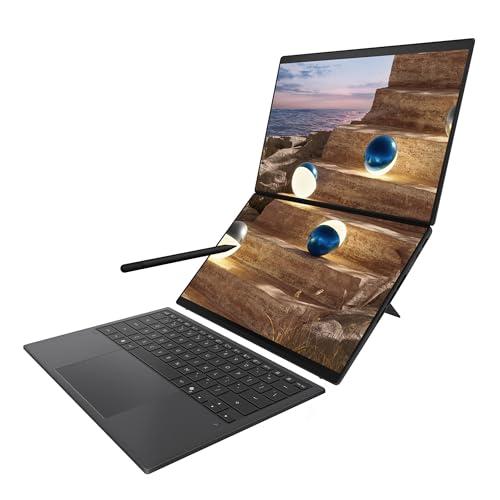
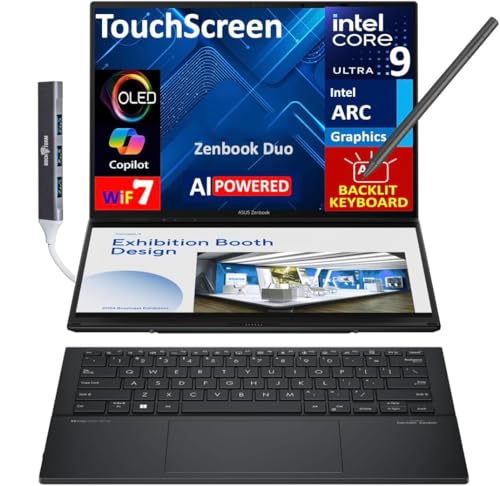
The Zenbook Duo has two 14 inch OLED touchscreens, one in the lid and one on the base where a keyboard would normally sit. A detachable Bluetooth keyboard clips onto the lower screen for laptop use and comes off for dual screen use. Listings describe 3K or WQXGA+ OLED panels at 120Hz, Intel Core Ultra processors, up to 32GB of memory and large SSDs.
Newer versions are listed with a faster 144Hz refresh and the latest Intel Core Ultra chips, while older models, such as the UX482 and UX481 generations, use smaller panels and older processors at much lower prices.
Modes: Laptop, Dual Screen, Desktop and Tablet
In laptop mode, the keyboard attaches magnetically to the bottom screen, so it looks and feels like a normal laptop with a touchpad and an extra strip of screen above the keyboard. In dual screen mode, the keyboard comes off and both screens stack vertically for a large workspace, with a built-in stand holding the laptop upright.
Desktop mode places the stand and the keyboard in front of the screens so the Duo behaves like a compact two-monitor setup. Tablet mode lets you hold the two screens like an open notebook, which is handy for reading, drawing and note taking with a stylus.
Who Gets the Most Out of Two Screens
People who keep a reference open while they work gain the most. Programmers can keep code on top and documentation or a terminal below. Traders can hold charts above and an order screen below. Writers and researchers can read a source on one screen and type notes on the other.
Editors and designers also benefit, because tool palettes and timelines can live on the second screen while the canvas fills the first. If your work lives in one window at a time, the second screen will feel like unused weight.
Display Quality
Both screens are OLED, so contrast and colors look excellent, and touch with a stylus is smooth at 120Hz. The panels are glossy, which means reflections in bright rooms, and OLED care habits apply: use dark themes where possible and let the screens sleep when idle.
Having two bright OLED panels also affects battery life. Expect the Duo to last a shorter time than a single-screen ultrabook, especially in dual screen mode, so plan to carry the charger.
Performance and Cooling
Current listings pair the Duo with Intel Core Ultra 9 chips, 32GB of memory and Intel Arc graphics. That is plenty for multitasking, creative apps and light gaming, and the chassis is large enough to keep the processor reasonably cool.
It is not a gaming laptop, so treat the graphics as capable for editing and casual games rather than for high settings in demanding titles.
Trade-offs to Accept
- Weight and size: heavier than a single-screen 14 inch ultrabook, and the kickstand adds bulk.
- Battery life: two OLED panels use more power.
- Typing on a lap: the detachable keyboard works best on a flat surface.
- Price: configurations with the best chips cost far more than normal laptops.
Buying Tips
Compare the full title carefully. The same Duo name appears on several generations, so confirm the processor model, the memory size and the display refresh rate. Prices span from older refurbished style listings to configurations at the top of the range, and the best value is often one generation back with 32GB of memory.
If you only need extra screen space occasionally, a portable monitor with your regular laptop is a cheaper way to get there. See our asus zenbook duo alternative guide and the best 2 in 1 laptop page for other options.
Setting Up a Good Workflow
Most of the value of a two-screen laptop comes from window management, so spend ten minutes on layout. Pin your main app to the top screen and your reference, chat or terminal to the bottom screen, and learn the snap shortcuts so that windows land in the same place every time. Keep the keyboard attached when you are on a train or a couch, and detach it only when you have a flat surface.
Use a stylus for note taking in tablet mode, and keep the brightness reasonable on both panels to stretch the battery. A slim sleeve and a compact charger round out the kit, since the Duo is bulkier than a regular ultrabook.
It also pays to check the warranty and return window before you commit, because a laptop with two screens and a detachable keyboard has more parts that can disappoint in person than a plain clamshell.
Related Reading
For convertibles that cost less, see the lenovo yoga 7i 2 in 1 review and the hp spectre x360 14 review.
FAQ
Is the Zenbook Duo good for travel?
It travels well for its capability, but it is heavier and more fiddly than a standard ultrabook. It makes the most sense when you will really use the second screen on the road.
Can I use the Duo as a normal laptop?
Yes. Attach the keyboard to the lower screen and it behaves like a standard laptop, with the extra screen area available whenever you want it.
Does the Duo have a touchscreen?
Both screens support touch and stylus input, so you can write, draw and drag windows between screens by hand.
Which Duo version should I buy?
Choose the newest generation your budget allows, with at least 32GB of memory if you plan to keep it for several years. Older generations are cheaper and still good for office work.
Final Verdict
The Duo is the best answer if you truly use two screens for work. This asus zenbook duo review suggests choosing it when you can use the second screen daily, and picking a standard ultrabook when you cannot. Use the product table to compare current Duo configurations and pick the generation and memory size that suit your budget.
Prices and availability can change, so check the product page before ordering.


