ASUS
ASUS Zenbook Duo Laptop (2026), Dual 14” OLED 3K 144Hz Touch Display, Intel Core Ultra 9 Processor 386H, Intel Graphics, 32GB RAM, 1TB SSD, Sleeve and Stylus Included, WiFi 7, Windows 11, Moher Gray
Disclosure: We may earn a commission when you buy through links on this page, at no extra cost to you. As an Amazon Associate I earn from qualifying purchases. Learn more
Highlights
- High-Performance DUO Take your productivity further in Windows 11 with the 16-core Intel Core Ultra 9 Processor 386H, delivering responsive multitasking and enhanced graphics performance. Paired with 32 GB RAM and 1 TB storage, demanding workloads stay smooth and efficient.
- AI That Works Supercharge your productivity with 50 TOPS on Copilot, giving you instant file retrieval, quick summaries, faster searches, and more without the waits that break your flow.
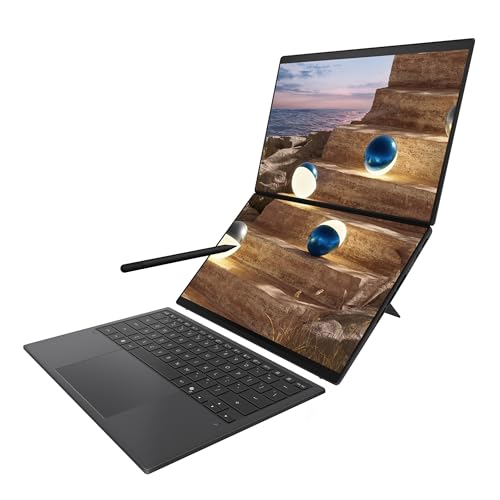
- Transforms in Seconds Switch modes fast with a magnetic keyboard and integrated kickstand. Move from dual-screen productivity to laptop or sharing mode in just a few seconds, keeping your workflow fluid wherever you are.
- Immerse Your Senses Dual 3K 144 Hz ASUS Lumina OLED touchscreens with 100% DCI-P3 color deliver vivid clarity and up to 1000 nits HDR brightness, while the anti reflection coating and E Reading mode help reduce eye strain during extended use. Six speakers with Dolby Atmos support add rich, spacious sound.
- All-Day Power A 99Wh battery setup keeps you moving through busy days, and fast-charge technology brings you to 60% in just 49 minutes.
- Easy to Carry Everything travels as one sleek device thanks to its unified design, making it easy to slip into your bag and take between home, office, class, or café sessions.
- Built to Last From the full Ceraluminum chassis, hinge, and kickstand to the screens, every part is engineered to set a new gold standard for durability in portable computing.
- Ports That Keep You Connected 2× Thunderbolt 4, 1× USB 3.2 Gen 2, and 1× HDMI 2.1 FRL, plus Wi‑Fi 7 and Bluetooth 5.4 keep you connected and productive without extra adapters.
- Included in the Bundle Comes with a protective sleeve and ASUS Pen 3.0 with wireless charging and MPP 2.6 support for precise control and on‑the‑go productivity.
Why You'll Love It
- Dual OLED touch displays support flexible work modes for multitasking and creative tasks
- Intel Core Ultra 9 processor and 32GB RAM handle demanding workflows smoothly
- 1TB storage provides space for files, projects, and everyday computing needs
- Included stylus and magnetic keyboard expand input options for different tasks
- WiFi 7 and Thunderbolt 4 ports provide modern connection choices
Pros
- +Dual 3K OLED touch displays
- +Strong Core Ultra 9 processor
- +Included stylus and sleeve
- +Flexible dual screen modes
- +Large 99Wh battery setup
Cons
- -Dual screen setup may require adjustment
- -Higher performance design may not suit basic users
Detailed Review
ASUS Zenbook Duo OLED laptop is designed for buyers who want a flexible workspace with dual displays and strong multitasking capability. Its two screen design suits professionals, creators, students, and anyone who wants more room for organizing apps, documents, and workflows without switching between separate windows.
The standout feature is the pair of 14 inch 3K 144Hz ASUS Lumina OLED touchscreens. They provide 100% DCI-P3 color coverage, up to 1000 nits HDR brightness, anti reflection coating, and an E Reading mode. For buyers who work with visual content or prefer touch interaction, the combination of two touch displays creates multiple ways to arrange tasks. Six speakers with Dolby Atmos support add an audio feature for entertainment and productivity.
The performance setup is built around the Intel Core Ultra 9 Processor 386H, Intel Graphics, 32GB RAM, and 1TB SSD. This combination is aimed at people who need responsive multitasking and room for demanding workloads. The laptop also includes AI features with 50 TOPS on Copilot for tasks such as file retrieval, summaries, and searches. A 99Wh battery setup with fast charge technology supports longer work sessions, while the charging feature can bring the battery to 60% in 49 minutes.
The design focuses on changing between different working styles. The magnetic keyboard and integrated kickstand allow the device to move between dual screen productivity, laptop mode, and sharing mode. The full Ceraluminum chassis, hinge, and kickstand are designed as part of the overall build. Connectivity includes two Thunderbolt 4 ports, one USB 3.2 Gen 2 port, HDMI 2.1 FRL, WiFi 7, and Bluetooth 5.4. The package also includes a protective sleeve and ASUS Pen 3.0 with wireless charging and MPP 2.6 support.
The main trade-off is that the dual display approach is a specific choice for people who value extra screen space and flexible layouts. Buyers who only need straightforward laptop use may not need a design built around multiple modes and touch displays.
Verdict: ASUS Zenbook Duo is a strong fit for shoppers who want a powerful dual screen laptop with touch displays, flexible modes, and included accessories. Buyers looking for a simpler everyday computer may prefer a more traditional laptop design.
Specifications
- Processor: Intel Core Ultra 9 Processor 386H
- RAM: 32 GB
- Storage: 1 TB SSD
- Displays: Dual 14 inch 3K 144Hz ASUS Lumina OLED touchscreens
- Battery: 99Wh battery setup
- Wireless: WiFi 7 and Bluetooth 5.4
- Ports: 2x Thunderbolt 4, 1x USB 3.2 Gen 2, 1x HDMI 2.1 FRL
Who Should Buy It
A great fit if you:
- Need extra screen space for organizing multiple tasks, documents, or creative workflows during the day.
- Prefer a laptop with touch controls and flexible modes instead of a standard single screen setup.
- Want strong hardware for demanding workloads with substantial memory and storage included.
Consider something else if you:
- Prefer a simpler traditional laptop for basic tasks and would rather avoid a dual screen design.
- Need a different type of computer focused on a specific alternative format or feature set.
Before You Buy
Confirm on the listing:
- Check whether the dual 14 inch display format matches your preferred workspace and carrying needs.
- Confirm that your existing accessories and devices work with the listed ports and wireless connections.
- Check the included items on the listing if you specifically need the sleeve or ASUS Pen 3.0.
- Review your software needs to ensure the listed processor, memory, and storage fit your workflow.
How to compare your options: Compare laptops by the features that matter most for your tasks, including display setup, processing hardware, storage, input options, and connectivity. This model stands out for its dual OLED touchscreens, Core Ultra 9 processor, 32GB RAM, 1TB SSD, included stylus, and multiple connection options. Consider whether those features match how you plan to work before choosing.
Getting the Most From It
Set up the laptop around the way you work most often. If you use the dual display design, arrange your apps and tasks to take advantage of the available screen space.
Use the included magnetic keyboard and ASUS Pen 3.0 based on your preferred workflow. Keep the sleeve available when moving the device between locations.
Use the available connection options when connecting compatible devices. If the laptop came with setup or care instructions, follow those recommendations for maintaining the device.
Explore the available modes, touch features, and AI tools so the laptop matches your daily tasks instead of using only one configuration.
FAQ
What comes with the ASUS Zenbook Duo?
It comes with a protective sleeve and ASUS Pen 3.0. The pen supports wireless charging and MPP 2.6 for precise control.
Does the ASUS Zenbook Duo have touch displays?
Yes, it has dual 14 inch 3K 144Hz ASUS Lumina OLED touchscreens. The displays include 100% DCI-P3 color and anti reflection coating.
Can the ASUS Zenbook Duo switch between different modes?
Yes, it can switch between dual screen productivity, laptop mode, and sharing mode using the magnetic keyboard and integrated kickstand.
Who is this laptop best suited for?
It suits buyers who want dual screen flexibility, strong multitasking hardware, and touch input options. The listing does not state every possible software compatibility detail, so check your specific programs before buying.
What connectivity options does it have?
It includes Thunderbolt 4, USB 3.2 Gen 2, HDMI 2.1 FRL, WiFi 7, and Bluetooth 5.4.
Product Details
| Brand | ASUS |
| ASIN | B0GJHNW3VK |