
AVerMedia Live Gamer Ultra 2.1 Review for 2026: Who It Suits and What to Check
Disclosure: We may earn a commission when you buy through links on this page, at no extra cost to you. As an Amazon Associate I earn from qualifying purchases. Learn more
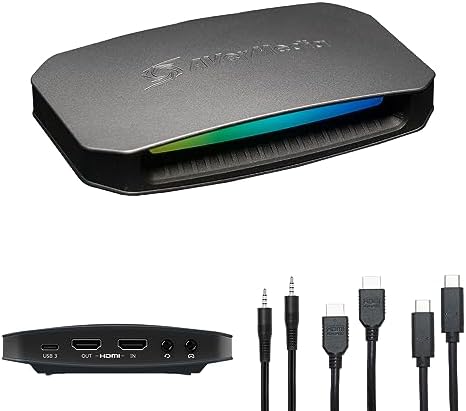
AVerMedia Live Gamer Ultra 2.1 Review: a USB capture card with 4K pass-through and 1080p recording, with HDR and graphics card notes.
This avermedia live gamer ultra 2.1 review looks at the Ultra line of capture cards, which AVerMedia positions as its mainstream high-quality USB option for 4K pass-through and 1080p recording. It is a good fit for players who want sharp gameplay on a 4K screen while recording or streaming at the resolution most platforms accept.
Below you will find how the Ultra line works, what the specifications mean, how it compares with internal cards and with Elgato alternatives, and who should buy it. The product table lists AVerMedia and Elgato cards that are in stock.




What the Live Gamer Ultra Line Offers
The Live Gamer Ultra GC553 listing describes 4Kp60 HDR pass-through, recording up to 4Kp30, 1440p60, 1080p120 and 1080p60 HDR, and ultra low latency so you can play uncompressed video straight on your monitor with almost no delay. It connects over USB 3 and works with Xbox Series X and S, PlayStation 5 and Switch.
The 2.1 in the name suggests a newer generation of the line. Because AVerMedia names and revises models often, check the exact listing for its pass-through and recording specifications.
Pass-Through vs Capture Resolution
This distinction decides how the card feels. Pass-through is what you see on your monitor, and it can be a higher resolution than the recording. The Ultra passes 4K at 60 frames per second to your display while recording a lower-resolution copy, so the game looks great while you play.
For streaming, 1080p at 60 frames per second is the standard, so the card's 4K30 capture is more than enough for most creators.
HDR and the NVIDIA Note
The GC553 listing includes a note that, for 4K, HDR or high frame rate recording, only NVIDIA graphics cards are supported. That is a useful reminder to check compatibility with your PC's graphics card before buying, especially if you have an AMD or an Intel integrated GPU.
Connection and Latency
A USB 3 connection to a computer is needed for the highest quality modes, so use a blue USB 3 port on the back of a desktop and avoid hubs. Pass-through latency is the delay between your controller and the screen, and a card with a zero-latency pass-through lets you play comfortably on the display directly.
Internal Alternatives
If you have a desktop PC, an internal card can offer lower latency and more headroom. The AVerMedia GC573 Live Gamer 4K and the Live Gamer Duo are PCIe cards, as are the Elgato 4K Pro and the Blackmagic DeckLink Mini Recorder 4K. They require a free slot and a case that fits the card, and they do not travel well.
External Alternatives
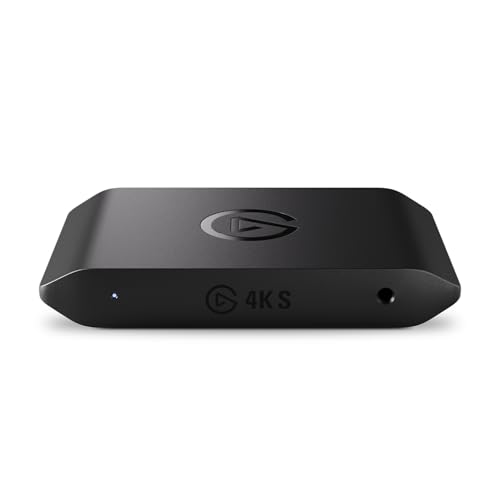
- Elgato 4K S: a compact USB card for PS5, Xbox and Switch.
- Elgato 4K X: HDMI 2.1 with high frame rate pass-through.
- AVerMedia GC571: an affordable 4K pass-through card.
- Elgato HD60 S+: a popular 1080p card with 4K pass-through.
For comparison, see the best capture card guide, the elgato 4k s review and the elgato cam link 4k review.
Strengths and Weaknesses
- 4K60 HDR pass-through with low latency.
- Records at resolutions most platforms accept.
- Works with the latest consoles.
- Some high-end modes require an NVIDIA graphics card.
- Software is less polished than the best rivals.
Who Should Buy It
Choose it if you play on a 4K display, want to stream or record at 1080p and use a USB connection. Choose an internal card if you have a desktop and want the lowest delay, and an Elgato card if you want the most polished software.
Setting Up for 4K Gaming and 1080p Streaming
Connect the console's HDMI output to the card's input and the card's output to the 4K display. In the console settings choose the output you want to see, and in the capture software select the card as a video device and set the capture resolution to 1080p at 60 frames per second for streaming. This gives you a crisp 4K picture on the monitor and a more manageable stream for your audience.
Keep an eye on your computer's load. Capturing, encoding and streaming at once uses a lot of processing power, so close other programs, use hardware encoding if your graphics card offers it and lower the bitrate if you see dropped frames.
Cables, Ports and Power
A high-quality HDMI cable matters at 4K. Use the one in the box or a certified cable, and avoid long runs with cheap cables. Plug the USB cable into a USB 3 port, preferably directly into the motherboard, and avoid sharing the bus with other heavy devices like external drives.
If the picture shows a flicker or a signal loss, try the HDMI cable first, then another USB port. Most problems with capture cards come from the cable or the port rather than the card itself.
Choosing Between Ultra and Cheaper Cards
If you stream only at 1080p and play on a 1080p or 1440p display, a cheaper card such as the Live Gamer Mini gives the same stream quality for much less money. The Ultra becomes worth the premium when you want 4K pass-through, HDR on supported consoles or a higher capture ceiling for the future. Think about the screen you play on today and the one you will own in two years.
Buying Notes
Read the title of the listing carefully, since AVerMedia model names and revisions are easy to confuse. Confirm the exact model number, check that the box includes the USB cable and HDMI cable, and buy new from a seller with a clear warranty. Update the firmware and the capture software as soon as the card arrives.
FAQ
Does the Ultra support HDR?
The listing describes HDR pass-through and some HDR recording modes. Check the listing and the graphics card requirements.
Do I need an NVIDIA graphics card?
The listing says certain high-resolution and HDR modes need NVIDIA. For 1080p recording, other graphics cards usually work.
Can I use it with a laptop?
Yes, with a USB 3 port. Laptops with weaker graphics may struggle with high settings.
Is it good for Xbox and PlayStation?
Yes. The card lists support for Xbox Series X and S, PlayStation 5 and Switch.
Final Verdict
If you want 4K pass-through and straightforward 1080p capture on a USB card, this avermedia live gamer ultra 2.1 review says the Ultra line is a strong choice. Confirm the exact model details and your graphics card support, and compare the options in the product table.
Prices and availability can change, so check the product page before ordering.


