
Best 1000w Power Supply: Efficiency, Cables and Fit (2026)
Disclosure: We may earn a commission when you buy through links on this page, at no extra cost to you. As an Amazon Associate I earn from qualifying purchases. Learn more

Builders with a high-end graphics card: what to check on the best 1000w power supply, from efficiency tier and native 12V-2x6 cables to size and warranty.
A 1000W power supply is a serious part for a serious PC: high-end graphics cards, overclocked processors and multi-drive builds all lean on it. The best 1000w power supply is not just the one with the biggest number, but the one that delivers stable power, fits your case and has the connectors your graphics card needs.
This guide explains what the rating covers, which features to check and how to avoid paying for capacity you will not use. The product table lists fully modular and standard units from several makers to compare with the points below.


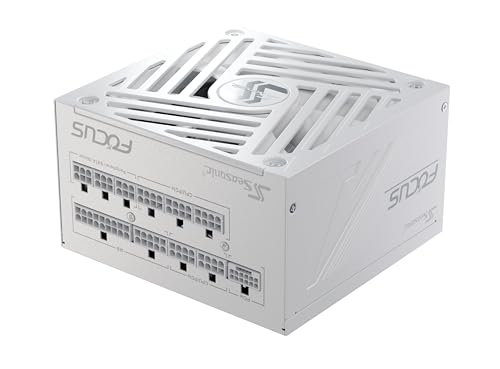


Do You Actually Need 1000 Watts?
Many gaming PCs run well on a smaller unit. A power supply works most efficiently in the middle of its load range, and a 1000W model suits systems with a top-tier graphics card, a high-core-count processor or several drives and accessories. If your parts add up to well under that figure, a smaller, cheaper unit may serve you better.
Use the maker's power calculators for your graphics card and processor, then add headroom. A 1000W unit also leaves room for a future upgrade, which is a good reason to choose it if you plan to swap in a stronger graphics card later.
Efficiency Ratings
The 80 Plus label (Bronze, Gold, Platinum and Titanium) describes how much of the wall power becomes usable power. Higher tiers waste less as heat, run cooler and often use better components, but they also cost more. Gold is the common balance of price and efficiency for a gaming build, and Platinum is worth a look for a system that runs for long hours.
ATX Version and Graphics Connectors
Recent graphics cards use a 12V-2x6 (or 12VHPWR) power connector. Current power supplies often ship a native cable for it, and listings describe them as ATX 3.1 or PCIe 5.1 ready. A native cable is neater and more reliable than an adapter. Check your graphics card's requirements, count the PCIe power connectors it needs and confirm the supply provides enough.
Modular, Semi-Modular and Fixed Cables
- Fully modular supplies let you attach only the cables you need, which improves airflow and looks clean.
- Semi-modular units have permanent motherboard cables and detachable others.
- Fixed cable units are cheapest but leave unused cables to hide.
In a compact case, modular cables are worth the extra cost. In a roomy case, the saving from a fixed-cable unit may matter more.
Size, Noise and Cooling
Most 1000W units use the standard ATX form factor, but depth varies. Check the length against your case and cable clearance. Many models use a fan that stays off at low load, which keeps a lightly loaded PC quiet. A larger fan generally moves air more quietly, so look for decent fan size and a bearing type listed in the specifications.
Protections and Warranty
Look for overvoltage, undervoltage, overcurrent, short circuit and overpower protection in the listing. A long warranty signals confidence from the maker: many quality units carry ten years. Keep the receipt, because a warranty claim without proof is harder.
Choosing Among the Best 1000w Power Supply Models
Compare three things first: efficiency tier, connector set and warranty. Then weigh noise, cable length and cost. In practice, units from established makers with a Gold or Platinum rating and a native graphics connector cover most needs. Prices commonly run from about $100 to $250, and the upper end usually adds a higher tier and a refined fan.
For related help, read best power supply for gaming pc or look at our psu tier list.
Transient Spikes and Why Headroom Helps
Modern graphics cards can draw short bursts of power far above their average, and a good supply absorbs those spikes without shutting down. That is one reason a 1000W unit makes sense for a high-end card even if the average draw is lower. The ATX 3.1 standard tightened how supplies handle such spikes, so a unit that follows it is a safer match for a demanding card.
A supply with good internal parts also holds its voltage steadily under load, which keeps the PC stable during long gaming sessions and heavy renders. You cannot see that quality on the box, so rely on maker reputation, warranty length and reviews from buyers who run similar hardware.
Cables, Sleeving and Cable Length
Cable length matters in large cases and in cases with a rear-mounted motherboard tray. Check the listing for the length of the motherboard and CPU cables, and make sure the PCIe cables reach your graphics card without strain. Flat cables are easier to route and tidy up, while sleeved cables look nicer through a glass panel. Neither affects performance, so choose according to your case.
Installation Notes
Install the supply with the fan facing the vent in your case, and use the screws in the box. Plug in only the cables you need and keep the rest tidy. Connect each graphics card power cable directly to the supply and avoid chaining adapters. Always unplug the supply from the wall before touching internal parts.
Warranty and Returns
Check the warranty length and who handles claims, since power supplies protect expensive parts. Keep the receipt, the box and the original cables together. If a unit makes unusual noises, smells hot or fails to start the PC, stop using it and contact the seller.
Frequently Asked Questions
Will a 1000W supply use 1000 watts all the time?
No. The PC draws only what it needs. The rating is the maximum the unit can deliver.
Is Gold or Platinum better for a gaming PC?
Platinum wastes slightly less power as heat, but Gold is often better value. Decide by how long your PC runs under load.
Can I reuse old cables?
No. Modular cables are not interchangeable between makers or sometimes between models. Use the cables that came with your supply.
Do I need ATX 3.1?
If you own or plan to buy a recent graphics card with the new connector, yes, because it gives you a native cable and the right spike handling.
Final Thoughts
Pick the efficiency tier, the connector set and the warranty that fit your build. The best 1000w power supply is the one that powers your parts quietly with headroom to spare. Prices and availability can change, so check the product page before ordering.


