
Best 1080p Ultrawide Monitors: 21:9 and 32:9 Formats (2026)
Disclosure: We may earn a commission when you buy through links on this page, at no extra cost to you. As an Amazon Associate I earn from qualifying purchases. Learn more

Multitaskers, editors and sim fans: how to choose the best 1080p ultrawide monitors by format, size, curve, refresh rate and desk space.
An ultrawide screen at 1080p stretches your desktop sideways, giving you room for two windows side by side or a wide view in games. The best 1080p ultrawide monitors use the 2560 by 1080 or the extra-wide 3840 by 1080 format, and the choice among them depends on size, curve and budget.
The range of true 1080p ultrawide models is smaller than for standard monitors, since many ultrawide screens now use higher resolutions. This guide explains the formats and what to check. The product table lists the models available in this group.



Two Kinds of 1080p Ultrawide
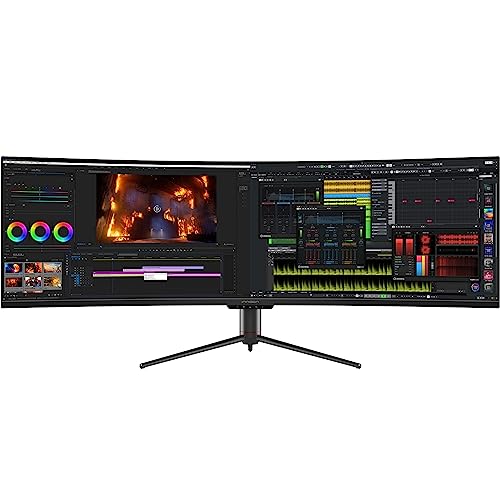
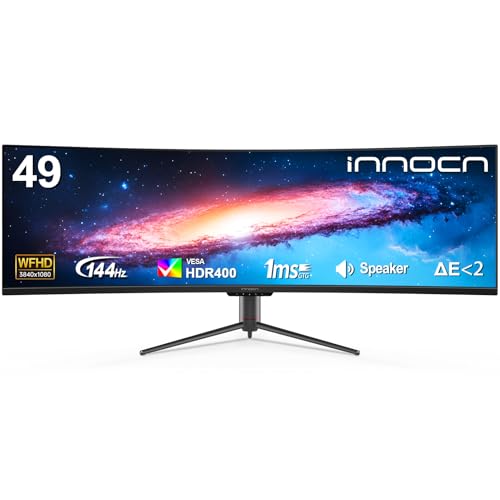
The first is the 21:9 format at 2560 by 1080 pixels, found on 29 and 34 inch screens. It gives you about a third more width than a standard 16:9 monitor. The second is the 32:9 super ultrawide format at 3840 by 1080, found on 49 inch screens, which is like two 1080p monitors side by side in one frame.
Both keep the height at 1080 pixels, so the picture looks sharp only on the smaller widths. On a 34 or 49 inch screen the pixels are bigger and the image is softer, which is why many people sit farther back.
Who Benefits Most
- Office users with spreadsheets, timelines or two documents open together.
- Video editors who want a wide timeline.
- Racing and flight-sim players who like a wide field of view.
- Stock and data traders who watch many charts.
Games and Compatibility
Many games support ultrawide formats, but some stretch or crop the picture, and some show black bars on the sides. Check forums or support pages for the games you play. Competitive shooters sometimes restrict ultrawide views to prevent an advantage, so check each game's settings.
Curve and Size
Ultrawide screens are usually curved to keep the edges within your line of sight. A 29 inch model suits a compact desk and sits close to a standard 24 inch screen in height. A 34 inch model fills a standard desk. A 49 inch model is very wide, so you need a deep desk and a sturdy stand, and you may need to turn your head.
Refresh Rate and Panel Type
Most 1080p ultrawide models offer 60 to 144Hz. IPS panels give good color for editing, and VA panels give strong contrast for movies. For gaming, choose a faster refresh rate and adaptive sync, and check that your graphics card can drive the extra width.
Productivity Features
Many ultrawides include picture-by-picture modes, where two computers share the screen, and screen-splitting software for window layouts. A USB-C port with power delivery makes a laptop easy to connect. Look for a stand that adjusts height and tilt, and a VESA mount if you want an arm.
Choosing the Best 1080p Ultrawide Monitors
Check the format, size and stand. Prices span a wide range: around $200 for a 29 inch screen or a 34 inch model, and from about $650 to well above $1,000 for 49 inch super ultrawide monitors. A bigger screen needs more desk space and a stronger graphics card. If sharpness matters, consider whether a higher-resolution ultrawide fits your budget.
For wider options, read best ultrawide monitors and best ultrawide monitors for gaming.
Desk Space and Stand Considerations
A 34 inch ultrawide is roughly the width of two standard monitors, and a 49 inch model is wider still. Measure your desk before you order and leave room for the stand's feet. Check the stand's height range, since a curved screen that sits too low strains your neck. A monitor arm can free up desk space and lets you push the screen further back for comfort.
Using Ultrawide Screens With Consoles and Laptops
Consoles usually output a standard 16:9 picture, so you will see black bars on each side unless the game supports ultrawide. Laptops handle ultrawide well over HDMI or USB-C, though you should check that the laptop's port supports the resolution. Picture-by-picture modes let two computers share the screen, which is useful for a work laptop and a personal PC on the same desk.
Setup Tips
Set the native resolution and the highest refresh rate in your display settings. Use a window manager tool to snap windows into zones. In games, choose the ultrawide aspect ratio in the video settings. Raise the stand so the middle of the screen is at eye level.
Warranty and Return Window
A large curved monitor can arrive with backlight bleed, a bent stand or dead pixels, so inspect it on the first day. Open a dark image to check the corners and a white page to look for uneven color. Check that the stand holds the screen without wobble. Keep the original packaging, since large monitors are awkward to ship back without it.
Which Ultrawide Is Right for You?
A 29 inch 21:9 monitor is a gentle step up from a standard screen and suits a compact desk, spreadsheets and casual gaming. A 34 inch model feels like a small cinema and suits films and wide timelines. A 49 inch super ultrawide replaces two monitors and suits traders, editors and sim players with deep desks. Pick the size you can fit and use, not the biggest number.
Audio, Ports and Picture Modes
Many ultrawides include speakers that suit casual video but not music. Check for HDMI and DisplayPort inputs, a USB hub and a headphone jack. Look for picture modes for movies and games, and picture-by-picture to show two sources side by side.
Frequently Asked Questions
Is 1080p ultrawide sharp enough?
It is fine on 29 inches and softer on larger screens. Sit farther back on 34 and 49 inch models.
Will my graphics card handle it?
The extra width means more pixels, but 1080p ultrawide is still lighter than 1440p. A mid-range card usually copes.
Do all games support ultrawide?
Many do, but not all. Check settings or community notes for each game.
Is it good for office work?
Yes. Two windows side by side without a bezel is a clear productivity gain.
Final Thoughts
Pick the format that fits your desk and your uses. The best 1080p ultrawide monitors add width and immersion at a lower cost than higher-resolution ultrawides. Prices and availability can change, so check the product page before ordering.


