
Best Affordable Projectors: Which One Fits the Way You Use It?
Disclosure: We may earn a commission when you buy through links on this page, at no extra cost to you. As an Amazon Associate I earn from qualifying purchases. Learn more

Budget projectors matched to students, travelers, movie nights and gamers, with features to compare and mistakes to avoid.
A projector can turn any blank wall into a 100 inch screen for less than the price of a large TV, but no single affordable projector suits everyone. A student in a dorm, a traveler who wants movies on hotel walls, a family planning backyard movie nights and a gamer chasing low input lag all need different things. This guide to the best affordable projectors starts with how you plan to use one, then explains which features matter for that routine.
The short answer: most people should choose a native 1080p smart projector with built in streaming apps, auto focus and keystone correction and decent built in sound, which costs around $150 to $400; travelers should pick a battery powered portable model, and gamers should spend a little more for a projector with low input lag and a high refresh rate mode.


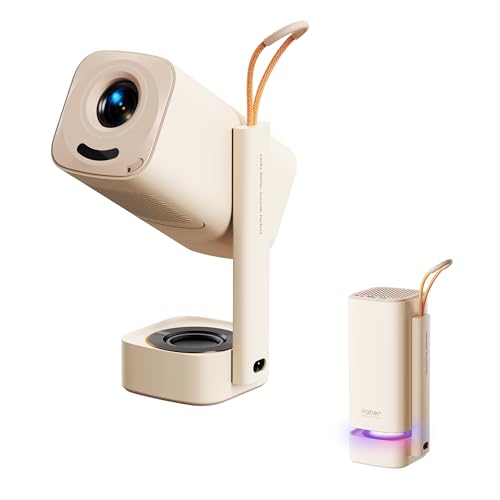
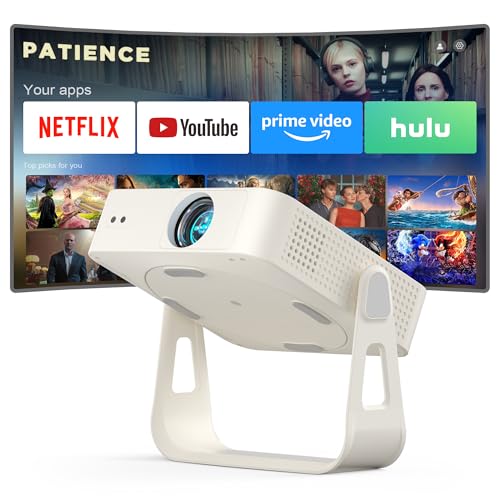
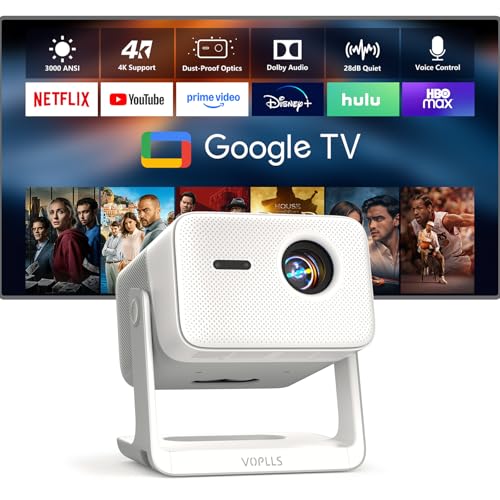

Top 3 Picks at a Glance
These three projectors from the product table above cover home movie nights, travel and gaming.


Who Should Buy Which Projectors?
Affordable projectors fall into a few broad types. Mini smart projectors are compact boxes with built in apps for bedrooms and dorms. Portable projectors add batteries for travel and camping. Home theater projectors focus on brightness and picture quality, and gaming projectors prioritize low input lag. Your routine decides which type fits.
For Students and Everyday Users
Students and casual viewers want simple setup, built in streaming and a low price. A mini smart projector around $130 to $250 with officially licensed apps like Netflix, auto focus and Bluetooth speaker support suits dorm rooms and bedrooms. Look for native 1080p resolution rather than projectors that only support 1080p input, and auto keystone correction so the image stays square when placed at an angle. Quiet fans matter in small rooms.
For Travelers and Commuters
Travelers need light weight, built in batteries and quick setup. Portable projectors around the size of a soda can or small book run for two to three hours on battery, enough for a movie, and many include streaming apps and speakers. They work well in hotel rooms, on camping trips and at friends' houses. Expect lower brightness than plug in models, so they shine in dark rooms and at night outdoors.
For Movie Nights and Families
Families planning regular movie nights benefit from brighter projectors with native 1080p or 4K support, strong built in sound or audio output for speakers and smart platforms like Google TV. Larger image sizes of 100 inches or more need more brightness, so look for models that specify ANSI or ISO lumens rather than vague light source numbers.
For Gamers and Power Users
Gamers want low input lag, high refresh rate support and sharp images. Gaming projectors with input lag under about 16 milliseconds feel responsive, and some support 120Hz at 1080p for smoother motion. They cost more than basic mini projectors but less than many large gaming TVs. Pair one with a dark room and a proper screen for the best experience.
Key Features to Compare
Once you know your routine, compare models on the features below.
Smart Platform and Sound
Many affordable projectors include built in smart platforms. Officially licensed Google TV or Netflix certified projectors run streaming apps reliably, while unofficial Android systems may lack Netflix or deliver it in low resolution. If a projector lacks good apps, add a streaming stick. Built in speakers range from tinny to surprisingly full, and models with branded audio tuning sound better. For movie nights, connect a Bluetooth speaker or soundbar through audio out.
Brightness and HDR
Brightness is the most important projector spec. Look for ANSI or ISO lumen ratings, which are standardized; inflated numbers like 20,000 lumens on cheap models are misleading. Around 200 to 500 ANSI lumens works in dark rooms, while 1,500 lumens or more helps in rooms with some light. HDR support exists on many budget models, but low brightness limits its impact, so prioritize real brightness over HDR labels.
Display Technology (LCD, DLP, Laser)
Budget projectors use LCD or DLP technology. LCD models are common in mini projectors and offer good color but can show lower contrast. DLP projectors deliver sharper images and better contrast, and some viewers notice a rainbow effect. Laser and LED light sources last far longer than traditional lamps and turn on instantly. Native resolution matters too: native 1080p looks much sharper than 720p projectors that merely accept 1080p signals.
What You Can Realistically Get on a Budget
Around $100 to $200 buys a mini smart projector with native 1080p, Bluetooth, auto focus and modest brightness for dark rooms. Around $200 to $400 brings better brightness, licensed Google TV, improved sound and portable battery options. Around $500 to $1,000 adds laser light sources, 4K support, higher brightness and gaming features. Do not compromise on native resolution and real brightness; these decide whether the picture looks good.
Placement, Mounting, and Ergonomics
Throw ratio determines how far the projector must sit from the wall for a given image size. Standard projectors need around 8 to 10 feet for a 100 inch image, while short throw models need far less. Built in stands, adjustable angles and auto keystone make placement flexible. Ceiling mounting with a standard tripod or ceiling bracket keeps the projector out of the way, and many mini projectors support 1/4 inch tripod screws.
Common Mistakes to Avoid When Buying Projectors
- Trusting inflated lumen numbers. Look for ANSI or ISO lumens; vague light source lumen claims mislead buyers.
- Ignoring the smart platform and sound. Unlicensed systems may block Netflix or play it in low quality, and weak speakers ruin movie nights.
- Buying too small or too large an image. Huge images look dim on low brightness projectors; match image size to brightness and room.
- Skipping a screen in bright rooms. A proper screen improves contrast and color far more than a painted wall.
- Not checking the warranty. Budget projectors vary in quality, so buy from brands that offer at least a one year warranty.
Tips to Get the Most From Your Projector
Calibrate picture settings by turning off vivid or dynamic modes and choosing a movie or standard mode for natural colors. Darken the room as much as possible, since even affordable projectors look dramatically better in darkness. Clean the lens and any screen with a microfiber cloth only, avoiding paper towels and harsh cleaners. Keep vents clear for airflow, and let the projector cool before packing it. Update firmware for better app compatibility and auto focus performance.
Setting Up Affordable Projectors for the Best Picture
Good setup makes even the best affordable projectors look far better. Start by placing the projector square to the screen at the correct distance for your desired image size, which you can find in the manual or the manufacturer's throw calculator. Physical placement always beats digital keystone correction, which can soften the image slightly.
Use auto focus or adjust manual focus while displaying text, such as a menu, until letters look crisp. Set the projector to its native resolution output on your streaming stick, console or laptop. Lower ambient light by closing curtains and turning off lights near the screen, and choose a darker wall color around the screen if possible to reduce reflections.
For sound, connect a Bluetooth speaker or soundbar through the audio output, placing it near the screen so dialogue seems to come from the picture. If the projector has a low lag or game mode, enable it for consoles. Finally, let the projector warm up for a few minutes before judging colors and brightness.
Hosting an Outdoor Movie Night on a Budget
Backyard movie nights are one of the most popular uses for affordable projectors. Wait until after sunset, since most budget projectors struggle against daylight. A portable outdoor screen on a stand or a tightly stretched white sheet works better than the side of a house, and positioning the screen away from porch lights and streetlights helps contrast.
Bring a portable Bluetooth speaker for sound, an extension cord or battery powered projector and a streaming stick downloaded with your movie in case WiFi is weak outdoors. Keep the projector on a stable table or tripod and cover it if dew forms late in the evening.
Projector Screens vs Walls
A smooth white wall works for casual viewing, but a projector screen makes a noticeable difference. Screens provide a perfectly flat, uniform surface and reflect light more evenly, improving brightness, contrast and color. Gray or ambient light rejecting screens help in rooms that are not fully dark.
Affordable pull down or tripod screens cost around $30 to $100, and portable outdoor screens with stands are popular for backyard movie nights. If you use a wall, choose a matte white or light gray paint without texture. Avoid glossy surfaces, which create hotspots, and colored walls, which tint the image.
Projector vs TV: Which Is Right for You?
Projectors offer massive screen sizes for less money and can be packed away when not in use, making them ideal for small apartments, multipurpose rooms and outdoor movies. They work best in dark rooms and require more setup, including screen placement and audio.
TVs are brighter, easier to use in daylight and offer better contrast and HDR. If you mostly watch during the day in a bright living room, a TV is the better choice. If you want a cinema sized picture for movie nights and gaming in a dark room, an affordable projector delivers impressive value. Many households use both: a TV for daily viewing and a projector for special occasions.
FAQs
What image size should I get for my room?
Most rooms suit an image of around 80 to 120 inches. Bedrooms and dorms often work best at 60 to 90 inches, while living rooms and backyards can go larger. The best most affordable projectors deliver sharp, bright images at moderate sizes, so avoid stretching low brightness models to 150 inches or more.
Does refresh rate matter for non gamers?
Refresh rate matters little for movies and TV shows on a projector. Films are shot at 24 frames per second, and standard 60Hz projectors handle them well. Higher refresh rates mainly benefit gamers who want smoother motion and lower input lag.
How long do affordable projectors last?
LED and laser projectors typically last 20,000 to 30,000 hours of light source life. That equals years of daily viewing. Traditional lamp projectors need lamp replacements every 3,000 to 6,000 hours. Keeping vents clean and avoiding overheating help any projector last longer.
Is 4K worth it on a budget projector?
True 4K is rarely available on budget projectors, but 4K support can still help. Many affordable models accept 4K signals and downscale them, which does not add detail. Native 1080p is the sweet spot for budget buyers, while pixel shifting 4K projectors cost more but deliver sharper images on large screens.
LCD vs DLP: which is better?
DLP is generally better for sharpness and contrast, while LCD is better for color brightness and avoiding rainbow effects. Both work well in affordable projectors. Sensitive viewers who notice DLP rainbow artifacts may prefer LCD, while gamers often appreciate DLP's faster response.
Can I connect a game console to a budget projector?
Yes, most affordable projectors include HDMI ports for game consoles. Check input lag, since many mini projectors have high lag that makes fast games feel sluggish. Gaming projectors with low lag modes deliver a much better experience for shooters and racing games.
Our Verdict
The right affordable projector depends on how and where you watch. Focus on native 1080p resolution, honest brightness ratings and a reliable smart platform, then choose portability or gaming features based on your routine. Students and casual viewers can start with a mini smart projector, travelers should choose a battery powered portable model and gamers benefit from a low lag projector.
Compare the best affordable projectors in the product table above to find the right fit for your room and budget.


