Best Curved Monitors: The Buyer Checklist We Use
Disclosure: We may earn a commission when you buy through links on this page, at no extra cost to you. As an Amazon Associate I earn from qualifying purchases. Learn more

How we judge curved monitors from 27 inch QHD to 34 inch ultrawide OLED, with three picks, a checklist and red flags.
Curved monitors wrap the screen around your field of view, making games feel more immersive and keeping the edges of wide displays at a comfortable viewing angle. They range from affordable 27 inch QHD gaming screens to 34 inch ultrawide OLED panels that replace dual monitor setups. Not every curved monitor is worth it, though, and curvature, panel type and size all affect the experience. This guide to the best curved monitors explains the checklist we use, then shows three picks that pass.
The short answer: most buyers should choose a 34 inch curved ultrawide with 3440 by 1440 resolution, a VA panel, 1500R curvature and a refresh rate of 144Hz or higher, such as the AOC CU34G2X around $340; budget gamers can get a 27 inch curved QHD monitor like the Samsung Odyssey G5 around $240, and enthusiasts can step up to a curved ultrawide OLED like the LG UltraGear 34GS95QE around $700.



How We Evaluate Curved Monitors
We score curved monitors on seven criteria, each with thresholds for good and poor performance.
Curvature and Panel Technology
Curvature is listed as a radius, such as 1800R, 1500R or 1000R, where a smaller number means a tighter curve. Tighter curves like 1000R and 800R feel more immersive on large ultrawides, while 1800R suits 27 inch monitors. VA panels are common on curved monitors, offering high contrast and deep blacks for gaming and movies. OLED curved monitors add perfect blacks and instant response. IPS curved monitors are rarer but offer wider viewing angles. Good: curvature matched to screen size and a high contrast panel. Poor: aggressive curves on small screens that distort straight lines.
HDR and Brightness
Brightness around 300 to 400 nits suits most rooms. Real HDR requires high peak brightness and local dimming or OLED contrast; look for VESA DisplayHDR 400 True Black or higher on OLED and DisplayHDR 600 or higher on LCD. Many budget curved monitors list HDR10 support without the brightness to show it. Good: certified HDR on OLED or bright panels. Poor: HDR labels on dim screens.
Resolution and Screen Size
Curves make the most sense on wider screens. A 27 inch curved monitor should have at least 2560 by 1440 resolution. A 34 inch ultrawide with 3440 by 1440 is the sweet spot for immersion and productivity. Larger 45 to 49 inch super ultrawides suit simulation games and multitasking. Good: QHD or ultrawide QHD at 27 to 34 inches. Poor: 1080p on 32 inch or larger curved screens, which looks soft.
Connectivity and Ports
DisplayPort is best for high refresh PC gaming, while HDMI 2.1 helps consoles. USB C with power delivery lets laptops connect with one cable on productivity models. USB hubs and KVM switches add convenience. Good: DisplayPort plus HDMI, ideally USB C. Poor: a single HDMI port limiting refresh rates.
Refresh Rate and Response Time
Gaming curved monitors range from 144Hz to 240Hz or more. VA panels can show dark smearing in fast scenes, so faster VA panels and OLED models handle motion best. For office use, 60 to 100Hz is fine. Good: 144Hz or higher for gaming with low smearing. Poor: slow VA panels with obvious ghosting.
Adaptive Sync and Gaming Features
FreeSync Premium and G Sync compatibility prevent tearing, while low input lag modes and crosshair overlays help competitive players. Ultrawide gaming requires game support for 21 by 9 aspect ratios. Good: adaptive sync with a wide refresh range. Poor: no variable refresh.
Stand, Ergonomics, and Extras
Ultrawide monitors are heavy and wide, so a sturdy height adjustable stand or VESA mount matters. Built in speakers are usually basic. Good: adjustable stand and VESA support. Poor: wobbly stands with tilt only.
3 Picks That Pass Our Checklist
These three curved monitors come from the product table above and meet every criterion on our checklist.


Best Overall
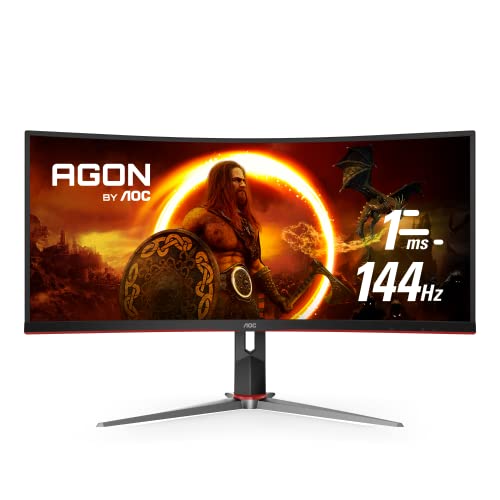
The AOC CU34G2X, around $340, is our pick for most buyers who want an immersive ultrawide without overspending. Its first strength is a 34 inch curved VA panel with 3440 by 1440 resolution, giving lots of horizontal space for games, timelines and side by side windows. Its second strength is a 144Hz refresh rate with adaptive sync and a frameless design that looks clean on any desk.
The limitation is typical VA dark smearing in very fast scenes, which competitive esports players may notice.
Best Value
The Samsung Odyssey G5 27 inch, around $240, suits gamers who want a curved QHD screen at an accessible price. Its first strength is a 1000R curved VA panel with 2560 by 1440 resolution and a 144Hz refresh rate for smooth, immersive gaming. Its second strength is a 1 ms response time setting and adaptive sync, making it a strong entry point into high refresh curved gaming.
The limitation is a basic stand with limited adjustment, so a monitor arm can help.
Best Premium Pick
The LG UltraGear 34GS95QE, around $700, is for enthusiasts who want the best curved gaming and media experience. Its first strength is a 34 inch WOLED ultrawide panel with 800R curvature, delivering perfect blacks, vivid HDR and incredibly immersive views. Its second strength is a 240Hz refresh rate with 0.03 ms response, making fast games look exceptionally clear.
The limitation is OLED burn in risk with static content, so use dark themes and auto hide taskbars for work.
Quick Buyer Checklist
- Does the curvature suit the screen size you want?
- Is the resolution at least QHD for 27 inches or ultrawide QHD for 34 inches?
- Is the refresh rate 144Hz or higher for gaming?
- Does it support FreeSync or G Sync?
- Do your favorite games support ultrawide aspect ratios?
- Does your desk have space for a wide monitor?
- Does it include DisplayPort for high refresh PC gaming?
- Is the stand adjustable or VESA compatible?
Red Flags to Watch For
- Low resolution on large curves. 1080p on big curved screens looks blurry.
- Misleading response times. MPRT figures can hide slow VA pixel transitions.
- Vague HDR claims. HDR labels without certification often mean little.
- Suspicious reviews. Many short, similar five star reviews suggest manipulation.
- No warranty details. Ultrawides are large investments; check coverage and dead pixel policies.
Best Curved Monitors for Specific Needs
Best Curved Monitors for PC
The best curved monitors for pc gaming and productivity combine ultrawide QHD resolution, DisplayPort connectivity and adaptive sync. A 34 inch ultrawide like the AOC CU34G2X or Samsung Odyssey G5 34 inch gives PC gamers immersive views and lets office users replace two monitors with one seamless screen.
Best for Productivity
Productivity users should choose curved ultrawides with IPS or high quality VA panels, USB C docking and KVM switches for juggling laptops and desktops.
Best for Simulation Games
Racing and flight simulator fans benefit from 34 inch or larger ultrawides and super ultrawides with tight curves for wraparound immersion.
Curved vs Flat Monitors: Which Is Better?
Curved monitors keep the entire screen at a similar distance from your eyes, which reduces eye movement and distortion at the edges of wide displays. This makes them ideal for ultrawides and large screens. They also feel more immersive in games and movies.
Flat monitors are better for design work that requires straight lines, multiple monitor setups and smaller sizes like 24 inches, where curves add little benefit. Flat screens also mount more easily and cost less at equivalent specs. Choose curved for ultrawide immersion, and flat for precision work and smaller screens.
Ultrawide Gaming and Game Support
Ultrawide monitors with 21 by 9 aspect ratios show more of the game world, giving a wider field of view in racing, flight, open world and strategy games. Most modern PC games support ultrawide resolutions, but some titles add black bars or stretch the image. Competitive shooters may restrict field of view for fairness. Consoles generally do not support ultrawide aspect ratios, displaying 16 by 9 content with black bars.
Before buying, check whether your favorite games support 3440 by 1440. Community fixes can enable ultrawide in some older titles.
Choosing a Graphics Card for a Curved Ultrawide
A 3440 by 1440 ultrawide has about 34 percent more pixels than a standard 2560 by 1440 monitor, so it needs more graphics power for high frame rates. Midrange cards like the RTX 5060 Ti or Radeon RX 9060 XT handle many games at high settings around 100 frames per second with upscaling, while high end GPUs push beyond 144 frames per second. For 27 inch QHD curved monitors, upper midrange cards are usually enough.
Upscaling technologies like DLSS, FSR and XeSS make ultrawide gaming more accessible on midrange hardware. If your GPU is older, consider a 27 inch curved QHD monitor instead of an ultrawide, or plan to lower settings in demanding games.
Mounting and Desk Space for Curved Monitors
Curved ultrawides are wide and deep, measuring around 32 inches across for 34 inch models, so measure your desk before buying. The curve also adds depth, which matters on shallow desks. Heavy curved monitors benefit from sturdy monitor arms rated for their weight and width; check that the arm supports curved screens and the monitor's VESA pattern.
Position the monitor so the center sits at eye level and the curve wraps evenly around your seat. Leave space behind the monitor for cables and airflow, and use cable management to keep the wide footprint tidy.
Using a Curved Monitor for Productivity
Curved ultrawides are excellent for productivity. You can place three windows side by side, such as email, a browser and a document, or view long timelines in video editors and spreadsheets without scrolling. Window management tools like Windows Snap Layouts, PowerToys FancyZones or Mac apps like Rectangle divide the screen into custom zones. Monitors with picture by picture modes can show two computers side by side, useful for remote workers with separate work and personal machines.
Tips to Get the Most From Your Curved Monitor
Sit at a distance roughly equal to the curvature radius for the most natural view; for an 1800R monitor that is about 1.8 meters, though most people sit closer. Center the monitor at eye level and use window snapping tools to split the screen into zones. Calibrate brightness and color, enable adaptive sync in your graphics settings and use a quality DisplayPort cable. On OLED monitors, allow pixel refresh cycles.
How Much to Spend on a Curved Monitor
Around $140 to $250 buys 27 inch curved gaming monitors with QHD or high refresh 1080p. Around $250 to $400 covers 34 inch VA ultrawides with 144Hz or higher. Around $700 to $1,000 brings curved OLED ultrawides with stunning contrast and motion. For most buyers, the best curved monitors cost between $250 and $400.
Curved Monitors: Your Questions Answered
How long do curved monitors last?
Most curved monitors last around five to ten years. LCD backlights degrade slowly, while OLED monitors last many years with care features enabled. Quality stands and mounts help prevent physical damage.
What size curved monitor should I get for my desk?
A 34 inch ultrawide suits most desks at least 48 inches wide, while 27 inches fits smaller spaces. Sit about 2 to 3 feet away. Super ultrawides need very wide desks.
IPS vs OLED: which is better for curved monitors?
OLED is better for contrast and motion, while IPS is better for color accuracy and static work. Most curved monitors use VA panels, which offer strong contrast at lower prices than OLED.
Are curved monitors good for work?
Yes, curved ultrawides are excellent for multitasking and productivity. They replace dual monitor setups without a bezel in the middle. For graphic design requiring straight lines, flat monitors may be preferable.
Is 1000R or 1800R better?
1000R feels more immersive on large ultrawides, while 1800R suits smaller screens and mixed use. Tighter curves wrap around your view more, which some users love and others find distracting.
Do curved monitors cause eye strain?
Curved monitors can reduce eye strain on wide screens by keeping edges at a consistent distance. Proper brightness, viewing distance and breaks matter more than the curve itself. Some people need a few days to adjust to tight curves.
Our Verdict
Curved monitors shine on wide screens, delivering immersive gaming and comfortable multitasking. Most buyers should choose a 34 inch VA ultrawide with 144Hz, budget gamers can start with a 27 inch curved QHD monitor and enthusiasts will love curved OLED ultrawides. Match curvature to size, check game support and make sure your desk has room.
Compare the best curved monitors in the product table above to find the right screen for your setup and budget.