
Best Gaming Setup: Every Type Explained Side by Side
Disclosure: We may earn a commission when you buy through links on this page, at no extra cost to you. As an Amazon Associate I earn from qualifying purchases. Learn more

Compact, mid range and premium gaming setups compared, with the desk, chair, monitor and peripherals that make each one work.
A great gaming setup is more than a powerful PC or console. The desk, chair, monitor, headset, keyboard, mouse and lighting all shape how comfortable, immersive and organized your gaming space feels. Setups range from compact corners in a bedroom to premium battle stations with multiple monitors. This guide to the best gaming setup compares the main setup types side by side, then explains how to choose the right pieces for your space and budget.
The short answer: most gamers should build a mid range setup around a 55 inch gaming desk, a 27 inch QHD monitor with a 144Hz or higher refresh rate, a supportive gaming chair, a wired or 2.4GHz wireless mouse, a mechanical keyboard and a comfortable headset, which costs around $500 to $800 for the furniture and peripherals; compact setups can fit in about 40 inches of wall space, while premium setups add dual monitors, monitor lighting and higher end chairs.




Top 3 Picks at a Glance
These three products from the product table above form the foundation of a strong gaming setup: the desk, the monitor and the chair.


Types of Gaming Setups Compared
The table below summarizes the main gaming setup types and what they typically include.
| Type | Best For | Pros | Cons | Typical Price |
|---|---|---|---|---|
| Compact setup | Bedrooms, dorms, apartments | Fits small spaces, affordable | Limited desk area and storage | around $300 to $500 |
| Mid range setup | Most PC and console gamers | Comfortable, immersive, balanced cost | Needs a dedicated corner or wall | around $500 to $1,000 |
| Premium setup | Enthusiasts, streamers, creators | Multiple monitors, best comfort and lighting | Expensive, needs space | around $1,200 to $3,000 or more |
| Laptop gaming setup | Gaming laptop owners | Portable, flexible | Needs stand and cooling for comfort | around $200 to $600 in accessories |
Premium Options
Premium gaming setups center on a large desk, often 60 inches or wider, with space for dual monitors or an ultrawide, a high end ergonomic gaming chair, premium headset and microphone for streaming and accent lighting. Monitor arms free desk space and allow flexible positioning, while cable management trays keep everything tidy. Many premium setups add a monitor light bar to reduce eye strain and a dedicated streaming camera.
They suit enthusiasts, streamers and anyone who spends many hours gaming or creating content each week. The trade off is cost and space; a premium setup can fill an entire wall of a room.
Mid Range Options
Mid range setups balance comfort, immersion and price. A 55 inch gaming desk like the Korfile carbon fiber desk provides room for a monitor, keyboard, mouse pad and speakers, often with built in power outlets and LED lighting. A 27 inch QHD high refresh monitor such as the KOORUI Mini LED gaming monitor delivers sharp, smooth visuals, and a racing style chair like the GTRACING adds recline and lumbar support.
Add a mechanical keyboard, a lightweight gaming mouse and a comfortable headset, and you have a setup that suits most PC and console gamers.
Compact Options
Compact setups use 32 to 47 inch desks, a single 24 or 27 inch monitor and space saving peripherals like tenkeyless keyboards. Wall shelves, monitor risers and under desk storage help organize gear. Compact setups suit dorm rooms, small apartments and shared spaces, and they cost less to build. Prioritize a good chair and monitor, since those matter most for comfort and performance.
Premium Options vs Mid Range Options: Which Should You Choose?
- Space: Mid range setups fit most rooms; premium setups need more wall and floor space.
- Comfort: Premium chairs and monitor arms add ergonomic adjustments for long sessions.
- Immersion: Dual monitors or ultrawides in premium setups expand your view.
- Cost: Mid range setups deliver most of the benefits at about half the price.
- Upgradability: Mid range setups can grow into premium setups over time.
Choose mid range if you game a few hours a day and want great value. Choose premium if you stream, create content or spend most evenings gaming and want the best comfort and immersion.
How to Choose the Right Gaming Setup
Size, Weight, and Fit for Your Space
Measure your space before buying a desk. A 55 inch desk needs about 5 feet of wall space plus room for your chair to roll back. Desk depth of 24 inches or more keeps monitors at a comfortable distance. Check that your chair fits under the desk and that cables can reach outlets. In small rooms, L shaped or corner desks use space efficiently.
Warranty and Customer Support
Desks, chairs and peripherals vary in quality. Choose products with clear warranty terms, especially for chairs and monitors, which see daily use. Brands that offer replacement parts, such as chair casters or gas lifts, extend product life.
Ease of Use and Setup
Most gaming desks and chairs ship flat and take 20 to 60 minutes to assemble. Plan cable management from the start with trays, clips and power strips mounted under the desk. Choose peripherals with plug and play support and simple software.
Intended Use and Who It Is For
PC gamers need space for a tower, monitor, keyboard and mouse pad, while console gamers may prefer a larger screen and couch friendly setup. Streamers need room for a microphone arm, camera and lighting. Competitive players should prioritize a high refresh monitor and lightweight mouse.
Safety and Certifications
Use surge protectors with enough outlets to protect expensive electronics, and avoid daisy chaining power strips. Chairs with certified gas lifts reduce failure risk. Check desk weight capacity before adding heavy monitors, speakers and PCs. Keep drinks away from electronics, and route cables to avoid tripping hazards.
Best Gaming Setups for Specific Needs
Best Gaming Setup for Laptops: Which Type Works Best
The best gaming setup for laptops raises the laptop on a cooling pad like the llano V12, connects it to an external monitor through HDMI or USB C and adds a full size keyboard, mouse and headset. This improves posture, keeps temperatures in check and turns the laptop into a desktop style rig while staying portable for travel.
Best Gaming Setup with Desks
The best gaming setup with desks starts with a sturdy surface at least 55 inches wide, such as the Korfile gaming desk with built in power outlets and LED lighting. Add a large desk mat for keyboard and mouse, a monitor at eye level and cable management underneath for a clean, functional battle station.
Best Setup for Console Gamers
Console gamers often prefer a TV or large monitor with HDMI 2.1, a comfortable chair or couch and a quality headset for chat. A compact desk with a 27 inch 4K or 1440p monitor also works well for console players who want a dedicated space.
Building Your Gaming Setup Step by Step
Start with the desk and chair, since they determine comfort and layout. Position the desk so the monitor faces away from windows to reduce glare. Next, choose a monitor that suits your games and hardware; 27 inch QHD at 144Hz or more is a sweet spot for PC gamers. Add a keyboard and mouse that fit your hands and play style, then a headset with a clear microphone for chat.
Finish with lighting and organization. A monitor light bar like the BenQ ScreenBar Halo 2 illuminates your desk without glare, while LED strips behind the desk add ambiance. Cable trays, velcro ties and a single surge protector keep wiring tidy.
Ergonomics for Long Gaming Sessions
Comfort prevents fatigue and strain. Set your chair height so your feet rest flat and your elbows sit level with the desk. Position the monitor at arm's length with the top at or slightly below eye level. Keep the keyboard and mouse close together so your shoulders stay relaxed. Use the chair's lumbar pillow to support your lower back, and take short breaks every hour to stretch and rest your eyes.
Choosing the Right Monitor for Your Setup
The monitor is the centerpiece of any gaming setup. For competitive shooters, a 24 or 27 inch monitor with 240Hz or higher refresh keeps motion crisp. For most gamers, a 27 inch QHD monitor at 144Hz to 200Hz balances sharpness and smoothness, and Mini LED or OLED panels add HDR punch. Console gamers should choose monitors with HDMI 2.1 for 4K or 1440p at 120Hz.
Ultrawide monitors suit racing, flight and strategy games, while dual monitors help streamers keep chat and software visible. Match the monitor to your graphics card, since high resolutions need more power to reach high frame rates.
Peripherals That Make a Difference
A gaming mouse with a shape that fits your grip improves aim and comfort; lightweight wireless models like the Logitech G305 offer freedom without lag. A mechanical keyboard such as the HyperX Alloy Origins Core provides consistent key feel and durability, and tenkeyless layouts leave more room for mouse movement. A large cloth mouse pad gives smooth, consistent glide.
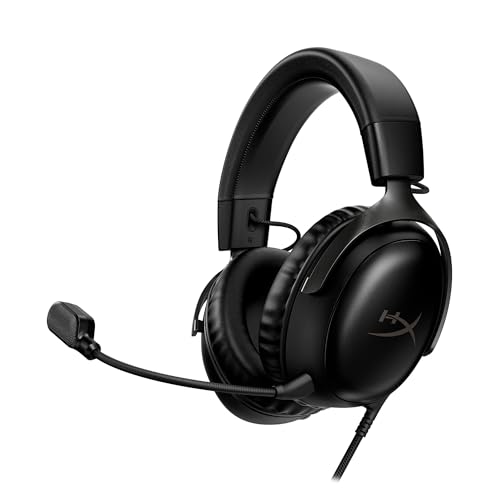
Audio matters for immersion and teamwork. A comfortable headset like the HyperX Cloud III delivers clear positional sound and a quality microphone for chat. Streamers may add a dedicated USB microphone on a boom arm and a webcam with good low light performance.
Lighting and Atmosphere
Lighting sets the mood and helps your eyes. Bias lighting behind the monitor reduces eye strain in dark rooms by lowering contrast between the bright screen and the wall. Monitor light bars illuminate the desk without reflecting on the screen. RGB strips, smart bulbs and synchronized peripheral lighting add personality and can match in game effects with compatible software.
Avoid placing bright lights behind you, which cause glare, and choose warm white settings for late night sessions to reduce eye fatigue.
Cable Management Made Simple
Good cable management keeps a setup clean and makes cleaning and upgrades easier. Mount a surge protector under the desk with adhesive strips or screws, then route cables through an under desk tray. Use velcro ties to bundle cables, and label power adapters. Wireless peripherals reduce clutter, and a monitor arm lets cables run neatly along the arm. Spend 30 minutes on cable management when building your setup, and it will save frustration for years.
Setup and Care Tips
Dust your monitor, desk and peripherals weekly, and clean keyboard keys and mouse feet monthly. Tighten chair and desk bolts every few months to prevent wobble. Keep firmware updated for peripherals and monitors. Use a surge protector and unplug equipment during storms. Wipe desk surfaces with a damp cloth and avoid harsh chemicals on carbon fiber or laminate finishes.
How Much to Spend on a Gaming Setup
Excluding the PC or console, a compact setup costs around $300 to $500, covering a small desk, budget chair, 24 inch monitor and basic peripherals. A mid range setup costs around $500 to $1,000 with a 55 inch desk, 27 inch QHD monitor, racing chair and quality peripherals. Premium setups cost $1,200 to $3,000 or more with ergonomic chairs, multiple monitors, monitor arms and streaming gear.
Frequently Asked Questions
How much should I spend on a gaming setup?
Plan to spend around $500 to $1,000 on furniture and peripherals for a solid mid range setup. Prioritize the monitor and chair, which affect performance and comfort most. Compact setups start around $300, while premium setups can exceed $2,000.
How long does a gaming setup last?
A quality gaming setup lasts many years, with desks and monitors often lasting five to ten years. Chairs and peripherals may need replacement sooner, typically every three to five years depending on use.
How do I maintain a gaming setup?
Clean surfaces and peripherals regularly, tighten bolts and keep firmware updated. Manage cables to prevent damage, use surge protection and replace worn parts like chair casters or ear pads when needed.
What features matter most when buying gaming setups?
Comfort, monitor quality and space efficiency matter most. A supportive chair, a high refresh monitor at eye level and a desk that fits your gear make the biggest difference. Lighting and RGB are fun extras.
Are expensive gaming setups worth it?
Expensive setups are worth it if you game or stream for many hours each week. Premium chairs, monitor arms and lighting improve comfort and reduce strain. Casual gamers get most of the benefits from mid range setups.
What should I buy first for a gaming setup?
Buy a comfortable chair and a good monitor first. They affect comfort and performance every time you play. Add a desk with enough space next, then upgrade peripherals like the keyboard, mouse and headset over time.
Final Thoughts
The best gaming setup fits your space, supports your body and showcases your favorite games. Start with a sturdy desk, a comfortable chair and a great monitor, then add peripherals and lighting that suit your play style. Compact setups work for small rooms, mid range setups deliver the best value and premium setups offer maximum comfort and immersion for dedicated players.
Compare the products in the table above to build the best gaming setup for your room and budget.


