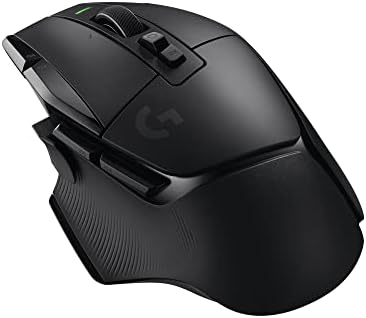
Best Mid Range Gaming Mouse for 2026: Sub 60g Wireless, Optical Switches, and Buyer Guide
Disclosure: We may earn a commission when you buy through links on this page, at no extra cost to you. As an Amazon Associate I earn from qualifying purchases. Learn more

Claw, palm or fingertip gripper? This best mid range gaming mouse guide matches shell shape, weight, sensor and switches to your hand size.
Competitive shooter fans and all day desk users no longer need a flagship budget to get a light, accurate wireless mouse. The roughly $45 to $90 bracket now offers PixArt PAW3395 and PAW3950 class sensors, optical or well made mechanical switches, PTFE skates, and 1,000Hz to 4,000Hz 2.4GHz wireless dongles in solid, hole free shells. Choosing the best mid range gaming mouse comes down to matching shell shape and weight to your hand size and grip style. Check the comparison table below to see the picks side by side.
In fast shooters and action games, shape and weight balance affect aim consistency far more than inflated DPI numbers on the box. Keep that in mind as you read the sections below, and measure your hand before you shop. A mouse that looks perfect on paper but sits wrong under your palm will cost you more accuracy than any spec can give back.








Who Should Buy Which Mid Range Gaming Mouse?
The right mouse depends first on what you play and how you hold the mouse, and only second on the price. The three groups below cover most buyers in this price range.
Competitive FPS and Battle Royale Players (Claw and Fingertip Grips)
If you play Valorant, Counter Strike 2, Apex Legends or Overwatch, look for a 45 to 62 gram symmetrical or compact ergonomic wireless mouse. A solid shell, white virgin PTFE glides and optical switches are the features that matter most. Lower mass means the mouse starts moving with less finger effort and stops without overshooting your target.
Pairing the mouse with a system that holds a steady, high frame rate removes input bottlenecks, so a fast mouse is not wasted on a stuttering game. Low sensitivity players who make wide arm swipes also benefit from a large, smooth cloth pad, because a light mouse exaggerates any rough spot on the surface.
Palm Grip Players and All Day Work and Play Hybrids
Palm grippers should choose a right handed ergonomic mouse weighing roughly 60 to 75 grams. If you rest your whole palm on the shell through eight hours of office work and then evening RPGs, a tiny fingertip mouse will cramp your ring and pinky fingers. Look for a raised, tilted left shoulder and a contoured thumb groove that supports the natural angle of your wrist.
Hybrid users also gain from tri mode connectivity. A single mouse can sit on Bluetooth for a laptop during the day and switch to the 2.4GHz dongle on a gaming desktop at night.
MMO, MOBA, and Productivity Macro Users
A multi button ergonomic wireless mouse suits anyone binding many abilities or timeline macros to the thumb. Players of World of Warcraft, Final Fantasy XIV or Dota 2, and video editors, benefit from a 9 to 12 button thumb grid, a tilt wheel with a free spinning scroll mode, and onboard profile memory. These mice are heavier, often 80 to 105 grams, which is a fair trade for the extra controls.
Check that the side buttons are spaced so you can find each one by feel. A grid that looks impressive but forces you to look down at your thumb defeats the purpose.
Key Technical Features That Improve Aim and Feel
Five features decide how a mouse performs: shell fit, switch type, sensor, shell construction and the polling rate with its skates. Everything else is secondary.
Hand Size and the Three Grip Styles: Palm vs Claw vs Fingertip
Your grip style decides which shell length and hump height will feel right. Measure your hand from the tip of your middle finger to the first crease of your wrist, and observe how your hand naturally holds a mouse:
- Palm Grip (Full Hand Contact): Your entire palm and finger lengths rest flat on the shell. Pair it with longer ergonomic or high mid hump mice (about 122mm to 130mm long) so your fingers do not overhang the front buttons.
- Claw Grip (Rear Hump Support and Arched Fingers): The base of your palm locks against the rear hump while your index and middle fingers arch upward. Pair it with symmetrical mice with a pronounced rear hump and narrow waist (about 118mm to 124mm long).
- Fingertip Grip (Zero Palm Contact): Only your fingertips touch the mouse while your palm hovers. Pair it with short, low profile, ultralight mice (under 55 grams, about 114mm to 120mm long) with flat sides.
As a rough guide, hands under about 17cm long usually suit smaller shells, while hands over 19cm do better with the longer ergonomic models. Many people sit between these sizes and can use a medium symmetrical shape in a relaxed claw grip.
Optical Switches vs Mechanical Switches (Stopping the Double Click Bug)
Optical switches are the safer choice if you click heavily, because they avoid the metal contact wear that causes accidental double clicks. A common failure on older gaming mice was mechanical switch oxidation, where a single press registered twice or dropped a held spray after months of use.
Optical switches use an infrared light beam under the plunger to register a click, with no metal leaf contact to degrade. Makers often rate them for 70 to 100 million clicks. Many mid range mice also use quality mechanical switches with adjustable debounce timers, which is a reasonable alternative.
Optical Sensors: PAW3395, PAW3950, Hero, and Focus Pro
Any of these current sensors will track accurately, so do not pay extra for "36,000 DPI" versus "26,000 DPI". Most esports players use between 400 and 1,600 DPI. What matters is Motion Sync (which aligns sensor reports with USB polling intervals), an adjustable lift off distance (LOD), and no hardware acceleration or angle snapping at fast swipe speeds. Sensors such as the PixArt PAW3395, PAW3950, Hero 25K and Focus Pro deliver these in the $50 to $90 bracket.
Solid Shells Under 60 Grams (No More Honeycomb Holes)
A solid, hole free shell stays lighter than you might expect and is easier to keep clean. Early lightweight mice punched honeycomb holes across the shell, which collected dust, skin and sweat and left the circuit board exposed to spills.
Modern designs use thin walled, reinforced plastic shells with internal ribbing to reach roughly 48 to 60 grams while staying rigid. Squeeze the sides of any shell you consider: good ones show no creaking. Buyer feedback that mentions creaky side walls or a rattling scroll wheel is worth taking seriously.
Polling Rates (1,000Hz vs 4,000Hz and 8,000Hz) and Virgin PTFE Skates
1,000Hz is plenty for most players, while 4,000Hz or 8,000Hz mainly helps on 240Hz and 360Hz monitors. A standard gaming mouse reports its position 1,000 times per second (a 1.0ms interval). Higher rates give smoother cursor steps but drain the battery much faster, with 4,000Hz using roughly three times the power of 1,000Hz.
Also flip the mouse over and check the feet. Look for undyed white virgin PTFE skates with rounded edges rather than cheap dyed strips that can scratch cloth pads.
Comparing Mid Range Gaming Mouse Shapes Side by Side
Matching shell silhouette and weight class to your grip prevents hand cramps and improves first shot accuracy.
| Mouse Silhouette | Typical Weight | Hump Placement | Ideal Grip Style | Best Game Genre |
|---|---|---|---|---|
| Symmetrical Rear Hump | 46 to 58 grams | High rear hump; narrow waist | Claw & Relaxed Claw | Tactical FPS (Valorant, CS2), Apex |
| Symmetrical Mid Hump Safe Shape | 53 to 63 grams | Centered dome; flat sides | Universal (Claw, Palm, Tip) | All around shooters, MOBA, action |
| Asymmetrical Right Hand Ergo | 58 to 72 grams | Tilted high left shoulder | Palm & Relaxed Claw | Long sessions, RPGs, shooters, work |
| Multi Button Thumb Grid / Tilt | 80 to 105 grams | Wide palm rest + thumb shelf | Palm Grip | MMOs, MOBAs, video/photo editing |
Price Tiers: What Your Budget Gets You
Most buyers get the best balance of features and cost between roughly $55 and $85. Below and above that range, the trade offs change.
Entry Enthusiast Wireless and Ultralight Wired (Around $35 to $55)
Around $35 to $55 you can choose between an ultralight wired mouse and an entry 2.4GHz wireless model. Wired options often have flexible paracord cables and 8,000Hz polling. Wireless ones can have a PAW3395 sensor, a 55 gram solid shell and a rechargeable battery rated around 60 hours. Heavy brick mice are no longer the only choice under $50.
The Core Mid Range Sweet Spot (Around $55 to $85)
This is the bracket where most buyers should shop. Expect 48 to 60 gram hole free shells with matte coatings, optical microswitches, PAW3395, PAW3950 or Hero class sensors, and tri mode connectivity (2.4GHz dongle, Bluetooth and USB C cable). Some include a 4K wireless receiver or a charging dock in the box.
Upper Mid Tier Pro Shapes and Magnesium Alloys (Around $85 to $110)
Spending around $85 to $110 brings popular esports shapes from major brands, some magnesium alloy shells, 8,000Hz wireless dongles, and browser based WebHID configuration. That last feature lets you adjust DPI, LOD and macros in a Chrome tab without installing heavy background software.
Wired or Wireless: Which Suits a Mid Range Budget?
Wireless is now the better pick for most buyers in this range, while wired still makes sense if you want the lowest price or never charge anything. The old latency gap has closed for practical play.
A wired ultralight mouse costs less, never needs charging and can poll at 8,000Hz without a battery penalty. The downside is cable drag, which a flexible paracord cable reduces but does not remove. Wireless models remove that drag, but you manage a battery and a dongle, and the added electronics usually add a few grams.
If you travel with a laptop or switch between devices, wireless with Bluetooth as a backup is the more flexible choice. If the mouse lives on one desk and you play a lot of fast shooters, a good wired model saves money that can go toward a better mousepad.
Common Mistakes That Ruin Your Aim With a New Mouse
Most aim problems after buying a new mouse come from settings and setup rather than the hardware. These are the five that show up most often.
- Leaving Windows "Enhance pointer precision" turned on: This setting, found in Mouse Properties under Pointer Options, applies variable acceleration so the same hand swipe moves the cursor different distances depending on speed. Uncheck it so muscle memory stays 1:1.
- Forgetting to peel the film off the skates: Many new mice ship with a nearly invisible protective film over the bottom feet. If the mouse feels scratchy on your pad, check the feet first.
- Plugging the 2.4GHz receiver into the back of a PC tower under the desk: A dongle behind a metal case can cause packet drops and stutter. Use the included extension adapter to place the receiver on your desk, about 6 to 10 inches from your mouse pad.
- Using Bluetooth mode for gaming: Bluetooth typically runs at a much lower polling rate and adds latency. Save it for laptop travel and switch to 2.4GHz for games.
- Setting a very high DPI with high in game sensitivity: This amplifies hand jitter and makes precise headshots harder. Most competitive players use 800 or 1,600 DPI and lower in game sensitivity until a full pad swipe turns the character 180 to 360 degrees.
Care, Grip Tape, and Skate Maintenance Tips
A little routine care keeps a mid range mouse gliding and clicking like new for years. Most of it takes only a few minutes.
Many mid range gaming mice include pre cut textured grip tape in the box. If you have dry hands that slip on matte plastic, or sweaty palms during tense rounds, applying the strips to the click triggers and side walls lets you hold the mouse with less squeezing force.
To keep glide smooth, wash your cloth mousepad every couple of months in the sink with warm water and mild dish soap, since dust and skin oils act like brakes on PTFE skates. Wipe the feet weekly with a dry microfiber cloth. When factory skates wear thin after a year or two, universal replacement PTFE skates cost around $7 for a pack and swap on in a couple of minutes.
Charge the battery before it hits zero, and unplug the dongle when you travel with the mouse. If you will not use a wireless mouse for weeks, store it with some charge left rather than fully drained.
Frequently Asked Questions
What is a good weight for a mid range wireless gaming mouse?
For competitive shooters and general gaming, 48 to 63 grams is a good range for symmetrical and midsize ergonomic wireless mice. It gives easy flick speed and low wrist fatigue without feeling flimsy. Larger palm grip or multi button MMO mice feel balanced at roughly 65 to 85 grams.
Are wireless gaming mice as fast as wired mice now?
Yes, for practical purposes. Modern 2.4GHz wireless gaming mice in the $50 to $100 tier report latency around 1 millisecond or less, and can be lower on 4,000Hz dongles. A wireless mouse also removes cable drag during wide swipes.
What DPI setting should I use on a 26,000 DPI mouse?
Set it to 800 or 1,600 DPI and adjust your turn speed with each game's sensitivity slider. The high maximum is mostly a marketing figure. Staying in this range keeps your desktop cursor controllable while the sensor tracks small movements well.
Why do some mice use WebHID browser software instead of downloadable apps?
WebHID lets you configure the mouse in a browser without installing a large software suite. You open a page in Chrome or Edge, change DPI, polling rate, lift off distance and button binds, and save them to the mouse's onboard memory. Then you close the tab, leaving no background program running.
How long does the battery last on a lightweight wireless gaming mouse?
Many mid range PAW3395 or PAW3950 wireless mice last roughly 60 to 100 hours of active use at 1,000Hz with lighting off. That is about two to three weeks for typical play. Recharging over USB C usually takes around an hour, though makers' figures vary by model.
Final Thoughts
Selecting the best mid range gaming mouse means matching shell geometry to your hand size and grip style, then confirming a modern sensor and reliable switches. Claw and fingertip shooter fans should pick a 50 to 58 gram symmetrical mouse with a supportive rear hump, virgin PTFE skates and a desk mounted 2.4GHz receiver. If you palm grip through long work and gaming sessions, choose a contoured right handed ergonomic wireless shell. Compare the picks in the table above to upgrade your aim and comfort without overspending.