JBL
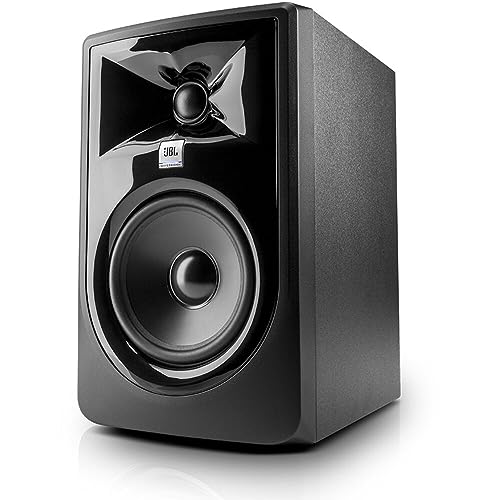
(2) JBL 305P MkII 5" 2-Way Active Powered Studio Reference Monitors Speakers
Disclosure: We may earn a commission when you buy through links on this page, at no extra cost to you. As an Amazon Associate I earn from qualifying purchases. Learn more
Highlights
- PACKAGE INCLUDES: (2) 305P MkII 5 2-Way Powered Studio Reference Monitor Monitoring Speaker
- CRYSTAL-CLEAR IMAGING: 305P MkII’s patented Image Control Waveguide delivers precise, immersive sound with a wide sweet spot, ideal for music production and podcasting.
- POWERFUL, REFINED AUDIO: Dual 41-Watt Class-D amplifiers in the 305P MkII ensure dynamic range and deep bass via a 5-inch woofer and Slip Stream port, perfect for cinematic sound design.
- TAILORED STUDIO FIT: 305P MkII’s Boundary EQ and HF Trim adjust low and high frequencies to suit any room, ensuring accurate mixes for vloggers and producers.
- ROBUST, VERSATILE DESIGN: Built with 70-year expertise, the 305P MkII offers XLR/TRS inputs and a sleek MDF enclosure, rigorously tested for 100-hour reliability.
Why You'll Love It
- Image Control Waveguide helps create a clear stereo image across a wider listening area
- Separate 41 watt Class D amplifiers support dynamic audio through each monitor's woofer and tweeter system
- Five inch woofer and Slip Stream port provide bass support for music and cinematic sound work
- Boundary EQ and HF Trim let you adjust low and high frequencies for your room
- XLR and TRS inputs offer connection options for compatible studio equipment
- Two powered monitors are included, giving you a pair for a studio monitoring setup
Pros
- +Image Control Waveguide for a wider listening sweet spot
- +Dual 41 watt Class D amplification
- +Boundary EQ and HF Trim adjustments
- +XLR and TRS input options
- +Pair of powered monitors included
Cons
- -Five inch woofer limits the available speaker size options
- -Room specific sound adjustments require user decisions
- -Designed around studio monitoring rather than a general purpose speaker brief
Detailed Review
The JBL 305P MkII studio monitors are a practical choice for music production and podcasting, especially for buyers who want a pair of powered speakers with room adjustment controls. Their main appeal is the combination of a five inch woofer, separate amplification, and an Image Control Waveguide designed to help listeners hear a more precise stereo image across a wider sweet spot. Rather than relying on a single headline feature, the design brings together sound presentation, connection options, and frequency adjustments that support a dedicated monitoring setup.
The Image Control Waveguide is a key reason to consider this model. JBL describes it as a way to improve imaging and create a wider area in which the stereo presentation remains useful. That matters when evaluating music, spoken audio, or other production work, since the monitoring experience is part of how you judge the material being created. The monitors are also described as suitable for cinematic sound design, extending their intended role beyond recording music alone. These are powered speakers, so the package centers on the monitors themselves rather than passive speakers that need separate amplification.
Each 305P MkII uses dual 41 watt Class D amplifiers, a five inch woofer, and a Slip Stream port. Together, these are intended to provide dynamic audio and bass support. Boundary EQ and HF Trim give you controls for adjusting low and high frequencies to suit the room. This is useful for shoppers who want some flexibility when positioning their monitoring setup, rather than treating the speakers as fixed sound sources with no tonal adjustment. XLR and TRS inputs provide two connection types to consider when matching the monitors with existing equipment.
The main trade-off is that this is a specific studio monitoring design, not an all purpose speaker system described for every listening situation. The five inch woofer is a defined part of the package, and buyers should consider whether that speaker format suits their workspace and intended projects. The room adjustment controls also make placement and listening priorities worth thinking through before settling on a setup. The MDF enclosure and the seller's stated 100 hour reliability testing are part of the design description, but they should not be treated as a guarantee of a particular lifespan.
Verdict: Choose these JBL 305P MkII studio monitor speakers if you produce music, podcasts, or cinematic sound and want powered monitors with imaging features and adjustable frequency controls. If your priority is a different speaker format or a system aimed at a different primary use, compare alternatives that more directly match that need.
Who Should Buy It
A great fit if you:
- You produce music and want a pair of powered monitors designed to support clear stereo imaging while evaluating your work.
- You record or edit podcasts and want speakers intended for monitoring spoken audio during your production process.
- You create cinematic sound and want monitors whose listed features include bass support and room related frequency adjustments.
- You already use studio equipment with XLR or TRS connections and want to compare a monitor pair with those connection options.
- You want to adjust low and high frequencies to better suit the room where you work.
Consider something else if you:
- You need a larger speaker format, in which case a model with a larger woofer may suit your preferred setup better.
- You mainly want general entertainment speakers rather than monitors intended for music production, podcasting, and cinematic sound work.
Before You Buy
Confirm on the listing:
- Measure the intended placement area and check the complete dimensions of each monitor so the pair fits your workspace.
- Check whether your existing equipment provides compatible XLR or TRS connections and confirm which input you plan to use.
- Verify that the package includes the two 305P MkII monitors described by the seller, along with any additional items you expect to receive.
- Review the manufacturer's setup and care instructions, including any requirements relevant to powering and positioning the speakers.
How to compare your options: Start with the type of work you do, the speaker size you want, and the connections available in your existing setup. Then compare the room adjustment features, imaging approach, amplification, and woofer design. These JBL monitors combine a five inch woofer with dual 41 watt Class D amplification, an Image Control Waveguide, Boundary EQ, and HF Trim. Decide which of those features directly supports your workflow before choosing between models.
Getting the Most From It
Begin by choosing a placement arrangement that suits your workspace and intended listening position. Keep the pair arranged consistently so you can make meaningful judgments about stereo placement when working on music, podcasts, or cinematic audio. Follow the manufacturer's setup guidance when connecting and positioning the monitors.
Use the Boundary EQ and HF Trim controls deliberately. Consider the low and high frequency balance you want to evaluate, and make adjustments with your room and listening needs in mind. Avoid changing several settings without paying attention to what each adjustment is intended to address.
Check your equipment connections before getting started. The monitors provide XLR and TRS inputs, so identify the connection type that matches your existing equipment and confirm the appropriate setup instructions. A deliberate connection check can help keep your workflow organized.
For ongoing care, follow the manufacturer's cleaning and maintenance guidance. Keep the controls and connections in mind when arranging the surrounding workspace, and review the instructions before changing the setup. Treat the room adjustments as tools for your monitoring workflow, not as a substitute for choosing a suitable placement.
FAQ
What comes with the JBL 305P MkII?
The package includes two 305P MkII five inch, two way powered studio reference monitors. Check the listing for any additional accessories you expect to receive.
Are these speakers suitable for music production?
Yes, they are described as studio reference monitors for music production. The Image Control Waveguide is intended to support precise imaging and a wider listening sweet spot.
Can I use these monitors for podcasting?
Yes, podcasting is one of the stated uses. Their powered design and monitoring focused features make them worth considering for a podcast production workspace.
What connections do the JBL 305P MkII monitors have?
They have XLR and TRS inputs. Check your existing equipment and the listing details to confirm which connection is appropriate for your setup.
Can I adjust the sound for my room?
Yes, Boundary EQ and HF Trim let you adjust low and high frequencies. The listing does not establish a specific setting for every room, so consult the setup instructions and adjust according to your monitoring needs.
Product Details
| Brand | JBL |
| ASIN | B088VSBV65 |