ASUS
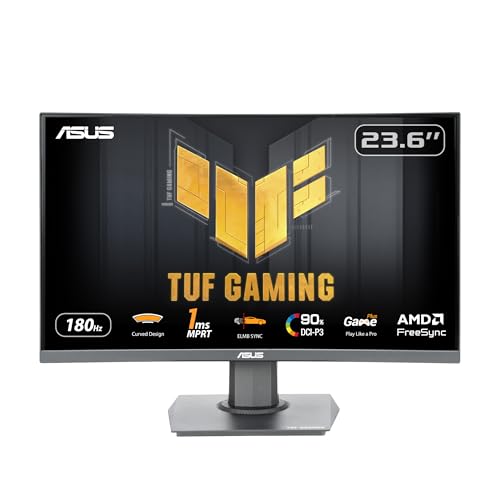
ASUS TUF Gaming 24 Inch 1080p 180Hz Curved FreeSync Gaming Monitor | ELMB Sync, 1ms, 1500R Curve, Shadow Boost, DisplayWidget Center, DCI-P3 90%, Eye Care Plus, ,3yr warranty
Disclosure: We may earn a commission when you buy through links on this page, at no extra cost to you. As an Amazon Associate I earn from qualifying purchases. Learn more
Highlights
- Immersive Curved Display: 23.6-inch Full HD 1500R curved gaming monitor with ultra-fast 180Hz refresh rate designed for professional gamers and immersive gameplay
- Ultra-Fast Response Time: 1ms MPRT response time for smooth gameplay, and ASUS Extreme Low Motion Blur (ELMB ) SYNC technology to further reduce ghosting and motion blur
- Seamless Gaming Experience: FreeSync delivers a tear-free gaming experience by enabling VRR (variable refresh rate) by default
- Enhanced Dark Scene Visibility: Shadow Boost enhances image details in dark areas, brightening scenes without over-exposing bright areas
- Robust Connectivity: DisplayPort (v1.2) and HDMI (v2.0) x2 ports for versatile device compatibility
- Complete Package Contents: DisplayPort cable, Power cord & adapter, L-shaped Screwdriver, Quick start guide, Warranty Card
- Free 3-month Adobe Creative Cloud Subscription: Receive complimentary access with the purchase of this product (offer valid to 8/31/2028)
- Superior Color Accuracy: Covers 90% of the DCI-P3 color gamut delivering vibrant contrast and lifelike colors for enhanced visual experience
- Eye Comfort Technology: Eye Care features reduce eye strain during extended gaming sessions for comfortable long-term use
Why You'll Love It
- Delivers ultra-smooth motion during fast-paced play via an 180Hz refresh rate and 1ms response time
- Wraps the field of view around your setup using a 1500R curved Full HD panel
- Minimizes screen tearing and stuttering automatically through built-in FreeSync technology
- Brightens shadow details across dark in-game scenes without blowing out the highlights
- Covers 90% of the DCI-P3 color gamut to render vibrant and lifelike visuals
Pros
- +180Hz refresh rate
- +1500R curved display
- +FreeSync variable refresh rate
- +Shadow Boost technology
- +Includes DisplayPort cable
Cons
- -Only includes one DisplayPort 1.2 version
- -Requires external audio setup
Detailed Review
An ASUS TUF Gaming 24 Inch 1080p 180Hz Curved FreeSync Gaming Monitor brings high refresh performance and a wrapped field of view directly to your desk. Designed for fast-paced sessions, this display pairs a quick response time with variable refresh technology to keep motion looking sharp and free of visual artifacts. The combination of a Full HD resolution on a compact screen size keeps pixel density high, ensuring text remains crisp for everyday tasks alongside gaming.
At the core of its visual performance is a fast 180Hz refresh rate, paired with a 1ms MPRT response time that reduces ghosting during rapid camera movements. The 1500R curvature draws you deeper into virtual worlds by wrapping the edges slightly toward your eyes. To keep motion even cleaner, ELMB Sync works alongside variable refresh rate technologies like FreeSync, letting you eliminate screen tearing without introducing stutter. Color reproduction stands out too, covering 90% of the DCI-P3 color gamut to deliver vibrant hues and realistic contrast that elevate standard gaming visuals.
Dark environments often hide crucial details, but Shadow Boost addresses this by intelligently brightening murky corners without washing out the rest of the image. When you settle in for extended stretches, built-in Eye Care technology works to reduce eye strain, making long sessions more comfortable. Connectivity options include two HDMI 2.0 ports and a DisplayPort 1.2 connection, allowing you to plug in multiple devices like consoles and PCs without constantly swapping cables.
Hardware trade-offs on a display like this usually center around physical adjustments and port generations. While you get versatile connection options, the included DisplayPort runs on version 1.2, which meets standard bandwidth needs for this resolution and refresh rate but lacks newer specification features. The stand design relies on the included components, and desk space requirements will depend on the physical footprint of the curved chassis and its base.
Verdict: This curved gaming monitor suits players who want high refresh rates, smooth variable synchronization, and vibrant colors in a compact form factor. Anyone requiring ultra-high 4K resolutions or advanced multi-display port standards for professional video work might want to explore alternative specifications.
Who Should Buy It
A great fit if you:
- Play fast-paced games and need an ultra-fast 180Hz refresh rate to eliminate motion blur and stutter.
- Want an immersive field of view from a 1500R curved display that fits comfortably on a standard desk.
- Need variable refresh rate technology through FreeSync to keep your gameplay smooth and tear-free.
- Desire vibrant and lifelike visuals powered by 90% DCI-P3 color gamut coverage.
- Spend long hours at your desk and want built-in eye comfort technology to reduce eye strain.
Consider something else if you:
- Require a higher resolution panel like 4K for detailed graphic design work or high-end media production.
- Need a larger screen size with a flat panel rather than a curved display format.
- Demand modern DisplayPort versions beyond version 1.2 for advanced multi-display daisy chaining.
Before You Buy
Confirm on the listing:
- Check whether the physical stand offers height, tilt, or swivel adjustments that match your desk setup.
- Measure your available desk space to ensure the curved chassis and its base fit comfortably.
- Verify that your computer or console has compatible HDMI 2.0 or DisplayPort 1.2 outputs to match the monitor ports.
- Check the exact contents included in the box to see if the power adapter and cables meet your immediate installation needs.
How to compare your options: When shopping for a display, focus on how refresh rates, response times, and panel curves align with your primary use case. Compare the color gamut coverage and adaptive sync support against your graphics hardware to ensure smooth performance. Check whether the included cable selection and port variety match the devices you plan to connect.
Getting the Most From It
Set up your display on a stable, flat surface using the included L-shaped screwdriver to secure the stand components firmly. Connect your video source using either the supplied DisplayPort cable or an HDMI cable plugged into one of the available HDMI 2.0 ports.
Navigate the on-screen menu or use the DisplayWidget Center software to adjust settings like Shadow Boost for dark scenes and ELMB Sync for motion clarity. Enable FreeSync in your graphics card settings to ensure variable refresh rates are active by default.
Keep the screen clean by wiping it gently with a dry or slightly damp microfiber cloth as recommended for electronic displays. Take advantage of the included Adobe Creative Cloud subscription if you plan to edit photos or design graphics.
FAQ
What accessories come in the box?
The complete package contains a DisplayPort cable, a power cord and adapter, an L-shaped screwdriver, a quick start guide, and a warranty card.
What ports are available for connecting devices?
It features robust connectivity with one DisplayPort 1.2 port and two HDMI 2.0 ports for versatile device compatibility.
Does this monitor help with dark scenes in games?
Yes. Shadow Boost enhances image details in dark areas by brightening scenes without over-exposing the bright areas.
Is there any software included to control monitor settings?
Yes, it supports DisplayWidget Center for managing your display options conveniently.
Does the purchase include any software subscriptions?
Yes, it includes a free 3-month Adobe Creative Cloud subscription with complimentary access valid through August 31, 2028.
Product Details
| Brand | ASUS |
| ASIN | B0CXS73LRP |