ASUS
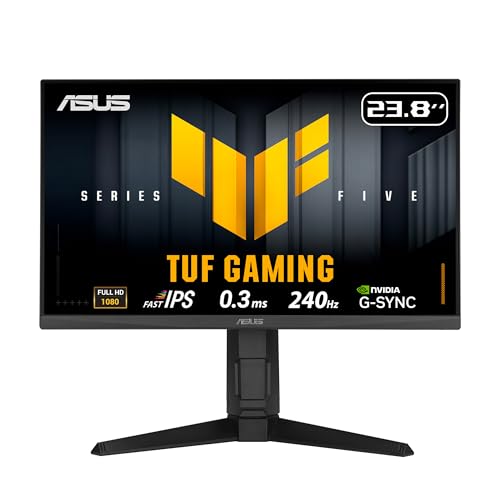
ASUS TUF Gaming VG249QML5A 24 Inch 1080p 240Hz G-SYNC Gaming Monitor | ELMB Sync, FreeSync Premium, Gaming AI, Fast-IPS, 0.3ms, 99% sRGB,Extreme Low Motion Blur Sync, Ergonomic Stand,3yr warranty,
Disclosure: We may earn a commission when you buy through links on this page, at no extra cost to you. As an Amazon Associate I earn from qualifying purchases. Learn more
Highlights
- Full HD Fast IPS Display: 23.8" Full HD (1920 x 1080) Fast IPS panel with 240Hz refresh rate for fast paced gameplay
- Ultra-Fast Response Time: ASUS Fast IPS technology enables a 0.3ms (min) response time for sharp gaming visuals with high frame rates
- Adaptive Sync Technology: FreeSync Premium and G-Sync compatible delivers a seamless, tear-free gaming experience
- Advanced Motion Blur Reduction: ASUS Extreme Low Motion Blur Sync (ELMB SYNC) technology enables ELMB together with variable refresh rate, eliminating ghosting and tearing for sharp gaming visuals with high frame rates
- Convenient Monitor Control: DisplayWidget Center enables easy OSD access and monitor settings adjustments with a mouse
- Enhanced Color Accuracy: 99% sRGB color gamut coverage ensures vibrant and accurate color reproduction for immersive gaming and content creation
- Ergonomic Design: Height adjustable stand allows you to customize viewing position for maximum comfort during extended gaming sessions
- Comprehensive Warranty Coverage: Backed by a 3 year warranty for peace of mind and long-term reliability
- Free 3-month Adobe Creative Cloud Subscription: Receive complimentary access with the purchase of this product (offer valid to 8/31/2028)
Why You'll Love It
- Experience rapid and responsive visuals with a 240Hz refresh rate designed for fast-paced gaming sessions
- Enjoy sharp and clear graphics during intense motion thanks to an ultra-fast 0.3ms minimum response time
- Eliminate screen tearing and ghosting with advanced Extreme Low Motion Blur Sync combined with variable refresh rate
- Customize your viewing setup easily with an ergonomic height-adjustable stand built for extended play
- Manage monitor settings conveniently using your mouse via the DisplayWidget Center interface
Pros
- +Fast IPS panel technology
- +240Hz refresh rate
- +0.3ms response time
- +FreeSync Premium and G-Sync compatible
- +Height adjustable ergonomic stand
Cons
- -1080p resolution limits detail
- -Basic 23.8 inch screen size
Detailed Review
The ASUS TUF Gaming VG249QML5A 24 Inch 1080p 240Hz G-SYNC Gaming Monitor brings high speed performance to your desk setup through a Fast IPS panel engineered for fast-paced gameplay. If you spend your time reacting quickly in competitive matches, this display focuses heavily on smooth motion and responsive input rather than ultra-high resolutions. It targets players who prioritize frame rates and motion clarity above all else, ensuring that fast movements remain sharp and distinct.
At the core of this monitor is a 240Hz refresh rate paired with ASUS Fast IPS technology, which achieves a minimum response time of 0.3ms. This combination means that visual transitions happen rapidly, reducing the blur that often trails fast-moving objects on screen. Whether you are tracking targets or looking around quickly, the display keeps up with high frame rates from your computer without missing a beat. Color reproduction is also handled well, with 99 percent sRGB color gamut coverage providing vibrant and accurate visuals for both games and content creation tasks.
To maintain smooth visuals without distracting artifacts, the monitor supports both FreeSync Premium and G-Sync compatibility. This adaptive sync technology synchronizes the display refresh rate with your graphics card to prevent tearing. Furthermore, ASUS Extreme Low Motion Blur Sync, known as ELMB Sync, allows you to run motion blur reduction at the same time as variable refresh rates, effectively eliminating ghosting while keeping your gameplay tear-free.
Practical usability extends beyond raw performance features. You can adjust the ergonomic height-adjustable stand to find a comfortable viewing position during long sessions. Monitor control is simplified through the DisplayWidget Center, letting you access the on-screen display and adjust settings directly with your mouse instead of fumbling with physical buttons on the back of the panel. Buyers also receive a free three-month Adobe Creative Cloud subscription.
While the display excels in speed and motion handling, the 1080p resolution on a 23.8-inch screen means it prioritizes performance over ultra-sharp pixel density. It may not satisfy those who want sprawling workspace real estate or 4K clarity for cinematic media. Verdict: This gaming monitor is an ideal pick for competitive players who need high refresh rates and advanced motion blur reduction, though users seeking higher resolutions for detailed design work might want to explore other options.
Who Should Buy It
A great fit if you:
- Play fast-paced competitive games where a 240Hz refresh rate and quick response times give you a competitive edge
- Want to eliminate screen tearing and ghosting using adaptive sync and advanced motion blur reduction technologies
- Need an ergonomic height-adjustable stand to maintain comfort during extended computer sessions
Consider something else if you:
- Require a higher resolution display for ultra-sharp text and detailed 4K content creation
- Prefer a larger screen size for immersive single-player cinematic experiences and expansive multitasking windows
Before You Buy
Confirm on the listing:
- Check whether your computer graphics card supports the required video outputs to drive a 240Hz refresh rate at 1080p resolution
- Measure your desk space to ensure the 23.8-inch physical footprint and ergonomic stand fit comfortably in your gaming area
- Verify which connection cables are included in the box so you can hook up your system right away
How to compare your options: When evaluating gaming displays, focus primarily on how refresh rates, response times, and adaptive sync technologies match your system capabilities. This model leans heavily into high-speed motion handling and color accuracy via its sRGB coverage, making it a strong contender if you value smooth competitive performance over sheer pixel count. Check whether competing models offer similar ergonomic stands and software control features to ensure you get the right balance of daily convenience.
Getting the Most From It
To get the best performance out of your hardware, ensure your computer output is set to utilize the full 240Hz refresh rate in your display settings. Enabling FreeSync Premium or G-Sync through your graphics card control panel will help keep motion smooth and free of tearing.
Take advantage of the DisplayWidget Center software to adjust your monitor settings and color profiles easily with your mouse rather than navigating built-in physical menus. If you work with creative applications, remember to redeem your complimentary three-month Adobe Creative Cloud subscription following the instructions provided with your purchase.
Position the ergonomic height-adjustable stand so that the top of the screen sits at or slightly below eye level, helping you maintain a comfortable posture during extended sessions. Keep the panel clean by wiping it gently with a soft, dry cloth as recommended for electronic displays.
FAQ
What is the screen size and resolution?
The display features a 23.8-inch Full HD panel with a resolution of 1920 by 1080 pixels.
Does it support adaptive sync technologies?
Yes, it is compatible with both FreeSync Premium and G-Sync to deliver a tear-free gaming experience.
How do I adjust the monitor settings?
You can use the DisplayWidget Center software to easily access and adjust OSD monitor settings directly with your mouse.
What is included with the warranty?
The product is backed by a three-year warranty for long-term reliability and peace of mind.
Are there any software bonuses included?
Yes, the purchase includes a free three-month Adobe Creative Cloud subscription, with offers valid up to a specified date.
Product Details
| Brand | ASUS |
| ASIN | B0FP1FDQ2Y |