AULA
AULA S99 Wireless Keyboard,99 Key Computer Gaming Keyboards with Number Pad
Disclosure: We may earn a commission when you buy through links on this page, at no extra cost to you. As an Amazon Associate I earn from qualifying purchases. Learn more
Highlights
- Full Key Programmable: This custom keyboard supports full-key macro programming to create exclusive shortcut operations, helping you trigger complex commands with a single click and be a step ahead in the game. The unique dual-mode knob design of the black and white keyboard wireless allows you to quickly switch between gaming and office modes. In addition, with 3 programmable shortcut keys (M1/M2/M3), the usb keyboard lets you easily set up personalized functions to improve operational efficiency
- Vibrant RGB Keyboard: The led keyboard comes with 16.8 million RGB color and 16 preset light effects add more fun to your desktop. With the knob or FN+ key combination, you can freely adjust the brightness and speed of the cute keyboard's lights to create an exclusive atmosphere(FN+END can switch backlit colour effect). With the macro software, you can also customize the lights to make your silent backlit keyboard truly unique and enjoy an immersive visual experience whether you are working or gaming
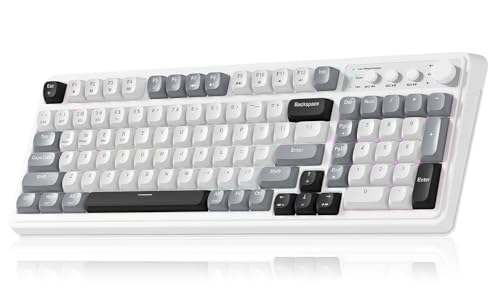
- 99 Keys Compact Ergonomic Keyboard: This 96% layout retro keyboard combines vintage aesthetics with modern craftsmanship, and the integrated numeric keypad retains the familiar typing experience while freeing up more desktop space. This aula keyboard is equipped with a foldable two-stage stand, you can adjust the angle of the clicky keyboard according to your needs, reducing the pressure on your wrists and creating a more comfortable typing experience
- Multi-device Connectivity: AULA light up keyboard supports Bluetooth 5.0, 2.4GHz wireless and USB-C wired connectivity modes, enjoying convenient switching anytime, anywhere. Up to 5 devices can be connected at the same time, one key switch, no need to pair repeatedly. Whether it's for office, gaming or mobile use, this typewriter keyboard delivers a seamless experience for another level of efficiency
- Gaming Keyboard: All keys on this aula s99 wireless keyboard support macro customization, which allows you to record and edit macros to program a series of complex actions into a key, useful in very real-time games for amateur gamers.If you have very strict requirements for game response speed, it is recommended that you purchase a mechanical keyboard priced at $50 or more, which is more suitable for professional gamers.The aula s99 pc keyboard is compatible with Windows XP/7/8/10, Mac, Android and iOS. Please NOTE: this product is a membrane keyboard not mechanical keyboard and this doesn't support hot-swapping
Why You'll Love It
- Connects up to five devices using Bluetooth 5.0, 2.4GHz wireless, or USB-C wired mode
- Space-saving 99-key 96% layout keeps a dedicated numeric keypad on your desktop
- Customizable per-key macros and three dedicated shortcut keys streamline complex daily inputs
- Vibrant backlighting with 16.8 million colors and 16 preset lighting patterns
- Dual-mode control knob lets you quickly alternate between office and gaming configurations
- Two-stage adjustable feet allow you to change typing angles to reduce wrist strain
Pros
- +Supports five connected devices simultaneously
- +Includes numeric pad in compact footprint
- +Full-key macro recording via software
- +Multiple wireless and wired connection options
- +Integrated multi-function control knob
Cons
- -Membrane switches do not support hot-swapping
- -Not built for competitive professional gaming
Detailed Review
A computer gaming keyboard should deliver flexibility across daily workloads, and the AULA S99 focuses on combining full data entry with wireless freedom. Featuring a 96% layout with 99 keys, it preserves the standard numeric pad while trimming down the extra width of standard boards. This frees up practical mouse surface on your desk without forcing spreadsheet users or number crunchers to abandon their familiar number pad layout.
Connectivity is a core strength of this unit. It supports three distinct connection methods, including Bluetooth 5.0, 2.4GHz wireless, and a USB-C wired hookup. You can link up to five individual devices at the same time, switching between them with a single keypress. Whether you move between a desktop PC, a laptop, an iPad, or an Android phone, you do not have to endure repeated pairing routines to change your active screen.
For customization, the board provides full-key macro programming through dedicated software, letting you bind sequences to a single press. It also carries three dedicated shortcut keys labeled M1, M2, and M3, alongside a dual-mode control knob that instantly flips settings between gaming and office modes. Backlighting features 16.8 million RGB colors with 16 preset effects, which you can adjust in brightness, color, and speed directly via FN key combos or the physical knob.
It is important to understand the switch construction before deciding. This is a membrane keyboard rather than a mechanical model, and it does not feature hot-swappable switch sockets. While it offers deep customization for casual play and everyday work, the seller notes that professional players who require ultra-fast input speeds should look toward mechanical alternatives designed specifically for high-level competition.
Verdict: The AULA S99 is an adaptable computer gaming keyboard that suits amateur gamers, students, and home-office typists seeking compact numeric input and multi-device wireless pairing. Dedicated competitive gamers looking for mechanical switch responsiveness or hardware modifications should look elsewhere.
Who Should Buy It
A great fit if you:
- Need a dedicated number pad for office tasks but want to save desk space with a compact 96% frame.
- Switch frequently throughout the workday across multiple computers, phones, or tablets using Bluetooth, 2.4GHz, and USB-C.
- Enjoy custom lighting profiles and want physical hardware controls like a mode knob and shortcut keys.
- Want simple macro programming for casual gaming without the higher cost of complex equipment.
Consider something else if you:
- Demand mechanical switches with modular hot-swap sockets for personalized hardware modifications.
- Compete in professional esports and require the absolute fastest input response speeds available from high-end gear.
Before You Buy
Confirm on the listing:
- Check which operating system version you run, as software and layout support covers Windows XP, 7, 8, 10, Mac, Android, and iOS.
- Verify whether the USB-C cable and 2.4GHz wireless receiver dongle are included in the package.
- Check the physical dimensions to ensure the 96% 99-key footprint fits your designated tray or desk mat.
- Confirm that your primary use cases match a membrane key feel rather than mechanical switches.
How to compare your options: Start by examining the switch mechanism and connection flexibility. If you swap between multiple computers and mobile devices daily, a model that manages five active connections across Bluetooth, 2.4GHz, and wired USB-C provides distinct convenience over single-mode boards. However, remember to weigh switch technology, as membrane keys deliver a different experience than mechanical options.
Getting the Most From It
Set up your workspace by unfolding the integrated two-stage feet to the angle that keeps your wrists resting naturally during long typing sessions. Take advantage of the three connection options by pairing your primary desktop via the 2.4GHz receiver or USB-C cable, while reserving the Bluetooth slots for secondary hardware like laptops or tablets.
Install the compatible macro configuration software to record complex sequences for games or routine productivity tasks, assigning them to the M1, M2, and M3 programmable keys. Use the dual-mode knob to switch between game and office profiles on the fly. To adjust visual preferences without opening software, remember that using the knob or pressing the FN key combinations (such as FN+END) lets you cycle through light effects and modify speed and brightness instantly.
FAQ
Is this a mechanical keyboard?
No, this model uses membrane switch technology. It is not a mechanical keyboard and it does not support hot-swappable switches.
How many devices can connect at once?
You can connect up to five devices simultaneously using Bluetooth 5.0, 2.4GHz wireless, and a USB-C wired connection, switching between them with a single keypress.
Which operating systems are compatible?
It works with Windows XP, Windows 7, Windows 8, Windows 10, Mac, Android, and iOS devices.
Can I adjust the typing angle?
Yes, it features a foldable two-stage stand that allows you to set the keyboard angle to reduce wrist strain.
How do I change the RGB lighting without software?
You can adjust lighting speed, brightness, and colors directly using the multi-mode knob or onboard shortcuts like FN+END.
Product Details
| Brand | AULA |
| ASIN | B0DXL239W1 |