BAMBULAB
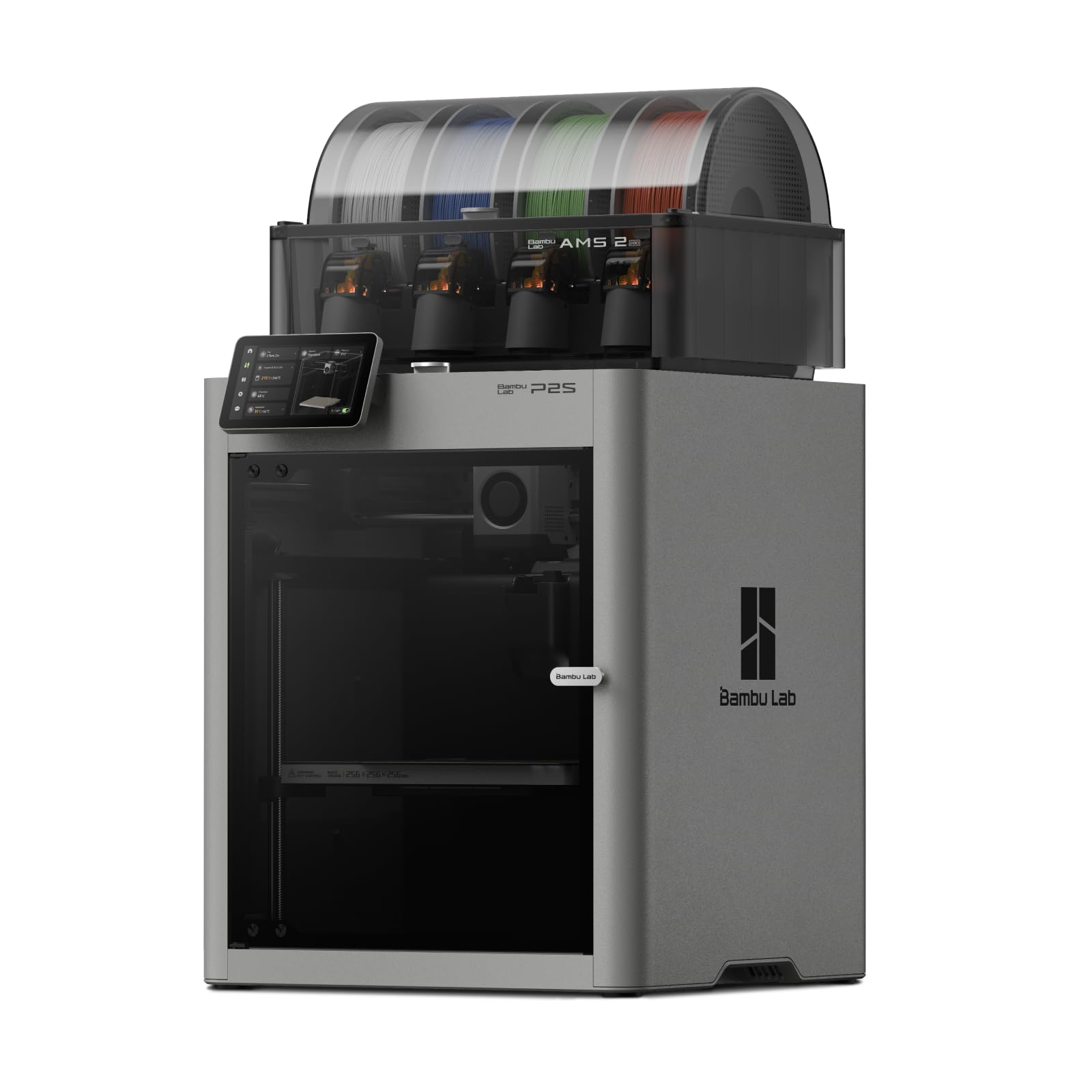
Bambu Lab P2S Combo, P2S 3D Printer & AMS 2 Pro, Multi-Color 3D Printing
Disclosure: We may earn a commission when you buy through links on this page, at no extra cost to you. As an Amazon Associate I earn from qualifying purchases. Learn more
Highlights
- High-Speed Precision: The Bambu Lab P2S 3D printer prints up to 600 mm/s while maintaining exceptional accuracy. With the PMSM Servo Extruder and Active Flowrate Compensation, every layer of your printed object stays sharp and smooth, delivering flawless corners and consistent results.
- Ready to Print in 15 Minutes: Set up your P2S FDM 3D printer and start printing in just 15 minutes. With AI failure detection, quick-swap nozzles, and automatic calibration, this 3D printer makes professional-grade 3D printing effortless, even for beginners.
- Effortless Multi-Color Printing: The AMS 2 Pro enables seamless multi-color/multi-material 3D printing. It features built-in filament drying at up to 65 °C, keeping every spool ready for flawless prints. (Note: The P2S 3D printer does not support multi-color printing; Combo version required.)
- Smart Airflow for Any Filament: The Adaptive Airflow System automatically balances cooling and heat retention—keeping overhangs crisp with cool air, or maintaining a 50 °C chamber for engineering-grade materials. A carbon filter ensures clean, safe air while you print.
- Limitless Creativity, Seamless Workflow: Explore over one million 3D models on MakerWorld and bring them to life with a smooth, unified workflow using Bambu Studio, Bambu Handy, and your FDM 3D printer, from design to finished print.
Why You'll Love It
- Fast printing speed with precision controls helps create detailed models efficiently
- Automatic calibration and AI detection simplify setup for newer makers
- AMS 2 Pro enables multi-color and multi-material creative projects
- Adaptive airflow helps balance cooling and heat retention for different filaments
- Connected design works with MakerWorld and Bambu software tools
Pros
- +High speed printing
- +Automatic calibration features
- +Multi-color printing support
- +Built-in filament drying
- +Integrated software workflow
Cons
- -Combo required for multi-color printing
- -Larger feature set to learn
- -Depends on supported workflows
Detailed Review
Bambu Lab P2S 3D Printer stands out for makers who want a fast, automated printing workflow with multi-color options through the included AMS 2 Pro. This FDM 3D printer is designed for people creating models, prototypes, and projects who want less manual adjustment between setup and finished prints.
The P2S focuses on speed and print consistency with printing speeds up to 600 mm/s and a PMSM Servo Extruder with Active Flowrate Compensation. In everyday use, these features are intended to help maintain sharp layers, smooth surfaces, and consistent results throughout a print. Automatic calibration and quick-swap nozzles are also designed to reduce the effort involved in preparing the printer for a project.
The AMS 2 Pro adds another layer of flexibility by enabling multi-color and multi-material 3D printing. It also includes built-in filament drying up to 65 °C, helping keep filament ready for printing. The Adaptive Airflow System adjusts cooling and heat retention, with the ability to maintain a 50 °C chamber for engineering-grade materials. A carbon filter is included as part of the airflow system.
Another benefit is the connected workflow across Bambu Studio, Bambu Handy, and MakerWorld. Access to over one million 3D models on MakerWorld gives users a place to find projects, while the software tools are designed to connect the process from selecting a model to creating a finished print. The trade-off is that the full feature set may be more than a casual user needs, and multi-color printing depends on using the Combo version with AMS 2 Pro. The printer also requires learning how its automated systems and software fit into your preferred workflow.
Verdict: The Bambu Lab P2S 3D Printer is a strong fit for creators who want a feature-rich FDM printer with automated setup, high-speed printing, and multi-color capabilities. Buyers who only need basic single-color printing may prefer a simpler option with fewer advanced features.
Who Should Buy It
A great fit if you:
- Want a 3D printing setup that reduces manual preparation during regular projects.
- Create models where multiple colors or materials add value to the finished design.
- Prefer having software tools and model sources connected in one workflow.
- Need a printer aimed at detailed projects rather than occasional simple prints.
Consider something else if you:
- Only need basic printing tasks and would rather choose a simpler 3D printer.
- Prefer a different workflow that does not rely on connected printing tools.
Before You Buy
Confirm on the listing:
- Check whether the included setup matches the projects you plan to create and your available space.
- Check what is included in the box if you need specific accessories or supplies for your workflow.
- Confirm compatibility with the filaments, software, or models you already plan to use.
- Check whether your preferred printing process works with the Combo version features.
How to compare your options: Compare 3D printers by the features that matter most for your projects, including speed, automation, multi-color capability, and workflow options. The P2S stands out for combining automatic calibration, Active Flowrate Compensation, AMS 2 Pro support, and software connections. Consider which features you will actually use before choosing a setup.
Getting the Most From It
Use the automatic calibration features as part of your normal setup routine to help prepare the printer for projects. If the printer includes instructions or a manual, follow the recommended setup and care steps before starting regular use.
Take advantage of Bambu Studio, Bambu Handy, and MakerWorld together to create a smoother path from choosing a model to completing a print. Organizing your projects through the connected workflow can help you make better use of the available tools.
Use the AMS 2 Pro features when your projects need multiple colors or materials. Keep filament prepared through the built-in drying function as recommended for your printing process.
Pay attention to airflow settings and printing conditions for the filament you choose. Following the recommended care guidance can help maintain the printer experience over time.
FAQ
Does the Bambu Lab P2S support multi-color printing?
Yes, the Combo version supports multi-color and multi-material printing through the AMS 2 Pro. The P2S printer by itself does not support multi-color printing, so the Combo version is required for that feature.
What is included with the Bambu Lab P2S Combo?
The product includes the P2S 3D printer and AMS 2 Pro according to the product name. The AMS 2 Pro adds multi-color and multi-material printing features.
Is this 3D printer suitable for beginners?
Yes, the product is designed to simplify printing for beginners with automatic calibration, AI failure detection, and quick-swap nozzles. These features are intended to reduce setup effort.
Can I find models to print with this printer?
Yes, MakerWorld provides access to over one million 3D models. The workflow also connects with Bambu Studio and Bambu Handy.
How does the printer handle different filaments?
The printer uses an Adaptive Airflow System to balance cooling and heat retention, and it includes a carbon filter. Check the listing for specific filament compatibility before choosing materials.
Product Details
| Brand | BAMBULAB |
| ASIN | B0FT818HCH |