BenQ
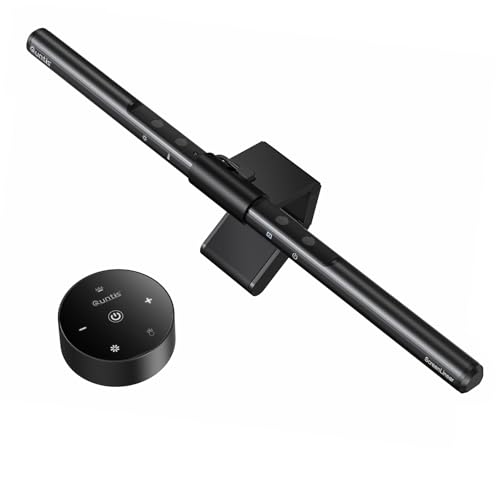
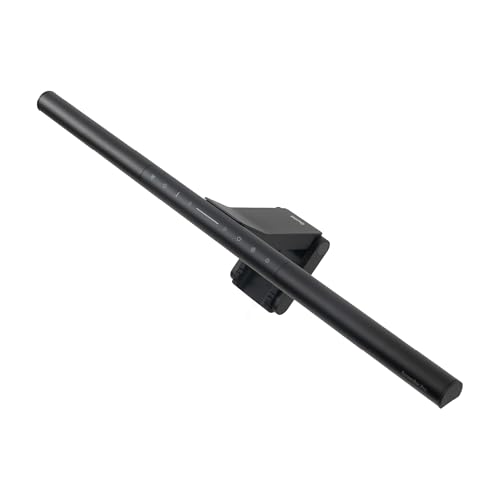
BenQ ScreenBar Pro LED Monitor Light Bar (Black) - Ultrawide Lighting, Motion Sensor, Adjustable Brightness/Color Temperature, Eye-Care USB-C Monitor lamp, No Glare, Curved Monitors, Monitor accessory
Disclosure: We may earn a commission when you buy through links on this page, at no extra cost to you. As an Amazon Associate I earn from qualifying purchases. Learn more
Highlights
- BRIGHT AND ULTRAWIDE ILLUMINATION – ScreenBar Pro offers over 1000lx central brightness and a 500lx range within 33"x20" (85cmx50cm), outperforming most desk lamps and enhancing eye comfort with ample illumination.
- HIGH COMPATIBILITY – Fits monitors 0.17" - 2.56" (0.43cm-6.5cm) thick and curvature 1000-1800R. Patented clamp design accommodates monitors with special back designs or non-flat top bezel. Easy setup and no blocking to camera lens.
- MOTION SENSOR – The ultrasonic motion sensor detects movements within a 24"±4" (60cm±10cm) diameter range, automatically lighting up when you're nearby and shutting down after 5 mins of absence to save energy.
- ASYM-LIGHT TECHNOLOGY– ScreenBar Pro's unique asymmetrical optics prevents screen reflection and direct glare, lighting up the desktop for enhanced productivity while reducing eye strain.
- SPACE SAVING – ScreenBar Pro integrates convenient function buttons for easy adjustments and sits directly on monitors to save desk space. Powered via USB-C or with the included adapter for flexible use.
Why You'll Love It
- Lights a broad desktop area, with central brightness exceeding 1000 lux and 500 lux coverage across 33 by 20 inches
- Asymmetrical optics direct light toward your workspace while helping prevent screen reflections and direct glare
- Motion sensing switches the light on when you approach and off after five minutes away
- Adjustable brightness and color temperature let you tailor the lighting to your working preferences
- The adjustable clamp accommodates monitors of different thicknesses and curved screens within the stated compatibility range
- USB-C power or the included adapter provides flexibility, while the monitor mounted design preserves desk space
Pros
- +Broad desktop illumination
- +Adjustable brightness and color temperature
- +Automatic motion activated lighting
- +Designed to reduce screen reflections
- +Space saving monitor mounted design
Cons
- -Requires a compatible monitor edge for mounting
- -Relies on a powered USB-C connection or included adapter
- -Automatic shutoff may not suit every lighting routine
Detailed Review
The BenQ ScreenBar Pro is an LED monitor light bar designed for people who want a well lit desktop without giving up space to a separate desk lamp. It mounts directly on a compatible monitor and directs illumination toward the work surface, making it worth considering for computer users who read, write, work with documents, or spend time switching between tasks at a desk. Its main appeal is the combination of broad coverage, adjustable lighting, and automatic operation in one monitor mounted accessory.
Illumination is a central selling point. BenQ lists central brightness above 1000 lux and 500 lux coverage across an area measuring 33 by 20 inches. That broad spread is intended to light more of the desktop rather than concentrate illumination in one small spot. The asymmetrical optical design also aims to keep light off the display, helping limit reflections and direct glare while lighting the area in front of the monitor. This combination is particularly relevant if your workspace includes papers or other items beside your keyboard and screen.
Adjustability gives the light bar more flexibility for everyday work. You can change brightness and color temperature using the integrated function buttons, allowing you to tailor the lighting instead of relying on a single fixed setting. The motion sensor adds convenience by detecting movement within a stated diameter of approximately 24 inches, with a tolerance of 4 inches. It turns the light on when you are nearby and switches it off after five minutes of absence, so you do not have to manage every lighting change manually.
Mounting compatibility deserves attention before purchase. The clamp is designed for monitor thicknesses from 0.17 to 2.56 inches and screen curvature between 1000R and 1800R. Its design also accommodates certain monitors with unusual rear shapes or nonflat top bezels, and the light bar is designed not to block the camera lens. USB-C power and the included adapter offer two stated power options. Because the light sits on the monitor, it also avoids occupying a separate area of the desktop.
Verdict: Choose this LED monitor light bar if you want broad desktop lighting, adjustable settings, motion activated operation, and a cleaner desk arrangement. It is less suitable if your monitor falls outside the supported mounting range or you prefer a lighting setup that does not depend on a monitor mounted fixture and powered connection.
Specifications
- Product type: LED monitor light bar
- Brand and model: BenQ ScreenBar Pro
- Color: Black
- Central brightness: Over 1000 lux
- Illuminated coverage: 500 lux across 33 by 20 inches, or 85 by 50 cm
- Supported monitor thickness: 0.17 to 2.56 inches, or 0.43 to 6.5 cm
- Supported screen curvature: 1000R to 1800R
- Motion detection range: Approximately 24 inches in diameter, with a 4 inch tolerance
- Automatic shutoff: After five minutes of absence
- Controls: Integrated function buttons for brightness and color temperature
- Power options: USB-C or included adapter
Who Should Buy It
A great fit if you:
- You work at a computer and want more illumination across the desktop without adding a separate lamp to your workspace.
- You regularly alternate between screen work and physical documents and want adjustable lighting for your desk area.
- You prefer automatic lighting that responds to your presence instead of requiring you to switch the light manually.
- Your monitor has a compatible thickness and curvature, and you want a light designed to accommodate certain unusual rear shapes.
- You value adjustable brightness and color temperature so you can tailor the light to different work preferences.
Consider something else if you:
- You need a standalone lamp that can be positioned independently of your monitor, making a separate desk lamp a better alternative.
- Your screen falls outside the supported mounting dimensions, so a lighting option with a different mounting design would suit you better.
Before You Buy
Confirm on the listing:
- Measure your monitor's thickness and check its curvature against the supported ranges of 0.17 to 2.56 inches and 1000R to 1800R.
- Inspect the top bezel, rear shape, and camera position, especially if your monitor has an unusual design or a camera near the mounting area.
- Check what is included in the package and confirm whether you intend to power the light through USB-C or use the included adapter.
- Consider your desk layout and the stated 33 by 20 inch illuminated area to decide whether the coverage matches your workspace.
How to compare your options: Focus on usable lighting coverage, control over brightness and color temperature, mounting compatibility, and power arrangements. The ScreenBar Pro combines broad illumination with asymmetrical optics, motion sensing, and monitor mounted placement. Compare those features with the way you actually work, rather than choosing by appearance alone. If automatic operation is important to you, consider whether its motion detection range and five minute shutoff suit your routine. If monitor compatibility is uncertain, resolve that question before choosing a light bar.
Getting the Most From It
Start by checking your monitor's dimensions and shape against the supported mounting range before positioning the light bar. Pay particular attention to the top bezel, the rear design, and the camera location. The clamp is intended to accommodate certain nonstandard monitor shapes, but confirming compatibility with your own screen is still a sensible first step.
Once the light is in place, use the integrated function buttons to adjust brightness and color temperature to your preference. Consider how much of the desktop you need illuminated, including the space where you read documents or keep work materials. The stated coverage can help you decide how to position your work within the lit area.
Choose the available power arrangement that fits your workspace. The light can be powered through USB-C or with the included adapter, so consider your existing desk setup before settling on a connection. Keep the cable arrangement consistent with how you use your monitor and desk.
Pay attention to the motion sensor during everyday use. It is designed to activate when movement is detected nearby and switch off after five minutes of absence. If the automatic behavior does not match your routine, consider how often you leave your desk and whether this operating style suits your needs. For cleaning and care, follow the manufacturer's instructions rather than assuming a particular method or cleaning product is appropriate.
FAQ
What comes with the BenQ ScreenBar Pro?
The listed package includes the monitor light bar and an adapter. USB-C is also a supported power option, so check the package details if you need to confirm the included accessories for your purchase.
Will it fit a curved monitor?
Yes, it supports monitor curvature from 1000R to 1800R. Check your monitor's specifications and thickness before buying to confirm that both fall within the supported ranges.
Does the light automatically turn off?
Yes, the motion sensor switches the light off after five minutes of absence. It is designed to detect movement within a diameter of approximately 24 inches, with a 4 inch tolerance.
Can I adjust brightness and color temperature?
Yes, integrated function buttons let you adjust both settings. This allows you to tailor the illumination to your working preferences instead of relying on one fixed setting.
Will it block my monitor camera?
The clamp design is intended to avoid blocking the camera lens. Because monitor shapes and camera positions vary, check the product listing against your particular screen if the camera's position is a concern.
Product Details
| Brand | BenQ |
| ASIN | B0CZ9P1QW9 |