Quntis
Quntis Computer Monitor Lamp, Screen Monitor Light Bar for Eye Caring, USB Reading LED Task Lamp with Auto-Dimming, Dimmable Light Bar, Touch Control, No Glare Space Saving Home Office Desk Lamps
Disclosure: We may earn a commission when you buy through links on this page, at no extra cost to you. As an Amazon Associate I earn from qualifying purchases. Learn more
Highlights
- No Blue Light Hazard & Flicker-Free Lighting: Certified to meet the IEC/TR 62778 and IEC/EN 62471 standards, Quntis monitor light bar effectively eliminates harmful blue light that may affect vision, reducing eye irritation and providing optimal eye protection. Enjoy our flicker-free illumination that provides a stable light source without worrying about eye discomfort. Experience a truly comfortable and eye-friendly illumination with Quntis computer monitor light.
- No Screen Glare & Space Saving: The innovative asymmetrical optical design only illuminates your desk area, enhancing immersion and focus while ensuring no reflected glare on your screen. Our scientifically designed weighted clip easily mounts on top of the monitor, saving valuable desk space.
- Auto-Dimming & Stepless Dimming: The built-in ambient light sensor continuously monitors the surrounding brightness and intelligently adjusts the existing light to 900 lux, preventing visual fatigue by avoiding excessive or insufficient lighting. The ScreenLinear monitor lamp also allows manual adjustments for both brightness and color temperature (3000K-6500K), so you can customize the lighting to your preference for optimal comfort.
- Close to Natural Light & Ultra-High Ra98 Color Rendering Index: Our computer light bar features 78 high-quality LED beads, offering uniform and adequate lighting while minimizing shadows and glare, creating a comfortable lighting environment for reading, working, and gaming. High CRI enhances vibrant and true-to-life colors, making objects on your screen appear vivid and realistic. Perfect for professionals engaged in color work, ensuring color accuracy and minimizing eye fatigue.
- Masterful Illumination, Empowering Eye Care: Quntis monitor reading lamp surpasses normal desk lamps by providing exceptional, eye-friendly illumination. It helps develop healthier visual habits during screen time and reduces the risk of myopia. Ideal for students, designers, and office workers, the ScreenLinear is a great solution for a comfortable visual experience, whether you’re reading, gaming, or spending long hours in front of a screen.
Why You'll Love It
- Asymmetrical lighting directs illumination toward your desk to help keep reflected glare off your screen
- Automatic brightness adjustment responds to ambient light, with manual controls for personal preferences
- Adjustable brightness and color temperature let you tailor lighting for reading, working, or gaming
- Weighted monitor clip helps free up desk space by placing the light above your workspace
- Ra98 color rendering supports natural looking colors for tasks involving visual detail
- Flicker free illumination and stated blue light safety certifications support a more comfortable lighting setup
Pros
- +Desk focused asymmetrical illumination
- +Automatic and manual brightness control
- +Adjustable color temperature
- +Space saving monitor mounted design
- +Ra98 color rendering
Cons
- -Requires a suitable monitor top for the weighted clip
- -Automatic brightness may not match every personal preference
- -Manual adjustment may be preferable for users wanting fixed lighting
Detailed Review
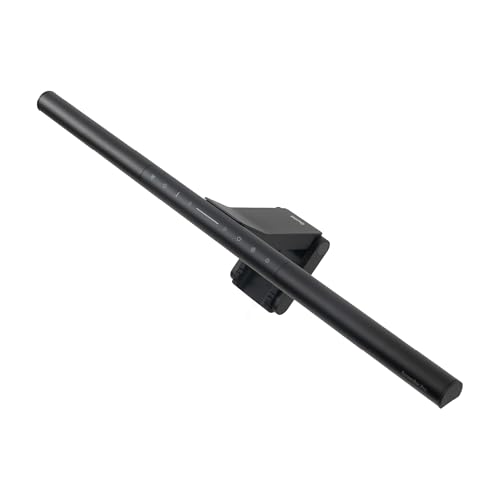
The Quntis monitor light bar is designed for people who want useful desk illumination without giving up valuable workspace or adding reflected light to their screen. Its weighted clip sits on top of a monitor, while an asymmetrical optical design directs light toward the desk rather than the display. That arrangement makes it worth considering for students, office workers, and anyone who divides their time between screen work and reading at a desk. Instead of treating the screen and the surrounding work area as one lighting target, the design focuses illumination where it is needed for desk tasks.
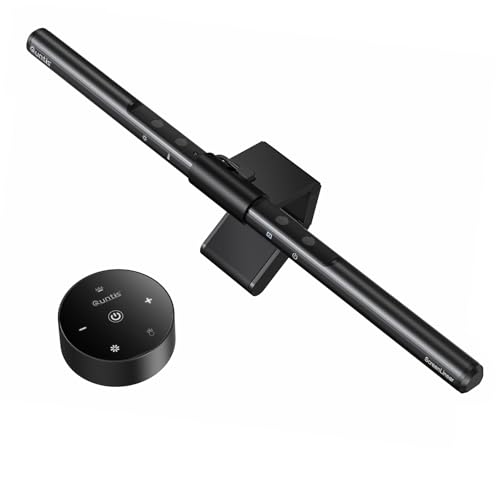
Brightness control is a central part of the experience. An ambient light sensor monitors surrounding brightness and automatically adjusts the lamp, with the seller describing a target of 900 lux. Manual controls also let you change brightness and color temperature, which ranges from 3000K to 6500K. This combination gives you a choice between letting the lamp respond to your environment and selecting a setting yourself. It is useful for shoppers who prefer flexibility as their activities and lighting preferences change, although people who want complete manual control may find automatic adjustment less appealing as their default.
The light bar uses 78 LED beads and has a stated Ra98 color rendering index. The seller positions this high color rendering as useful for viewing colors more naturally, particularly during visually detailed work. Designers and other users who pay attention to color may appreciate that emphasis, while general office users can consider it alongside the more practical benefits of desk illumination and adjustable brightness. The lamp is also described as flicker free and certified to meet IEC/TR 62778 and IEC/EN 62471 standards. These are specific features to consider when choosing lighting for a workspace, rather than a reason to assume the lamp can prevent or treat eye conditions.
Space saving is another meaningful design choice. Because the lamp mounts above the monitor using a weighted clip, it avoids occupying the same desk area as a separately positioned desk lamp. Its asymmetrical illumination is intended to reduce reflected screen glare, helping keep attention on the display while lighting the surrounding work surface. The seller also describes the light as uniform and designed to minimize shadows. The benefit depends on whether this style of monitor mounted lighting suits your screen and desk arrangement, so the clip and placement deserve consideration before purchase.
The main trade off is that this design concentrates on lighting a desk from the top of a monitor, rather than offering the flexibility of a separately positioned lamp. Its automatic adjustment also serves a different purpose from a purely manual light, though manual brightness and color temperature controls provide another way to personalize illumination. Verdict: This monitor light bar is a strong fit for shoppers who want adjustable, desk focused lighting, less reflected screen glare, and a workspace that stays uncluttered. Consider a conventional adjustable desk lamp instead if you need to position illumination independently of your monitor or prefer a lighting arrangement that does not depend on a monitor mounted clip.
Who Should Buy It
A great fit if you:
- Spend long periods working at a computer and want illumination directed toward your desk instead of reflected onto your screen.
- Read printed material or work on tasks beside your monitor and want a dedicated source of desk lighting.
- Prefer lighting that can respond to surrounding brightness but still allows you to change brightness and color temperature manually.
- Work with visually detailed material and value the stated Ra98 color rendering index when choosing workspace lighting.
- Want to keep your desk surface available for other activities by mounting the light above your monitor.
Consider something else if you:
- Need to position light independently around a desk, in which case an adjustable standalone desk lamp may suit you better.
- Do not have a monitor that can accommodate the weighted clip, making a freestanding lighting option a more practical choice.
Before You Buy
Confirm on the listing:
- Check the light bar's dimensions and compare them with the available space along the top of your monitor before deciding where it will sit.
- Review the clip's compatibility with your particular monitor shape and arrangement, especially if the top edge has an unusual design.
- Check what comes in the package, including any power connection or other accessories you expect to need for your setup.
- Confirm the power requirements and any setup or care instructions that apply to your intended desk arrangement.
How to compare your options: Start with how the lamp directs light, how it attaches to your monitor, and whether its brightness controls match your preferences. This model combines asymmetrical desk illumination, a weighted clip, automatic ambient adjustment, and manual brightness and color temperature controls. If color appearance matters for your work, also consider the stated Ra98 color rendering index. Compare these features against the way you use your desk rather than choosing solely on the number of controls. A suitable alternative should match your monitor arrangement, preferred lighting direction, and expectations for manual or automatic adjustment.
Getting the Most From It
Begin by considering how the light bar will sit on your monitor and where you need illumination across the desk. Positioning matters because the asymmetrical optical design is intended to direct light toward the work surface while avoiding reflected glare on the screen. Check that the weighted clip is seated appropriately for your monitor before settling on a working arrangement.
Choose automatic adjustment if you want the ambient light sensor to respond to changes in surrounding brightness. If the resulting illumination does not match your preference, use the manual brightness and color temperature controls to select a more comfortable setting. The available color temperature adjustment gives you flexibility to tailor the light to your task and personal preference.
For reading, office tasks, or gaming, consider whether the illumination covers the part of the desk you use most. If your work involves judging colors, keep the stated Ra98 color rendering feature in mind when evaluating the lamp's role in your workspace.
For routine care, follow any supplied product instructions and keep the light bar and its mounting area maintained as directed. If you rearrange your monitor or desk, reassess the clip placement and lighting direction so the setup continues to suit your working habits.
FAQ
Does this monitor light bar help reduce screen glare?
Yes, its asymmetrical optical design directs light toward the desk and is intended to avoid reflected glare on the screen. This makes it relevant for workspaces where screen reflections are a concern.
Can I adjust the brightness and color temperature?
Yes, it supports manual brightness and color temperature adjustment from 3000K to 6500K. An ambient light sensor also adjusts illumination automatically.
Will it fit my monitor?
The weighted clip is designed to mount on top of a monitor, but suitability depends on your particular monitor. Check the product listing for dimensions and clip compatibility before buying.
Is this suitable for reading and color focused work?
Yes, the lamp is intended for reading, working, and gaming, and its stated Ra98 color rendering index may appeal to people who value color appearance. Consider how the desk focused illumination fits your specific tasks.
What comes in the box, and how is it powered?
The product name describes a USB reading light, but the exact package contents and power connection details should be confirmed on the listing. Check those details before purchasing so they match your intended setup.
Product Details
| Brand | Quntis |
| ASIN | B08DKQ3JG1 |