Dell
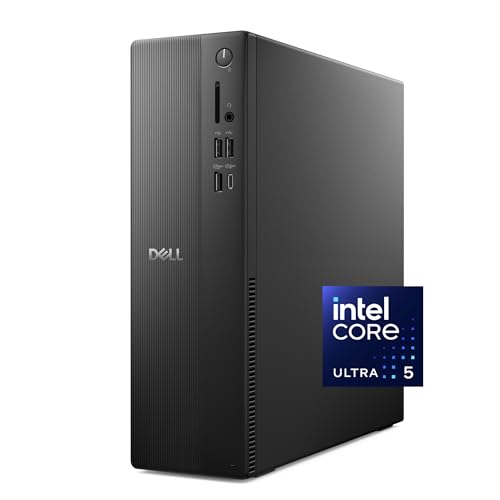
Dell Tower Desktop, Intel Core Ultra 7-265, 32GB RAM, Windows 11 Home | Intel UHD Graphics, 1TB PCIe NVMe SSD, Wi-Fi 6, Bluetooth, Wired Keyboard & Mouse, ECT1250
Disclosure: We may earn a commission when you buy through links on this page, at no extra cost to you. As an Amazon Associate I earn from qualifying purchases. Learn more
Highlights
- Speed up your tasks with AI: Unlock new levels of productivity and creativity by upgrading to Intel Core Ultra processors with built-in AI.
- Supports multiple monitors: Connect up to four FHD monitors using DisplayPort and Daisy Chaining*. Or connect two 4K displays using HDMI 2.1 port and DisplayPort.
- Effortless upgrades: The tool-less entry and removable side panel let you quickly access the internal components, making upgrades convenient and stress-free.
- Ready for business: Keep your data secure with a hardware TPM security chip. And when you need to step away from your desk, simply secure your desktop using the built-in lock slot or padlock loop.
- Style meets sustainability: Dell Tower Desktop seamlessly combines elegance with sustainability. Its sleek, modern design, crafted from recycled materials and featuring refined corners, makes it a stylish addition to any home or office.
- Dell Services: 1 Year Onsite Service provides support when and where you need it. Dell will come to your home, office, or location of choice, if an issue covered by Limited Hardware Warranty cannot be resolved remotely.
Why You'll Love It
- Intel Core Ultra processor with built in AI supports productivity focused workflows
- 32GB RAM and 1TB NVMe SSD provide ample space for everyday computing needs
- Supports multiple monitor setups for expanded viewing and connected workspaces
- Tool less access makes internal component upgrades more convenient
- TPM security chip and lock options support a more controlled office setup
Pros
- +Strong memory and storage configuration
- +Multiple display support
- +Easy internal access
- +Includes keyboard and mouse
Cons
- -Desktop form factor needs dedicated space
- -Wired accessories limit cable flexibility
Detailed Review
Dell ECT1250 Tower Desktop is a general purpose desktop computer built for buyers who want strong everyday productivity with room to work across multiple tasks. Its Intel Core Ultra 7 265 processor with built in AI features is the centerpiece, making this tower a fit for home offices, creative workflows, and users who want a current desktop setup with modern processing capabilities.
The combination of 32GB RAM and a 1TB PCIe NVMe SSD gives this Dell tower a practical foundation for handling files, applications, and regular computing needs. The storage provides space for your content and software, while the memory configuration is designed for buyers who regularly keep multiple tasks open. It also comes with Windows 11 Home, so the desktop is ready for a familiar operating environment.
Display flexibility is another important part of the design. The desktop can connect up to four FHD monitors using DisplayPort and Daisy Chaining, or connect two 4K displays using the HDMI 2.1 port and DisplayPort. This makes it a useful choice for shoppers who prefer a larger workspace with more than one screen. Wi-Fi 6 and Bluetooth are included for convenient wireless connections, while the wired keyboard and mouse provide a straightforward starting setup.
The tower is also designed with future changes in mind. The removable side panel and tool less entry make accessing internal components more convenient when upgrades are needed. For office environments, the hardware TPM security chip, lock slot, and padlock loop add features focused on managing and securing the desktop. The recycled material construction and refined corners give the tower a modern look while reflecting Dell's sustainability focus.
Verdict: Dell ECT1250 Tower Desktop is a strong match for shoppers who want a capable Windows desktop with generous memory, storage, and monitor support. Buyers who need a dedicated tower with upgrade access and office focused features should consider it, while those wanting a smaller or more portable computer should look at other formats.
Specifications
- Processor: Intel Core Ultra 7 265
- Memory: 32GB RAM
- Operating system: Windows 11 Home
- Graphics: Intel UHD Graphics
- Storage: 1TB PCIe NVMe SSD
- Wireless: Wi-Fi 6 and Bluetooth
- Included accessories: Wired Keyboard and Mouse
Who Should Buy It
A great fit if you:
- Need a desktop for productivity tasks, file work, and multiple applications at your desk.
- Want a computer that supports several monitors for a wider working area.
- Prefer a tower design with access for future internal component changes.
- Need included keyboard and mouse for a straightforward desktop setup.
Consider something else if you:
- Need a portable computer for moving between locations and would prefer a laptop style option.
- Want a compact setup and would rather choose a smaller desktop format.
Before You Buy
Confirm on the listing:
- Check whether the tower size and required connections fit your intended workspace.
- Check whether your existing monitors support the connection options you plan to use.
- Confirm which included accessories match your preferred desk setup.
- Check whether your current devices require specific compatibility details before connecting.
How to compare your options: Focus on processor capability, memory, storage, display support, and the flexibility you need from a desktop. This model stands out for its Intel Core Ultra processor, 32GB RAM, 1TB SSD, multi monitor support, and upgrade friendly tower design. If you are comparing configurations, match the features to the tasks you expect to perform.
Getting the Most From It
Set up the Dell tower in a location that works well for your desk arrangement and connect the included wired keyboard and mouse as part of your initial setup.
Use the available display connections based on the monitors you plan to connect. If you use multiple displays, organize your workspace so the screens support your preferred workflow.
If you decide to make internal changes later, follow the appropriate guidance for using the removable side panel and tool less entry features. Review any available instructions before accessing components.
Keep the desktop and its accessories cared for according to the provided guidance. Regular attention to your setup area can help keep your workspace organized and ready for daily use.
FAQ
Does the Dell ECT1250 include a keyboard and mouse?
Yes, it includes a wired keyboard and mouse. These accessories provide a basic starting setup for using the desktop.
Can this desktop connect to multiple monitors?
Yes, it supports multiple monitor connections. It can connect up to four FHD monitors using DisplayPort and Daisy Chaining, or two 4K displays using HDMI 2.1 and DisplayPort.
Does the Dell tower have upgrade access?
Yes, the desktop has tool less entry and a removable side panel for more convenient access to internal components.
Is this desktop suitable for office use?
Yes, it includes features aimed at office environments, including a hardware TPM security chip and lock options. It also includes a one year onsite service that provides support when a covered issue cannot be resolved remotely.
What should I check before connecting my current devices?
The listing does not state every device compatibility detail, so check your existing equipment requirements before purchase.
Product Details
| Brand | Dell |
| ASIN | B0F3P5NF56 |