HUION
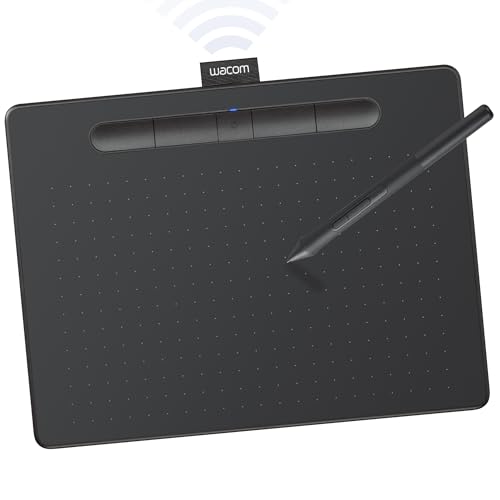
HUION Inspiroy H640P 6x4 inch Drawing Tablet 8192 Pen Pressure
Disclosure: We may earn a commission when you buy through links on this page, at no extra cost to you. As an Amazon Associate I earn from qualifying purchases. Learn more
Highlights
- Customize Your Workflow: The 6 customizable press keys on Huion H640P drawing tablet for pc let you assign your most-used commands—like undo, zoom, brush switch, or save—so you can keep your hands on the tablet and your mind on the art. Whether you're a digital painter switching brushes, or a comic artist zooming in and out, these keys keep your workflow smooth and uninterrupted. Plus, the Huion driver lets you save different shortcut profiles for different apps, so you never have to reconfigure when switching software.
- Professional Pen Performance: Huion H640P drawing pad for computer comes with the battery-free PW100 stylus that's always ready when inspiration strikes. With 8192 levels of pressure sensitivity, every light sketch, or bold stroke responds naturally to your hand—just like a real pen. The 5080 LPI resolution and 233 PPS report rate deliver lag-free, precise strokes, so you can draw confidently without second-guessing your cursor. The pen side buttons help you switch between pen and eraser instantly.
- Compact and Portable: Huion H640P computer graphics tablet features a compact, ultra-portable design at just 0.3 inches thin and 0.61 lbs light, so it slides easily into your backpack—perfect for sketching in coffee shops, taking notes in class, or editing on the go between home and studio. The 6x4 inch active area offers enough room for natural pen movements while fitting comfortably on crowded desks, or lecture hall seats.
- Stable Compatibility: Huion H640P graphic drawing tablet works seamlessly with Mac, Windows, Linux PCs, and Android smartphones/tablets (OS version 6.0 or later). Left-handed friendly, and you just need to flip the tablet and adjust the settings in the driver. Please note: H640P does NOT support iPhone/iPad.
- Move Beyond the Mouse: Huion Inspiroy H640P is a pen tablet that replaces your mouse for more natural, precise control. Freehand draw, take notes, or even play OSU—everything you do with a mouse, you can do better with a pen. The precise tip makes it ideal for detailed photo editing, graphic design, or signing PDF. Meanwhile, the ergonomic pen grip helps you avoid the strain that comes from hours of using a mouse.
- One Device, Endless Possibilities: H640P is not only a digital drawing pad, but also a writing pad for note-taking, a signature pad for documents, and a track pad for everyday navigation. It works well with most creative softwares like Photoshop, SAI, Medibang Paint, as well as many other applications and platforms for online education or remote work like OneNote, Microsoft Whiteboard, Zoom, etc.
- Gifts for Beginners and Professionals: For beginners, H640P digital art tablet is an easy way to ditch the mouse and start drawing naturally—just plug it in, and pick up the pen. For professionals, it's a portable companion that fits into a laptop bag for sketching on the go, editing between meetings, or even setting up a secondary workstation at home.
Why You'll Love It
- Custom shortcut keys keep frequent commands within reach while creating or editing
- Battery free pen with pressure sensitivity supports natural drawing control
- Compact design fits creative work in smaller desk spaces or on the go
- Wide compatibility supports computers and Android devices for flexible use
- Pen buttons and app profiles help streamline different creative workflows
Pros
- +Six customizable shortcut keys
- +8192 pressure sensitivity pen
- +Compact portable design
- +Left handed friendly setup
- +Broad software compatibility
Cons
- -No iPhone or iPad support
- -Requires driver setup for customization
Detailed Review
HUION H640P is a drawing tablet built for creators who want more natural pen control than a mouse can provide, with a compact design that suits beginners, digital artists, students, and anyone who needs a portable creative tool. It works as a drawing pad, writing surface, signature pad, and everyday navigation device, making it useful for tasks ranging from artwork to note taking.
The biggest focus is the pen experience. The PW100 stylus is battery free and offers 8192 levels of pressure sensitivity, so the tablet can respond to lighter sketches and stronger strokes according to the pressure applied. The 5080 LPI resolution and 233 PPS report rate are designed to provide precise cursor movement, while the pen side buttons allow quick switching between pen and eraser functions. This setup gives users more direct control when drawing, editing photos, creating designs, or signing documents.
Workflow customization is another important part of the H640P design. The six customizable press keys can be assigned to common commands such as undo, zoom, brush switching, or saving. The Huion driver also lets users create different shortcut profiles for different applications, which can reduce the need to manually change settings when moving between creative programs.
The compact size is a practical choice for buyers who need a smaller workspace solution. At 0.3 inches thin and 0.61 lbs, it is designed to fit into a backpack and work well in crowded desk areas. The 6x4 inch active area provides space for pen movements while keeping the overall footprint manageable. The main trade off is that a compact tablet may not be the right choice for shoppers who specifically want a larger drawing surface. It also does not support iPhone or iPad, so mobile Apple users should look elsewhere.
Verdict: HUION H640P is a strong fit for beginners, digital artists, remote workers, and students who want a compact drawing tablet with customizable controls. Choose it if its supported devices match your setup and you value portability, but consider another option if you need iPhone or iPad support or a larger active area.
Specifications
- Active area: 6x4 inch
- Pen: Battery free PW100 stylus
- Pressure sensitivity: 8192 levels
- Resolution: 5080 LPI
- Report rate: 233 PPS
- Shortcut keys: 6 customizable press keys
- Thickness: 0.3 inches
- Weight: 0.61 lbs
Who Should Buy It
A great fit if you:
- Want a compact drawing tablet for creating artwork, editing, or taking digital notes in different places.
- Need customizable controls to keep frequent commands available during creative projects.
- Are starting digital drawing and want a pen based alternative to regular mouse control.
Consider something else if you:
- Need an iPhone or iPad compatible tablet and prefer a device built for those platforms.
- Want a larger drawing surface and would rather choose a larger size model.
Before You Buy
Confirm on the listing:
- Check whether your computer or Android device matches the supported compatibility requirements for this tablet.
- Confirm that your preferred creative software works with the tablet before making a purchase decision.
- Check whether the included accessories and setup items match what you expect to receive.
- Measure your available desk space to see if the 6x4 inch active area fits your workflow.
How to compare your options: Focus on the active area, pen features, shortcut controls, and device compatibility that matter most for your work. The H640P stands out for its battery free pen, customizable keys, and compact design. Compare options based on whether those features match your drawing style, workspace, and connected devices.
Getting the Most From It
Set up the tablet by installing and adjusting the driver as needed for your preferred applications. Creating shortcut profiles can help organize commands for different programs and keep settings ready when switching between tasks.
Use the customizable keys for the commands you reach for most often, such as undo, zoom, brush changes, or saving. The pen buttons can also support quicker changes while working.
Keep the tablet and stylus in good condition by following any care guidance provided with the product. If a manual is included, review the recommended setup and care instructions before regular use.
For left handed use, flip the tablet and adjust the settings in the driver as described by the product information. This can help position the controls for a more comfortable workflow.
FAQ
Does the HUION H640P work with iPhone or iPad?
No, the H640P does not support iPhone or iPad. It works with Mac, Windows, Linux PCs, and Android smartphones or tablets with OS version 6.0 or later.
What type of pen comes with the tablet?
The H640P comes with a battery free PW100 stylus. The pen provides 8192 levels of pressure sensitivity and includes side buttons for switching between pen and eraser functions.
Can left handed users use this drawing tablet?
Yes, left handed users can use the H640P. The tablet can be flipped and adjusted through the driver settings.
Can I customize the shortcut keys?
Yes, the six press keys can be assigned to commands such as undo, zoom, brush switching, and saving. The driver also allows different shortcut profiles for different applications.
What software works with this tablet?
The H640P works with many creative applications including Photoshop, SAI, and Medibang Paint, as well as tools used for online education and remote work such as OneNote, Microsoft Whiteboard, and Zoom.
Product Details
| Brand | HUION |
| ASIN | B075T6MTJX |