KOORUI
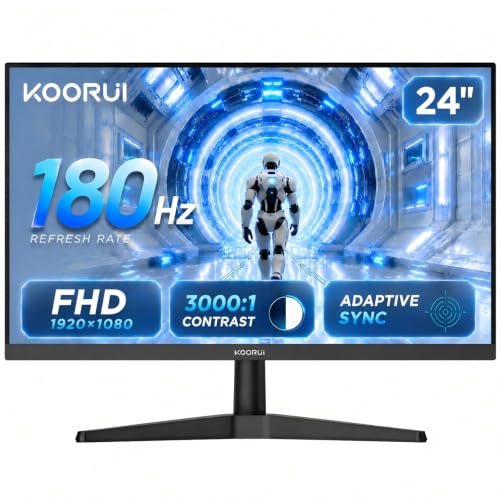
KOORUI 24 Inch Gaming Monitor, 180Hz 1080P VA Display with 3000:1 Contrast | FHD Eye Care, HDMI & VGA, VESA 100x100mm Mountable for Dorm Room, Dual-Screen Setup, PC and Console Gaming
Disclosure: We may earn a commission when you buy through links on this page, at no extra cost to you. As an Amazon Associate I earn from qualifying purchases. Learn more
Highlights
- Smooth 180Hz Gaming Performance: Experience smoother motion with a 180Hz refresh rate and Adaptive Sync, helping reduce tearing and stuttering during fast-paced games. Designed for casual gamers, students and budget-conscious PC users who want a smoother everyday gaming experience.
- Deep VA Contrast: The VA panel delivers rich blacks and enhanced contrast with a 3000:1 contrast ratio, bringing more depth to dark game scenes, movies and nighttime entertainment. A great choice for casual gaming and home entertainment setups.
- Compact FHD Display: The 24-inch 1080P screen delivers clear visuals for documents, spreadsheets, online classes, web browsing and everyday gaming. Slim bezels make it a practical choice for students, home-office users and dual-monitor setups.
- Comfortable Viewing: Flicker-free technology and low blue light mode help reduce eye strain during long viewing sessions. Whether gaming at night, studying or working from home, it provides a more comfortable everyday viewing experience.
- Flexible Setup: HDMI and VGA inputs support PCs, laptops and compatible devices, while VESA 100 × 100mm mounting allows easy installation for dual-monitor, dorm-room and compact workspace setups.
Why You'll Love It
- 180Hz refresh rate and Adaptive Sync help keep fast-moving gameplay smoother and reduce screen tearing
- VA panel with 3000:1 contrast ratio brings greater depth to dark scenes and nighttime entertainment
- 24-inch Full HD screen provides a practical workspace for studying, browsing, spreadsheets and gaming
- Flicker-free technology and low blue light mode support more comfortable viewing during extended screen sessions
- HDMI and VGA connections accommodate compatible computers, laptops and other devices
- VESA 100 × 100mm mounting and slim bezels make it suitable for compact desks and dual-screen arrangements
Pros
- +180Hz refresh rate with Adaptive Sync
- +High 3000:1 contrast ratio
- +Compact 24-inch Full HD display
- +Flicker-free and low blue light modes
- +VESA-compatible mounting and dual-screen design
Cons
- -Limited to Full HD resolution
- -VA panel rather than an alternative panel type
- -HDMI and VGA connectivity only
Detailed Review
The KOORUI 24 Inch Gaming Monitor is a Full HD gaming monitor aimed at casual players, students and anyone building a compact computer setup. Its main attraction is the 180Hz refresh rate, which gives everyday gaming a smoother-motion focus without making the display exclusively about entertainment. The 24-inch screen also has a practical role beyond gaming, providing room for documents, spreadsheets, online classes and general browsing. For someone who wants one screen to cover both work and leisure, this combination makes sense.
Motion handling is one of its defining features. The 180Hz refresh rate works alongside Adaptive Sync to help reduce tearing and stuttering during fast-paced games. This is particularly relevant to players who want smoother-looking movement but do not necessarily need a monitor built around specialized competitive gaming features. It gives the display a clear gaming purpose while remaining appropriate for everyday computer use. Buyers should consider whether their existing gaming setup and preferred games make a high refresh rate an important part of their purchasing decision.
The VA display brings a different benefit: contrast. Its 3000:1 contrast ratio is intended to produce rich blacks and more depth in darker game environments, movies and nighttime entertainment. This makes the screen appealing to people who spend time with varied content rather than gaming exclusively. The 24-inch Full HD format also keeps the overall setup focused on a manageable desktop display, while slim bezels help when placing another screen alongside it.
Comfort and installation flexibility round out the feature set. Flicker-free technology and a low blue light mode provide viewing options for people who spend time studying, working or gaming. HDMI and VGA inputs offer connections for compatible PCs, laptops and other devices, while VESA 100 × 100mm mounting supports alternative positioning and dual-monitor arrangements. These features give the monitor several possible roles in a home or dorm workspace.
There are some sensible trade-offs to consider. This is a 24-inch Full HD VA monitor, not a larger display or a higher-resolution screen. Its appeal is centered on refresh rate, contrast and everyday practicality rather than a broad collection of connection types or display formats. Buyers who specifically need a larger working area, a different resolution or connections beyond HDMI and VGA should consider a different monitor configuration. Verdict: This gaming monitor is a good fit for casual gamers, students and home-office users who value 180Hz motion, strong stated contrast and compact desktop dimensions. Choose another type if your priorities are a larger display, higher resolution or a wider selection of connections.
Who Should Buy It
A great fit if you:
- Want a dedicated gaming screen that also handles everyday schoolwork, browsing and home-office tasks.
- Play fast-paced games casually and want a 180Hz refresh rate with Adaptive Sync.
- Prefer a compact desktop display that can fit into a dorm room or smaller workspace.
- Enjoy movies and darker game environments and appreciate the contrast characteristics of a VA panel.
- Are planning a dual-monitor arrangement and want slim bezels with VESA mounting support.
Consider something else if you:
- Need more screen space for extensive multitasking, in which case a larger monitor may suit you better.
- Prioritize sharper, higher-resolution content, in which case a higher-resolution display would be a better match.
Before You Buy
Confirm on the listing:
- Measure your available desk or mounting space and check whether the 24-inch display suits your intended arrangement.
- Check that your computer, laptop or console has a compatible HDMI or VGA connection for the setup you intend to use.
- If you plan to mount the monitor, confirm that your chosen mounting arrangement accommodates the VESA 100 × 100mm pattern.
- Check the current package details to establish which accessories, cables and other items are included.
How to compare your options: Start with screen size and resolution, since these determine whether the display suits your available workspace and viewing preferences. Next, consider refresh rate and Adaptive Sync if gaming is important, then compare contrast characteristics if darker entertainment content is a priority. For mixed work and leisure, viewing features and connection options also deserve attention. This model combines a 24-inch Full HD VA display, 180Hz refresh rate, 3000:1 contrast and HDMI and VGA inputs. Consider how those features match your existing equipment and everyday activities rather than choosing on refresh rate alone.
Getting the Most From It
Start by choosing a position that works for your main activities. A central desktop position can make the screen useful for switching between documents, online classes and entertainment. If you are creating a dual-monitor workspace, consider how the slim bezels and available desk space work together before settling on the arrangement.
For gaming, check your computer's display settings and available game settings to make sure you are using the refresh-rate options supported by your setup. Adaptive Sync is another feature worth checking when configuring compatible gaming equipment. Your overall experience will depend on how your existing devices and selected settings work with the monitor.
Take advantage of the available viewing options according to your preferences. The low blue light mode and flicker-free technology are relevant when using the screen for extended study, work or entertainment sessions. You can consider these features when deciding how to configure the display for different activities.
If you use HDMI or VGA, select the connection that suits your compatible device and workspace. For a mounted setup, plan around the VESA 100 × 100mm mounting specification. Follow the manufacturer's care and setup instructions when handling or maintaining the monitor, and keep your preferred configuration consistent across everyday tasks.
FAQ
Is the KOORUI monitor suitable for gaming?
Yes, it is designed for casual gaming and offers a 180Hz refresh rate with Adaptive Sync. These features help reduce tearing and stuttering during fast-paced games.
Can I use this monitor for school or office work?
Yes, the 24-inch Full HD display is suitable for documents, spreadsheets, online classes and web browsing. It can serve as an everyday work or study screen as well as a gaming display.
Does this monitor support VESA mounting?
Yes, it supports VESA 100 × 100mm mounting. This makes it an option for compatible mounting arrangements and dual-monitor workspaces.
Can I connect a laptop or gaming console?
Yes, the monitor has HDMI and VGA inputs for compatible devices. Check your device's available output connections before choosing a cable or connection method.
What comes in the box?
The product information does not provide a complete package contents list. Check the current Amazon listing for included cables, accessories and setup materials before purchasing.
Product Details
| Brand | KOORUI |
| ASIN | B0BCDD4KTK |