Kootek
Kootek Laptop Cooling Pad Cooler Stand with 5 Quiet Fans for 12"-17" Laptop
Disclosure: We may earn a commission when you buy through links on this page, at no extra cost to you. As an Amazon Associate I earn from qualifying purchases. Learn more
Highlights
- Whisper-Quiet Operation: Enjoy a noise-free and interference-free environment with super quiet fans, allowing you to focus on your work or entertainment without distractions.
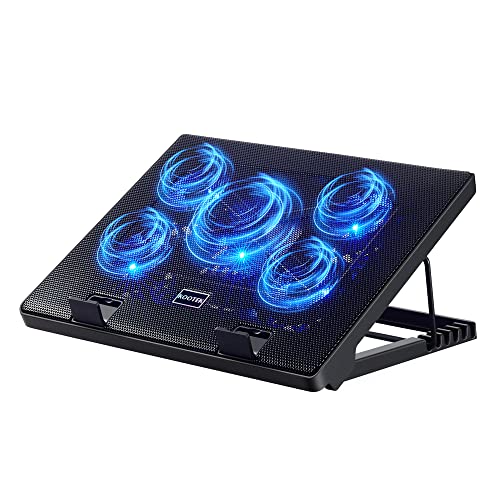
- Enhanced Cooling Performance: The laptop cooling pad features 5 built-in fans (big fan: 4.72-inch, small fans: 2.76-inch), all with blue LEDs. 2 On/Off switches enable simultaneous control of all 5 fans and LEDs. Simply press the switch to select 1 fan working, 4 fans working, or all 5 working together.
- Dual USB Hub: With a built-in dual USB hub, the laptop fan enables you to connect additional USB devices to your laptop, providing extra connectivity options for your peripherals. Warm tips: The packaged cable is a USB-to-USB connection. Type C connection devices require a Type C to USB adapter.
- Ergonomic Design: The laptop cooling stand also serves as an ergonomic stand, offering 6 adjustable height settings that enable you to customize the angle for optimal comfort during gaming, movie watching, or working for extended periods. Ideal gift for both the back-to-school season and Father's Day.
- Secure and Universal Compatibility: Designed with 2 stoppers on the front surface, this laptop cooler prevents laptops from slipping and keeps 12-17 inch laptops—including Apple Macbook Pro Air, HP, Alienware, Dell, ASUS, and more—cool and secure during use.
Why You'll Love It
- Five built in fans let you choose between one fan, four fans, or all five running
- Six adjustable height settings help you find a more comfortable viewing and working angle
- Two USB ports provide extra connections for peripherals while the cooling pad is in use
- Blue LED lighting accompanies the fans, with two switches controlling fan and light operation
- Front stoppers help keep compatible laptops in place on the stand
- Fits laptops from 12 to 17 inches, including compatible MacBook, HP, Dell, ASUS, and Alienware models
Pros
- +Five fans with selectable operation
- +Six adjustable height settings
- +Dual USB hub
- +Front laptop retaining stoppers
- +Broad 12 to 17 inch compatibility
Cons
- -Blue LED lighting may not suit every workspace
- -USB C devices require a separate adapter
- -Two switches control the fan and lighting functions
Detailed Review
The Kootek laptop cooling pad is a practical option for laptop owners who want added airflow and an adjustable working angle in one accessory. Its five fan arrangement, selectable fan operation, and six height settings give it two distinct jobs: supporting laptop cooling and raising the screen to a position that better suits the way you work or watch content. It accommodates laptops measuring 12 to 17 inches, making it worth considering if you use a compatible machine within that size range.
Cooling is the central feature. The stand contains one larger fan measuring 4.72 inches and four smaller fans measuring 2.76 inches each. All five have blue LED lighting, and two switches let you choose whether one fan, four fans, or all five operate together. That flexibility is useful if you prefer to select a fan configuration rather than run the entire set every time. The seller describes the fans as quiet, making the design relevant to people who want cooling support while working, gaming, or watching movies without unnecessary distraction. Actual results will depend on your laptop and how you use it.
The adjustable stand is another important part of the package. Six height settings let you change the angle instead of keeping the laptop in one fixed position. That gives you room to choose an arrangement suited to your desk activities, whether you are typing, viewing entertainment, or spending an extended period working. Two stoppers on the front surface help prevent the laptop from slipping, adding a practical retention feature as you position the stand. Before choosing a height, consider how the resulting angle will work with your usual desk setup.
A built in dual USB hub adds connectivity alongside the cooling function. It can provide connections for additional USB peripherals, although the supplied cable is a USB to USB connection. Devices that use USB C require a USB C to USB adapter. The two switches also make fan and LED control part of the everyday setup, while the blue illumination is a visible design choice to consider if you prefer a less noticeable appearance.
The main trade offs are straightforward. This is a powered cooling accessory with multiple fans and illuminated elements, not simply a passive laptop riser. Its intended fit is limited to laptops in the stated 12 to 17 inch range, and its USB connection arrangement may require an additional adapter for some devices. Verdict: This laptop cooling pad is a sensible choice for someone who wants selectable multi fan operation, an adjustable viewing angle, and extra USB connectivity in one stand. Consider another type of stand if you need a different laptop size range, prefer a design without blue lighting, or want USB C connectivity without an adapter.
Who Should Buy It
A great fit if you:
- You use a compatible 12 to 17 inch laptop and want a stand that combines cooling fans with adjustable positioning.
- You regularly switch between work, gaming, and watching movies and would value six choices for the stand angle.
- You want to choose between running one fan, four fans, or all five instead of using only one fixed fan configuration.
- You connect USB peripherals to your laptop and would appreciate a dual USB hub as part of the stand.
Consider something else if you:
- You use a laptop outside the stated size range and would be better served by a stand designed for your device.
- You want a stand without illuminated fans or need a USB C connection arrangement that works without a separate adapter.
The key question is whether you will use both the cooling and positioning features. If you only need a change in laptop angle, a simpler adjustable stand may suit your priorities. If selectable fans and extra USB connections are useful parts of your routine, the combined design has a clearer purpose.
Before You Buy
Confirm on the listing:
- Check your laptop's size and model against the stated 12 to 17 inch range, including whether the front stoppers suit your intended placement.
- Check your available USB connection and whether your existing devices need a USB C to USB adapter to connect through the supplied USB to USB cable arrangement.
- Confirm what comes in the package, particularly the cable and any adapter you might need, before planning your setup.
- Review the product instructions for power connection and care details so you understand how to operate and maintain the stand as intended.
How to compare your options: Start with laptop fit, then consider how much value you place on selectable fan operation, adjustable height, and additional USB connectivity. This model combines five fans with three operating choices, six height settings, and a dual USB hub. Also consider the blue LEDs and the USB connection arrangement, since those design details may matter as much as the cooling function. Choose based on the combination you will actually use rather than the number of features alone.
Getting the Most From It
Begin by positioning your laptop within the intended 12 to 17 inch size range and placing it securely against the stand's front stoppers. Choose a height setting that suits your usual activity, and check that the resulting screen angle works for your desk arrangement before settling into a long session.
Use the two switches to select the fan configuration that fits your needs. The available choices are one fan, four fans, or all five fans operating together. Familiarize yourself with the controls so you can change the configuration when your needs change, rather than treating one setting as the only option.
If you plan to connect peripherals through the dual USB hub, check the connection types of your devices first. The packaged cable uses USB to USB connections, and USB C devices require a USB C to USB adapter. Keeping that connection requirement in mind can help you prepare the accessories needed for your setup.
For routine care, follow any supplied product instructions and keep the stand and its controls maintained as directed. Consider whether the blue LEDs suit your workspace before choosing where to position the stand. Revisit the height and fan settings as your activities change, and keep the setup consistent with the laptop's fit and your preferred working angle.
FAQ
What laptop sizes does the Kootek cooling pad support?
It is designed for 12 to 17 inch laptops. The seller names Apple MacBook Pro and Air, HP, Alienware, Dell, and ASUS as examples, so check your particular model and fit before buying.
Can I control how many fans run?
Yes, the two switches let you select one fan, four fans, or all five operating together. All five fans have blue LEDs.
Does it have adjustable height settings?
Yes, there are six adjustable height settings. You can select an angle suited to working, gaming, or watching movies.
Can I connect USB C devices?
Yes, if you have the required USB C to USB adapter. The packaged cable is a USB to USB connection, so check your device's connection needs before use.
What comes with the cooling pad?
The seller identifies a packaged USB to USB cable as part of the connection arrangement, but the listing should be checked for a complete package inventory. Confirm whether any adapter you need is included or must be obtained separately.
Product Details
| Brand | Kootek |
| ASIN | B01469DJLM |